Reading on your phone? Send it to your laptop.
You'll get the guide and every prompt in one email.
Guide 013
APIs and API keys for beginners: get one and keep it secret
You need
- Claude Code installed and signed in
- A project folder open in your terminal
- A code editor such as VS Code, to open and edit files
- A Claude Console account only if you want an Anthropic API key (step 4)
Step 1 of 12
Understand what an API is
API stands for Application Programming Interface. It is a way for one program to ask another program for something.
I want my project to use the [SERVICE NAME] API. Explain in plain English what it does, what I would send it, what it sends back and whether it needs an API key. Assume I have never used an API before.A weather app on your phone, for example, doesn't measure the weather. It sends a request to a weather service's API and shows you the answer.
The Claude API works the same way. Your own app sends a message to Claude's API, and the API sends back Claude's reply.
Did that work?
Still stuck? Send me a DM on Instagram at @maxbuilds.ai and I'll help.
Step 2 of 12
Understand what an API key is
An API key is a long secret code that proves who you are to a service. The service uses it to know which account to charge.
Anthropic's keys start with sk-ant-. Other services use their own formats.
Anyone who has your key can use the service as you. If the service charges per use, you pay for what they do.
Step 3 of 12
Check if you need a key for Claude Code at all
You do not need an API key to use Claude Code if you sign in with a Claude Pro or Max plan. You log in through your browser the first time you run claude.
You need an Anthropic API key when you build your own app that calls Claude, or when you pay for Claude Code per use through the Claude Console.
Be careful with one setting. If a variable called ANTHROPIC_API_KEY is set on your computer, Claude Code offers to use that key. Once you approve it, Claude Code uses the key in place of your plan, and usage is billed to the key's account.
To check which one Claude Code is using, type /status inside Claude Code.
Step 4 of 12
Get an Anthropic API key from the Claude Console
Go to platform.claude.com and sign in, or create an account.
Open the API keys page at platform.claude.com/settings/keys.
Click Create key. Give the key a name you'll recognise, like the project it's for.
Choose an expiration. A shorter expiration limits the damage if the key ever leaks.
The Console shows the full key only once, so copy it now. If you lose it, you can't view it again and you make a new key.
Paste the key straight into your .env file in step 7. Do not paste it anywhere else.
Step 5 of 12
Know where a key must never go
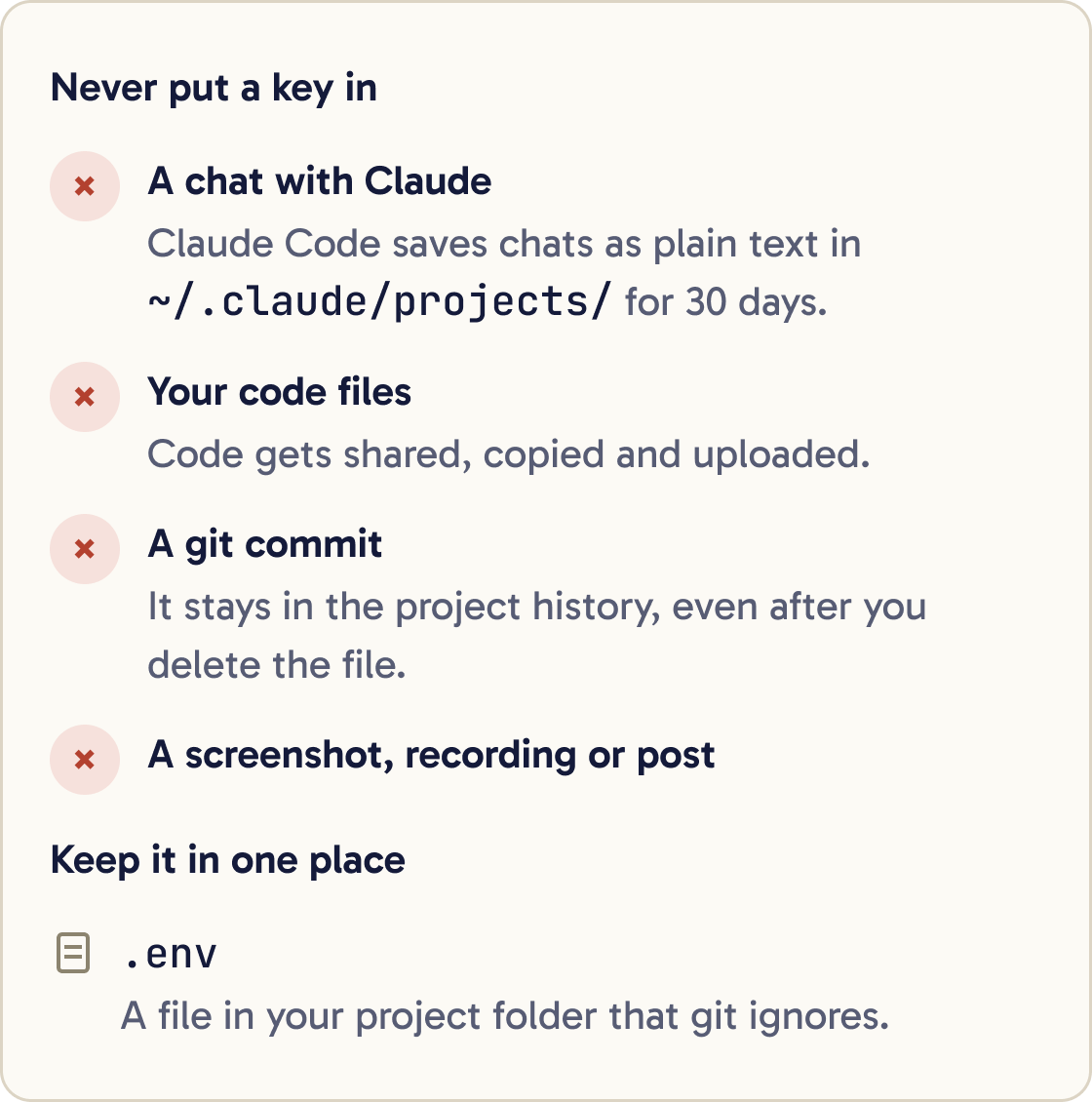
Never paste a key into a chat with Claude. Everything you type is sent to Anthropic, and Claude Code saves your conversations on your computer as plain text in ~/.claude/projects/ for 30 days. The ~ sign means your home folder.
Never type a key into your code files. Code gets shared, copied and uploaded.
Never commit a key with git. Once a key is in a project's history, it stays there even after you delete the file.
Never show a key in a screenshot, a screen recording or a public post.
Keep keys in one place: a .env file that git ignores. The next steps set that up.
Step 6 of 12
Learn what git and .gitignore are
Git is a tool that saves versions of your project. Each saved version is called a commit. GitHub is a website that stores those versions online.
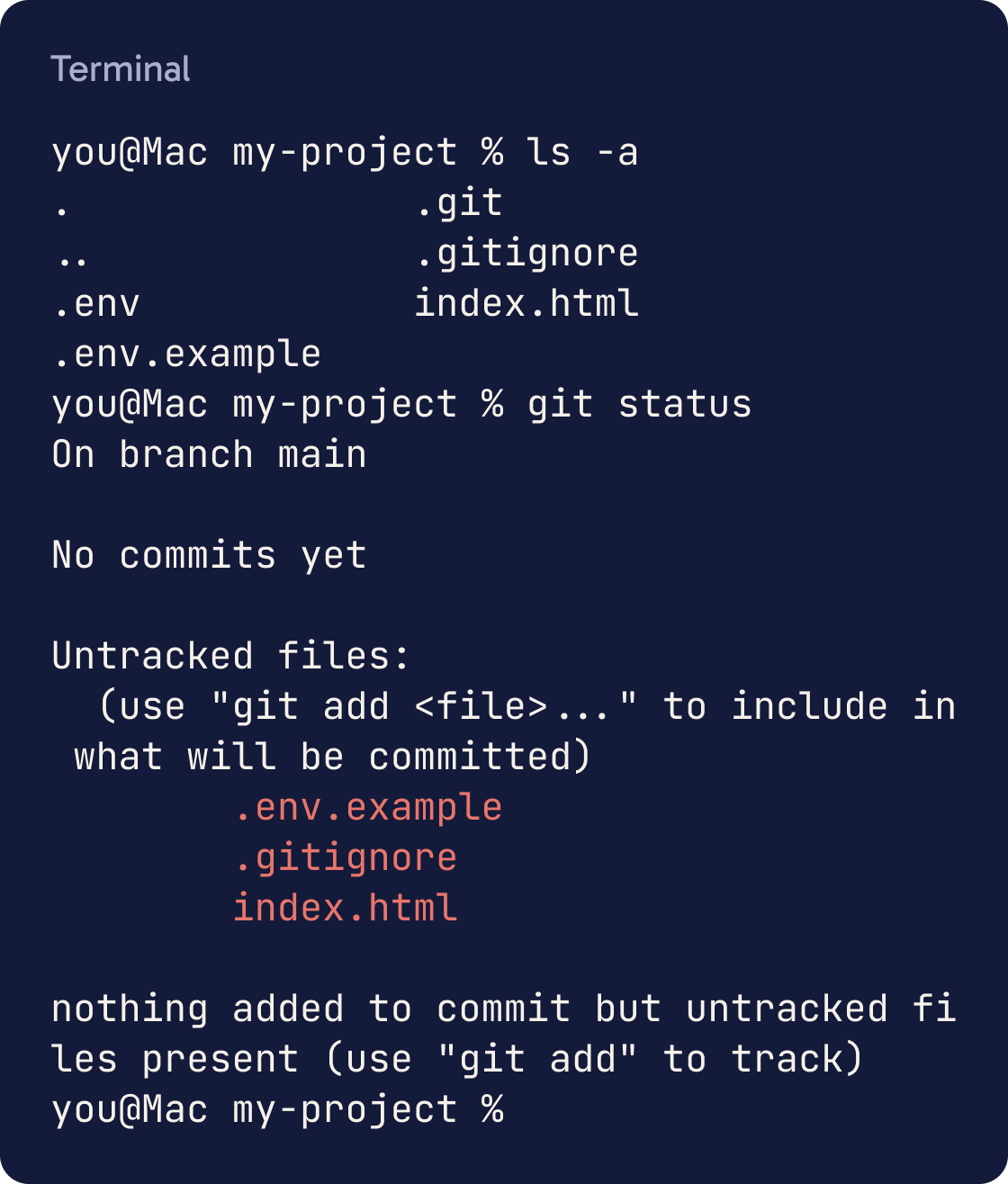
Is this folder a git repository? If yes, tell me whether a .gitignore file exists and whether it already ignores .env files. Do not change anything yet.A .gitignore file is a plain text list of files git must never save. Each line is a file name or pattern.
Adding .env to .gitignore means git skips your secrets file every time you commit.
.gitignore doesn't affect a file git already tracks. If .env was committed before, also stop tracking it with git rm --cached .env.
That command keeps the file on your computer and removes it from git's list.
Step 7 of 12
Set up a .env file safely with Claude
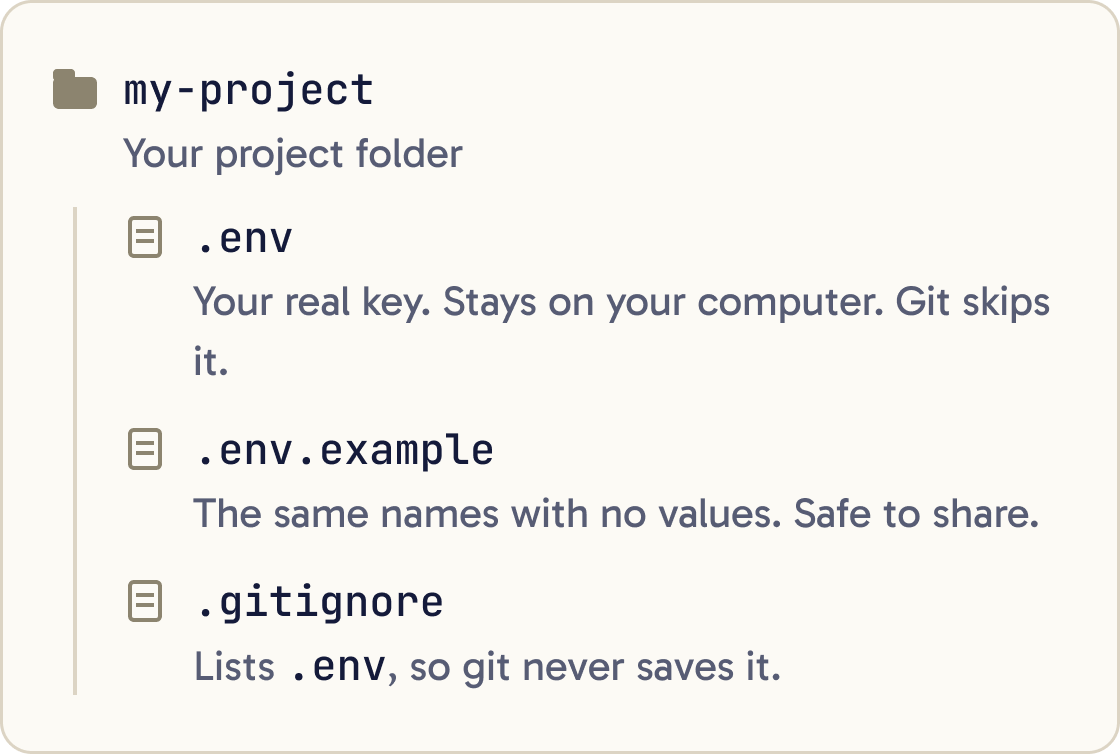
A .env file is a plain text file in your project folder. It holds settings and secrets, one per line, in the form NAME=value.
Set up this project to keep API keys safe. 1) Create or update .gitignore so it ignores .env and .env.* but keeps .env.example. 2) Create a .env file containing ANTHROPIC_API_KEY=paste-your-key-here as a placeholder. 3) Create a .env.example file with the same variable name and no real value. 4) If this is a git repository, check whether .env was ever committed and tell me. Do not ask me for the key and never print the contents of .env. Explain each file in one plain sentence when you finish.Update my code so it reads ANTHROPIC_API_KEY from the environment, loaded from the .env file. Use the standard approach for this language and tell me if you need to add a package. Remove any key that is written directly in the code. Do not print the key anywhere, including logs.Paste the prompt below into Claude Code. It asks Claude to build everything around the key, without Claude ever seeing the key.
Claude creates a .env file with a placeholder, a .env.example file you can share, and the .gitignore entry.
When Claude is done, open .env in your code editor. Replace the placeholder with your real key and save. Files that start with a dot can be hidden in Finder and File Explorer, so use the editor's file list.
Step 8 of 12
Stop Claude reading your .env file
You can tell Claude Code to block its file tools from opening .env. Do this after you have put your key in the file.
Open .claude/settings.json in your project, or ~/.claude/settings.json to cover every project. Create the file if it does not exist, and add this:
{ "permissions": { "deny": ["Read(./.env)", "Read(./.env.*)"] } }
If the file already has content, add the deny list inside the existing permissions section. Settings files must be valid JSON, so no comments and no trailing commas.
Type /status inside Claude Code to check the file loaded.
Step 9 of 12
Use environment variables
An environment variable is a named value your computer hands to every program you start from the terminal. ANTHROPIC_API_KEY is one.
You can set one for the current terminal window like this:
export ANTHROPIC_API_KEY="sk-ant-..."
It lasts until you close that window. To keep it for every session, the line goes in your shell's profile file, such as ~/.zshrc on a Mac. Keep in mind the warning in step 3: Claude Code also sees this variable and offers to use it.
Claude Code reads environment variables in two ways. It reads the ones set in your terminal before you start claude. It also reads the env section of a settings file.
Never put a real key in the env section of .claude/settings.json. That file is meant to be shared with your project.
Step 10 of 12
Check for secrets before every commit
Before you save a commit, look at exactly what's going in. A key in a commit is easy to miss and hard to remove.
Before I commit, run git status and git diff --staged. Tell me if any file contains something that looks like an API key, token, password or private key. Report only the file name and line number, never the secret itself. If you find nothing, say so plainly.Search this whole project, including hidden files but excluding .env and node_modules, for anything that looks like an API key, token or password written directly in a file. Report file names and line numbers only, never the values. Then suggest how to move each one into .env.Paste the prompt below into Claude Code. It checks the files you are about to commit and reports any secret by file and line, without printing the secret.
If Claude finds one, stop. Move the secret into .env and commit only once the check is clean.
Step 11 of 12
Keep keys for other services the same way
Every service key follows the same rules. Stripe, GitHub, OpenAI and email services all go in .env with their own names.
I need to add a [SERVICE NAME] key to this project. Add the variable name to .env and .env.example with a placeholder, and update the code to read it from the environment. Do not ask me for the real key. Tell me which page of [SERVICE NAME]'s dashboard creates the key, and what the smallest permissions are that this project needs.Give each one a clear name in capitals, such as STRIPE_SECRET_KEY or GITHUB_TOKEN.
When a service offers limited keys, pick the smallest access that works. GitHub's fine-grained tokens, for example, can be limited to one project.
Add every new variable name to .env.example with no value, so you remember what the project needs.
Step 12 of 12
If a key leaks: revoke it, then replace it
A key has leaked if it ended up anywhere other than your .env file. That includes a chat, a commit, a screenshot or a message.
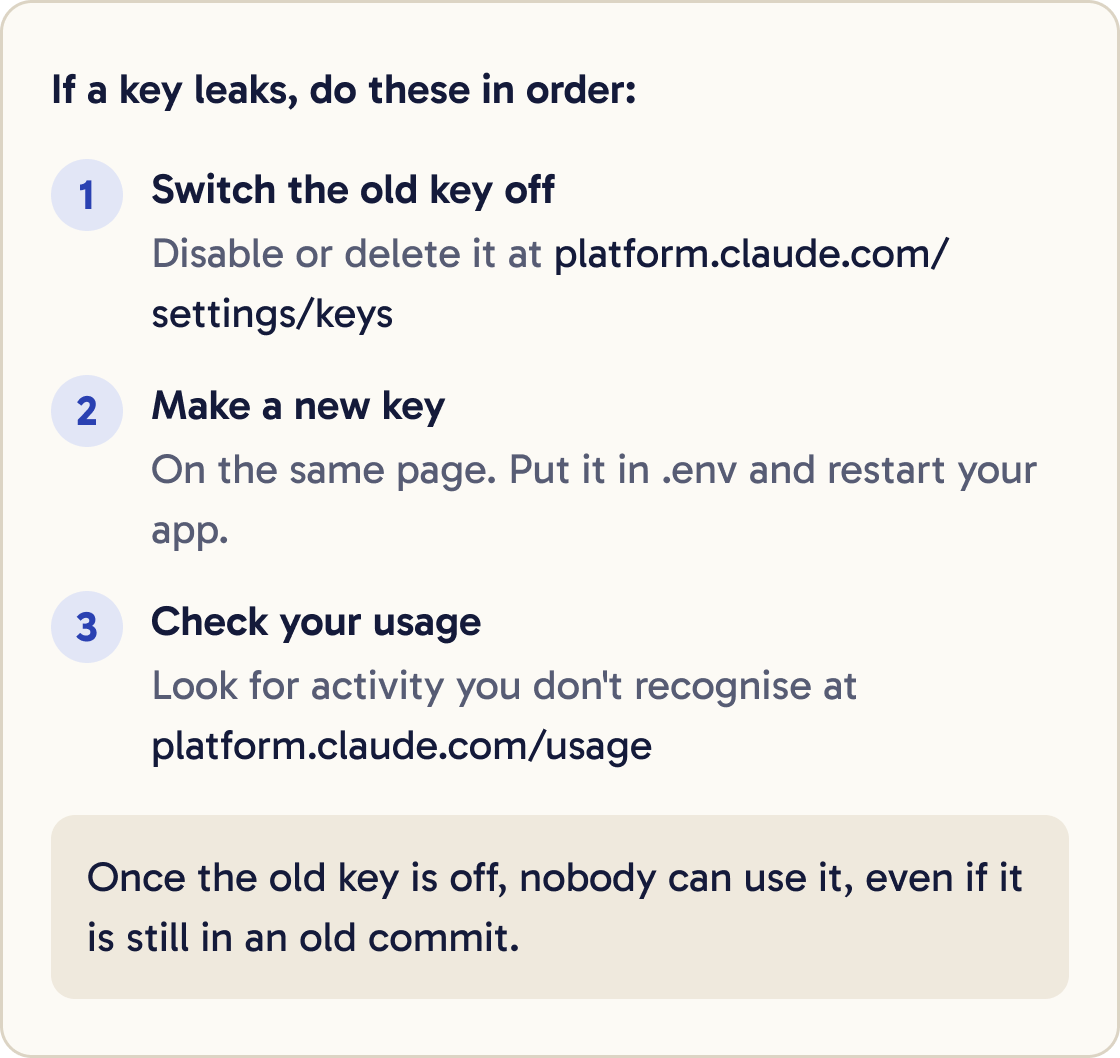
A key for [SERVICE NAME] has leaked. Do not ask me for the old or new key. Tell me, step by step, how to revoke it in [SERVICE NAME]'s dashboard and create a new one. Then list every file in this project that refers to the key's variable name, so I know nothing else needs changing.First, switch the old key off. For an Anthropic key, open platform.claude.com/settings/keys. Choose Disable to switch it off for now, or Delete to remove it for good.
Second, create a new key on the same page. Paste it into your .env file and restart your app.
Third, check the usage page at platform.claude.com/usage for activity you do not recognise.
GitHub's own advice is that revoking or replacing a leaked secret comes first. Once the old key is dead, it cannot be used, even if it is still in an old commit.
Did that work?
Still stuck? Send me a DM on Instagram at @maxbuilds.ai and I'll help.
Common mistakes
- Pasting a key into the chat to "let Claude set it up". Use the step 7 prompt, so Claude builds everything around a placeholder.
- Adding `.env` to `.gitignore` after it was already committed. Run `git rm --cached .env` so git stops tracking it.
- Leaving `ANTHROPIC_API_KEY` set in your terminal profile and wondering why Claude Code bills the API. Check `/status`.
- Writing a key into `.claude/settings.json`. That file is meant to be shared. Keep secrets in `.env` only.
- Choosing a key that never expires for a quick test. Pick a short expiration when you only need it for a day or a week.
- Waiting to revoke a leaked key while you clean up history. Revoke first. It is the only step that stops misuse.
Want the next guide?
I'll email you each new guide as I share it, with new tutorials and prompts too.