Reading on your phone? Send it to your laptop.
You'll get the guide and every prompt in one email.
Guide 029
Run Claude Code in GitHub Actions for reviews and fixes
You need
- A repository on github.com where you have admin access.
- Claude Code installed locally, plus the GitHub CLI signed in with `gh auth login`. You need both for quick setup.
- A Claude API key from the Claude Console, or a Pro, Max, Team or Enterprise plan for a subscription token.
- You can read YAML, the format GitHub workflow files use. You won't need to write it from scratch.
Step 1 of 11
Know the pieces
GitHub Actions is GitHub's automation system. A workflow is a YAML file in .github/workflows/ that runs on GitHub's computers, called runners, when something happens in your repository.
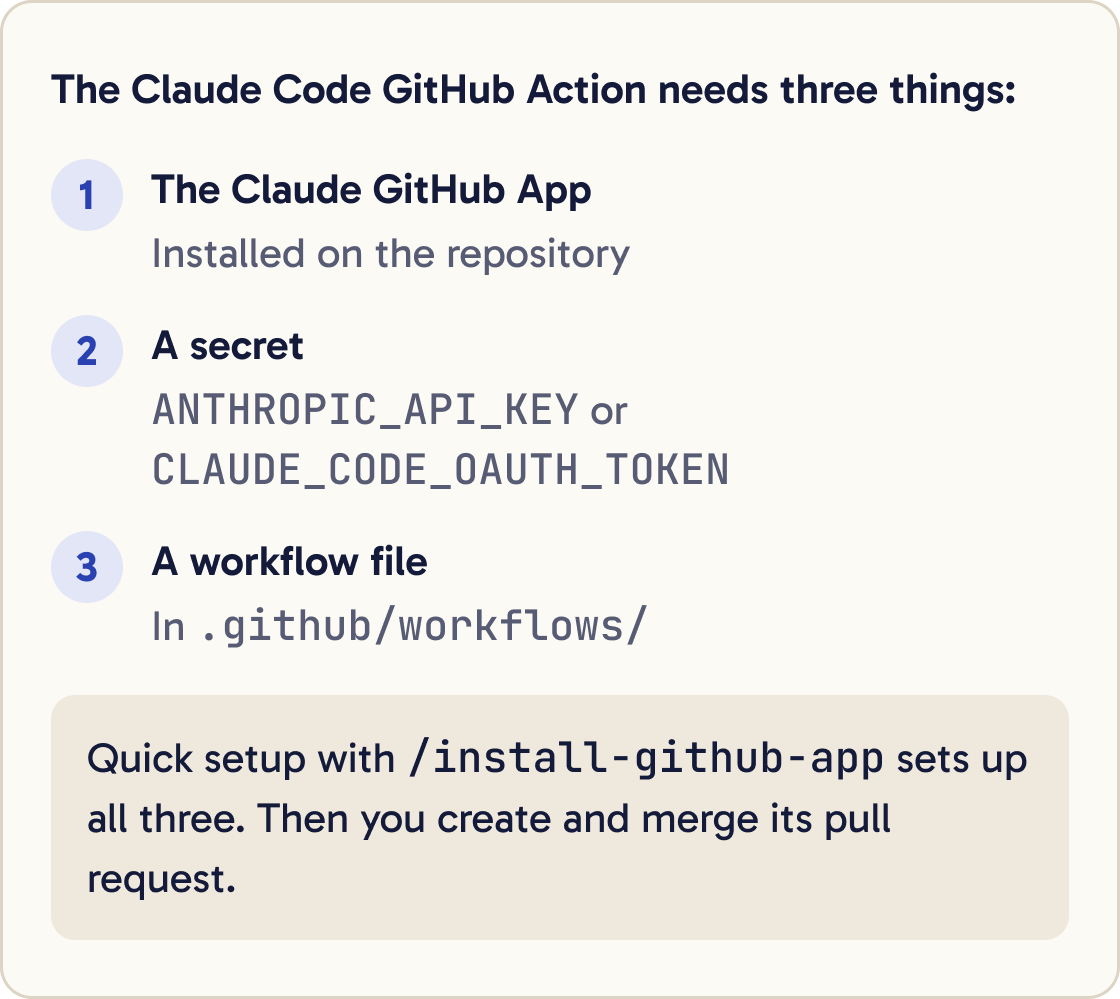
The Claude Code GitHub Action, anthropics/claude-code-action, runs Claude Code inside a workflow. It's built on the Claude Agent SDK.
It needs three things: the Claude GitHub App installed on the repository, a secret that holds your Claude credential, and a workflow file.
A secret is a value GitHub stores encrypted and hands to workflows. Nobody can read it back from the repository.
A pull request is a set of changes on a branch that you review on GitHub before you merge it into the main code.
Did that work?
Still stuck? Send me a DM on Instagram at @maxbuilds.ai and I'll help.
Step 2 of 11
Run quick setup
Open a terminal in the repository and start Claude Code:
claude
Then run:
/install-github-app
Claude Code installs the Claude GitHub App, then asks how to sign in the workflows. It can reuse an API key it already has, or you choose between a subscription token and pasting an API key.
It saves the credential as a repository secret called ANTHROPIC_API_KEY or CLAUDE_CODE_OAUTH_TOKEN. Then it pushes a branch with the workflow files you picked and opens a pull request page in your browser.
Create and merge that pull request. After that, @claude works in the repository.
Step 3 of 11
Or set it up by hand
Install the Claude GitHub App on the repository from github.com/apps/claude. The Action uses its Contents, Issues and Pull requests permissions, each read and write.
Add a secret under the repository's Settings, then Secrets and variables, then Actions. Name it ANTHROPIC_API_KEY and paste a key from the Claude Console.
To use your subscription, make a token on your computer with claude setup-token. Save it as CLAUDE_CODE_OAUTH_TOKEN, and in workflows use claude_code_oauth_token: ${{ secrets.CLAUDE_CODE_OAUTH_TOKEN }} in place of the anthropic_api_key line.
For a whole organisation, use an API key stored as an organisation secret. A subscription token is tied to the plan of the person who made it.
Step 4 of 11
Add the @claude workflow
Skip this step if quick setup already added claude.yml. Otherwise paste the prompt below into Claude Code.
Create .github/workflows/claude.yml with exactly this content, then show me the file. Don't commit it yet:

name: Claude Code

on:
  issue_comment:
    types: [created]
  pull_request_review_comment:
    types: [created]

jobs:
  claude:
    if: contains(github.event.comment.body, '@claude')
    runs-on: ubuntu-latest
    timeout-minutes: 30
    permissions:
      contents: write
      pull-requests: write
      issues: write
      id-token: write
      actions: read
    steps:
      - uses: actions/checkout@v6
        with:
          fetch-depth: 1
      - uses: anthropics/claude-code-action@v1
        with:
          anthropic_api_key: ${{ secrets.ANTHROPIC_API_KEY }}
          claude_args: "--max-turns 15"
The on section runs the workflow on new comments. The if line keeps runners from starting on comments that don't mention @claude.
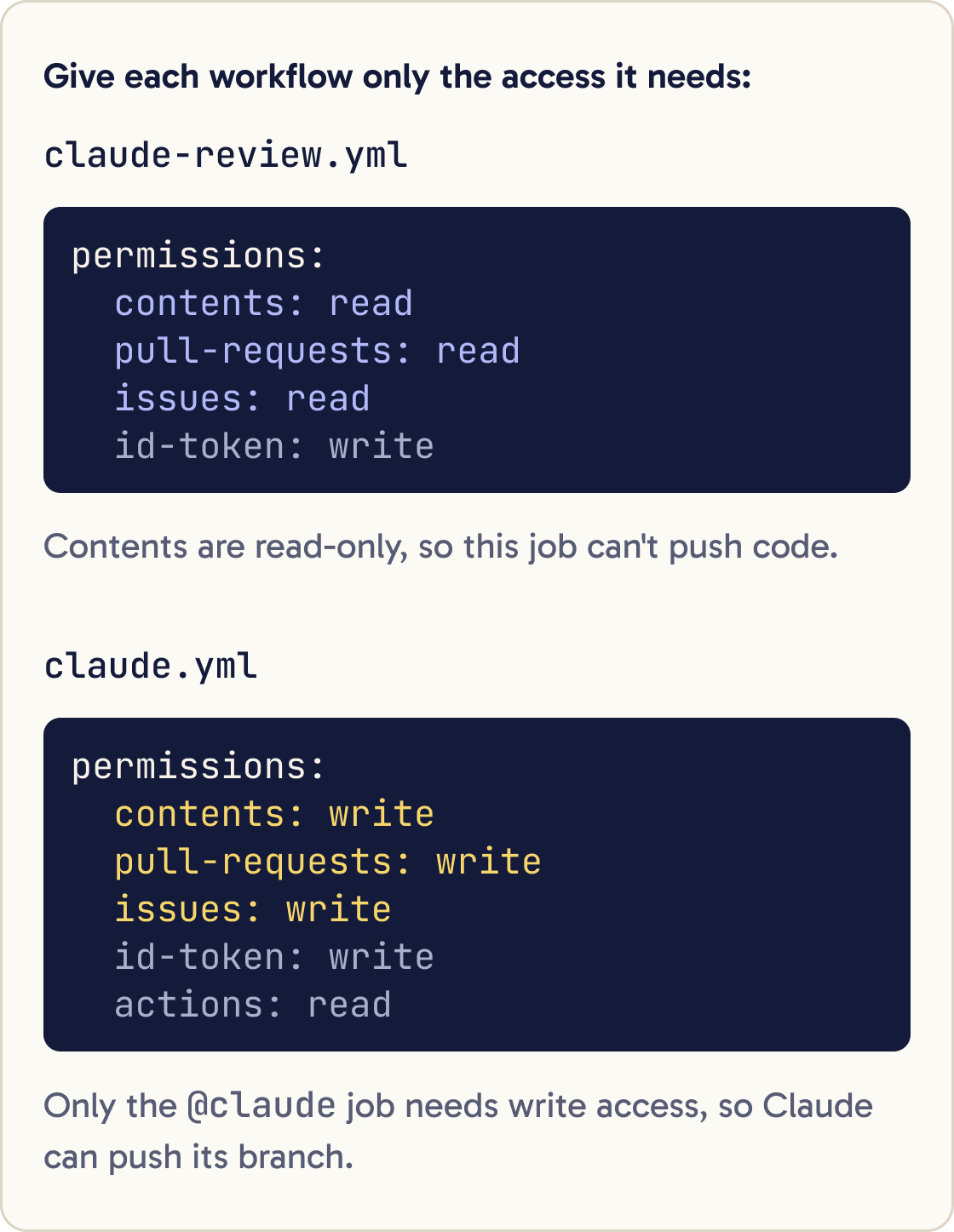
The permissions block sets what the job may do. id-token: write is needed for the Action's default sign-in through the GitHub App. actions: read lets Claude read CI results on pull requests.
timeout-minutes: 30 stops a stuck job after 30 minutes. --max-turns 15 stops Claude after 15 rounds of tool calls.
Commit the file on a branch, open a pull request and merge it. Then test it with a comment that mentions @claude. A new run appears under the repository's Actions tab.
Step 5 of 11
Fix an issue from a comment
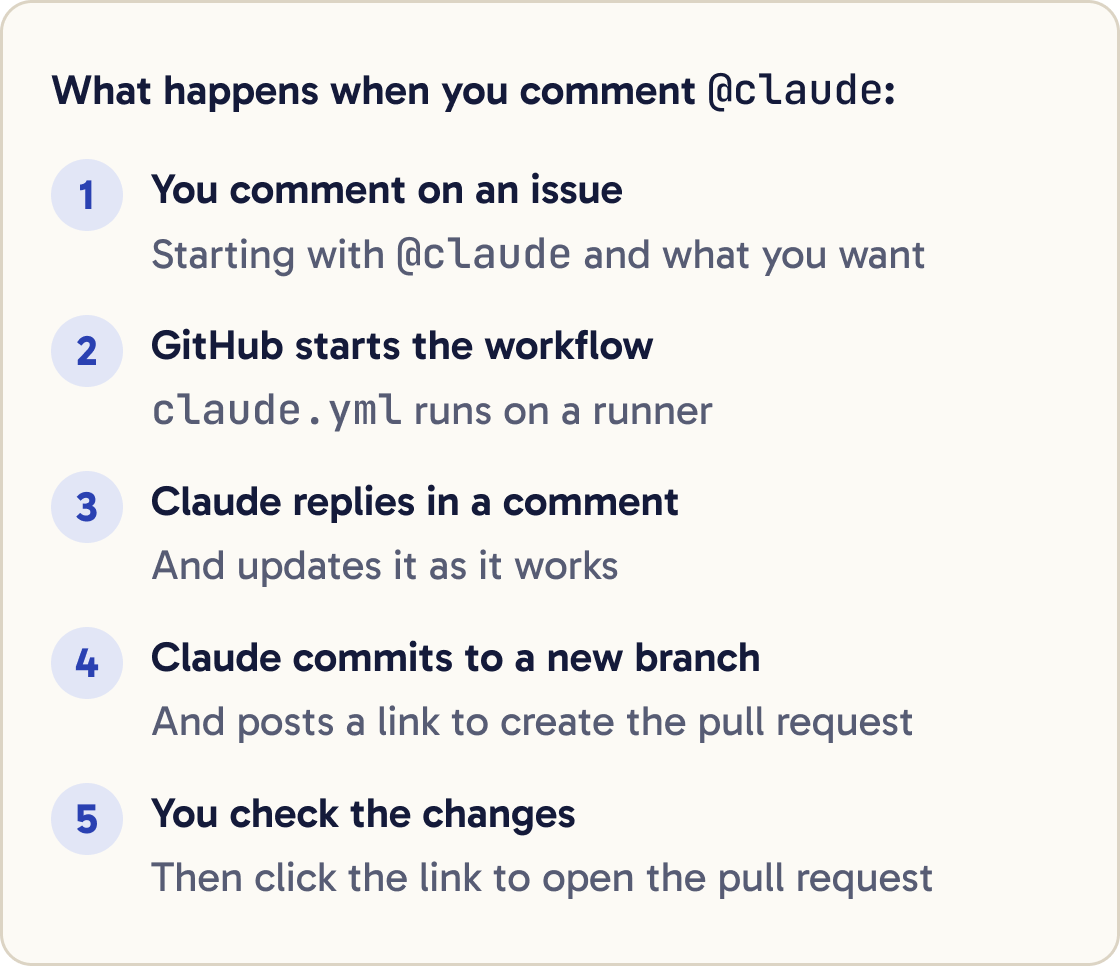
Open an issue that describes a bug clearly. Then add a comment that starts with @claude and says what you want.
@claude fix the bug described in this issue. Find the cause first and explain it in one paragraph. Add a test that fails before your fix and passes after it. Keep the change as small as possible and don't touch unrelated files.@claude review this pull request for bugs and missing tests. Only report problems that would break behaviour or the requirements in the description. Group them by file, with a suggested fix for each.Claude replies in a comment and updates it as it works. It commits its changes to a new branch.
By default Claude doesn't open the pull request. It posts a link to GitHub's create pull request page, and you click it after checking the changes. That keeps a person in charge of what gets proposed.
Step 6 of 11
Review every pull request automatically
Paste the prompt below. The workflow runs the official code-review plugin whenever a pull request is opened, updated, reopened or marked ready.
Create .github/workflows/claude-review.yml with exactly this content, then show me the file. Don't commit it yet:

name: Code Review

on:
  pull_request:
    types: [opened, synchronize, ready_for_review, reopened]

concurrency:
  group: claude-review-${{ github.event.pull_request.number }}
  cancel-in-progress: true

jobs:
  review:
    runs-on: ubuntu-latest
    timeout-minutes: 20
    permissions:
      contents: read
      pull-requests: read
      issues: read
      id-token: write
    steps:
      - uses: actions/checkout@v6
        with:
          fetch-depth: 1
      - uses: anthropics/claude-code-action@v1
        with:
          anthropic_api_key: ${{ secrets.ANTHROPIC_API_KEY }}
          plugin_marketplaces: "https://github.com/anthropics/claude-code.git"
          plugins: "code-review@claude-code-plugins"
          prompt: "/code-review:code-review --comment ${{ github.repository }}/pull/${{ github.event.pull_request.number }}"
          claude_args: '--allowedTools "mcp__github_inline_comment__create_inline_comment"'
--comment makes Claude post its review on the pull request: an inline comment on each issue, or one summary comment when it finds none. Without it, findings only go to the workflow log.
Keep the claude_args line. The Action starts the tool that posts inline comments only when --allowedTools names it.
The permissions are read-only for contents, so this job can't push code. The concurrency block cancels a review that's still running when you push again, so you only pay for the latest one.
Claude skips drafts, closed pull requests, ones it judges don't need a review and ones it has already commented on.
Commit the file, merge it, then open a small test pull request. When it worked, Claude's review shows up as comments on that pull request.
Step 7 of 11
Tell Claude your review rules
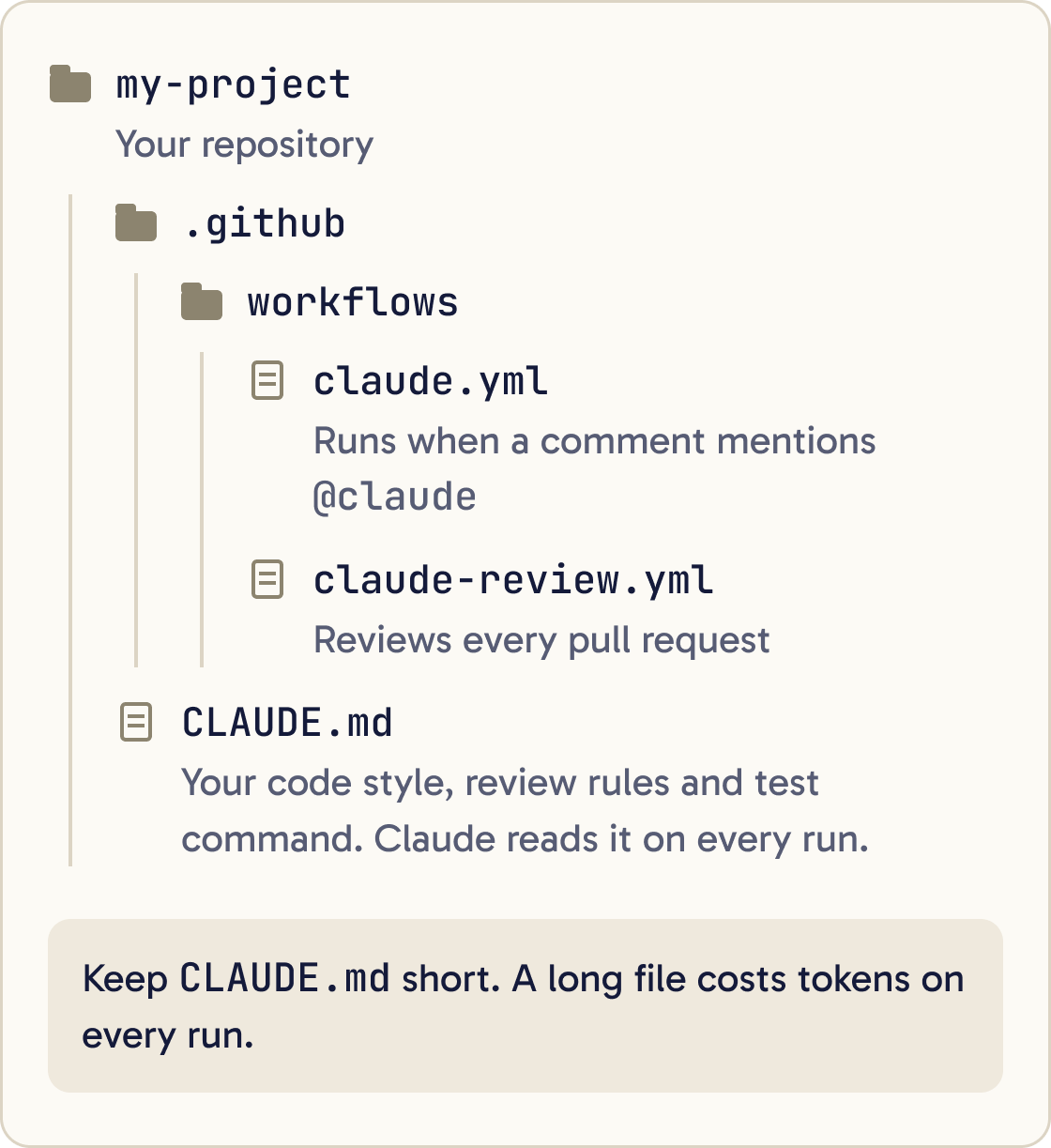
Claude reads CLAUDE.md at the repository root on every run. Put your code style, review criteria and test command there.
Add a section called "Code review" to the CLAUDE.md file at the root of this repository. Keep it under 15 lines. Ask me questions one at a time first, until you know: what counts as a blocking problem in this project, which folders matter most, our test command, and anything reviewers should ignore. Then write the section as short, checkable rules. Show me the change before saving it.Keep it short. The docs point out that Claude reads it every run, so a long file costs tokens on every review.
Step 8 of 11
Limit what Claude can do
Give each workflow the fewest permissions it needs. A review job needs read access. Only the @claude job needs write access.
In automation mode, a plain text prompt has no shell or GitHub access until you grant tools with --allowedTools in claude_args. Grant only the tools that job uses.
Leave allowed_non_write_users unset. The Action's security docs call it risky, because it lets people without write access trigger Claude.
If you allow bots, list them by name in allowed_bots. Avoid '*'. On a public repository anyone can create a GitHub App. The docs warn that '*' lets any of them start Claude with a prompt it controls.
With pull_request_target or workflow_run triggers, don't check out the pull request's code at the workspace root before the Action. Those runs get your repository's secrets.
Step 9 of 11
Keep the secrets safe
Never write a key into a workflow file. Always reference the secret, as in ${{ secrets.ANTHROPIC_API_KEY }}.
Deleting a secret from GitHub doesn't switch the key off. To retire a key, also delete it in the Claude Console.
To store no long-lived key at all, the Action supports workload identity federation through a Console service account. The workflow swaps GitHub's sign-in token for Claude API access. The Action's setup guide covers the Console side.
Step 10 of 11
Control the cost
Each run uses two things: GitHub Actions minutes on the runner, and Claude tokens. With a subscription token, runs use your plan's usage. With an API key, they're billed per token.
Cap each run with --max-turns in claude_args, and add timeout-minutes to each job. Use concurrency to stop old runs piling up.
Pick the model with --model in claude_args, for example --model claude-opus-5-5. Without it, the Action uses Claude Code's default model. Claude Sonnet 5.5, claude-sonnet-5-5, costs half as much per token as Opus 5.5 on the API.
Write specific @claude requests and use issue templates. Claude then needs fewer turns.
Step 11 of 11
Fix common problems
Most failures are setup: the app, the secret, or who triggered the run. Check the run's log under the repository's Actions tab first.
Did that work?
Still stuck? Send me a DM on Instagram at @maxbuilds.ai and I'll help.
Common mistakes
- Pasting an API key straight into a workflow file. Use a GitHub secret.
- Giving the review job write permissions it doesn't need.
- Setting `allowed_bots: '*'` or `allowed_non_write_users` on a public repository.
- Running with no `--max-turns` or `timeout-minutes`, so one stuck job burns minutes and tokens.
- Expecting Claude to open the pull request itself. It gives you a link and you create it.
- Leaving out the `claude_args` line on the review workflow, so no inline comments get posted.
Want the next guide?
I'll email you each new guide as I share it, with new tutorials and prompts too.