Reading on your phone? Send it to your laptop.
You'll get the guide and every prompt in one email.
Guide 010
Claude Code memory: set up CLAUDE.md so Claude remembers your rules
You need
- Claude Code installed and signed in. Typing `claude` in your terminal should start it.
- A paid Claude plan (Pro, Max, Team or Enterprise) or a Claude Console account.
- A project folder to practise in. Any folder with a few files in it is fine.
Step 1 of 14
Understand what memory means here
Claude Code starts every session fresh. It doesn't remember yesterday's conversation.
A session is one conversation with Claude Code. It runs from when you type claude to when you close it.
Two things carry knowledge from one session to the next. The first is a CLAUDE.md file, which you write. The second is auto memory, which Claude writes for itself.
Both load at the start of every session. Claude treats them as guidance and tries to follow them, but nothing forces it to obey every line.
Did that work?
Still stuck? Send me a DM on Instagram at @maxbuilds.ai and I'll help.
Step 2 of 14
Learn where CLAUDE.md files live
A CLAUDE.md file is a plain text file written in Markdown. Markdown is simple formatting: a line starting with # is a heading, and a line starting with - is a bullet point.
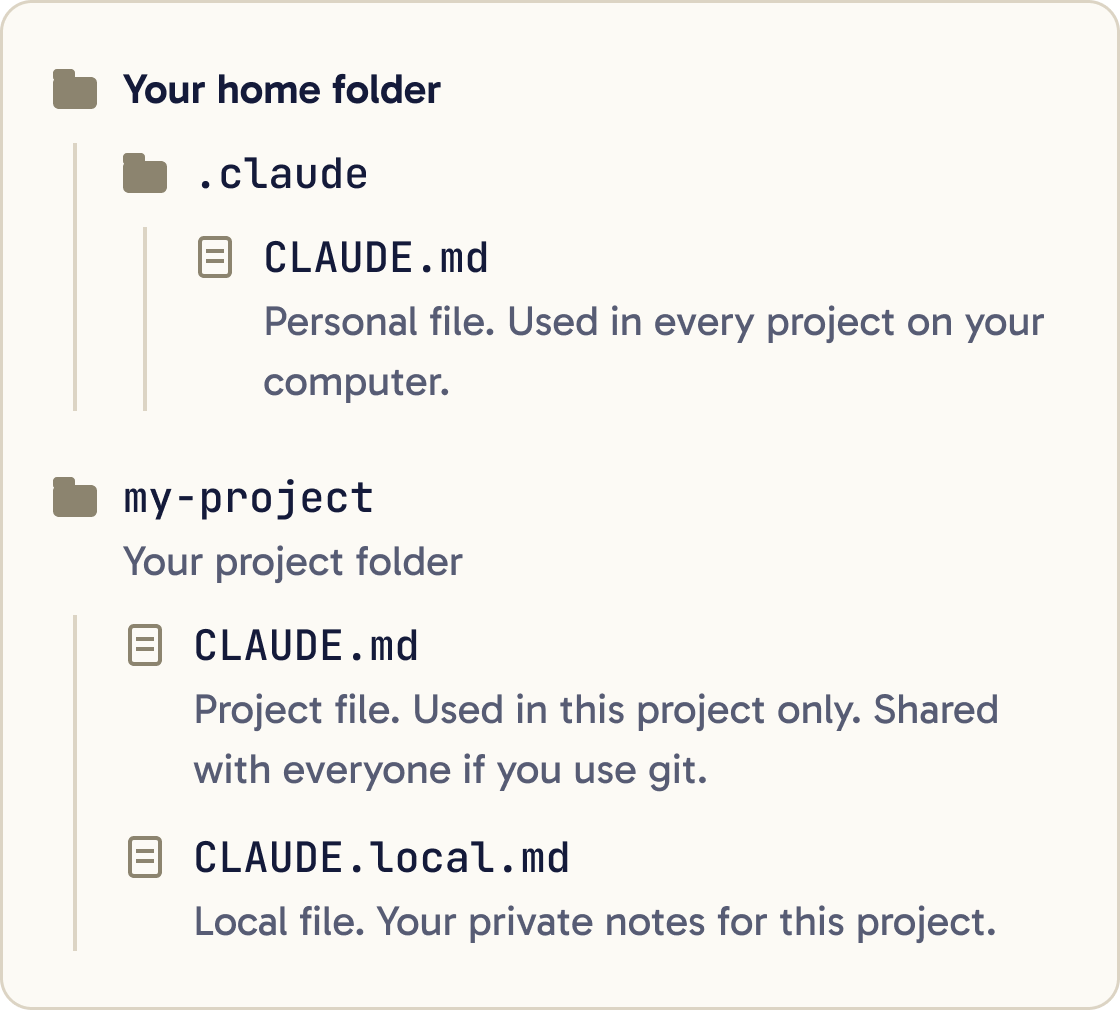
Where you save the file decides which sessions use it. There are four places.
Your personal file is ~/.claude/CLAUDE.md. The ~ means your home folder, the one named after your user account. This file applies to every project on your computer.
A project file is CLAUDE.md or .claude/CLAUDE.md inside your project folder. It applies to that project only.
If you share the project with git, everyone gets it. Git is a tool that tracks changes to files and lets people share them.
A local file is CLAUDE.local.md in your project folder. It holds your private notes for that one project.
A company IT team can also place a managed file on your computer. You can't switch that one off. Most people working on their own won't have one.
Step 3 of 14
Open your project in Claude Code
Open your terminal. The terminal is the app where you type commands. On a Mac it is called Terminal.
Move into your project folder with cd, which stands for change directory. Swap the path below for your own folder:
cd ~/Documents/my-project
Then start Claude Code:
claude
Claude Code loads memory from the folder you start it in, so start it in your project folder.
Step 4 of 14
Create a starter file with /init
Type this at the Claude Code prompt and press Enter:
/init
Claude looks through your project. It then writes a CLAUDE.md with the build commands, test instructions and habits it finds.
If a CLAUDE.md already exists, /init suggests improvements to it. Your existing file is kept.
When it finishes, you have a file called CLAUDE.md in your project folder.
If your project already has rules for Cursor or GitHub Copilot, /init reads those and brings the useful parts across.
Step 5 of 14
Check that Claude loaded it
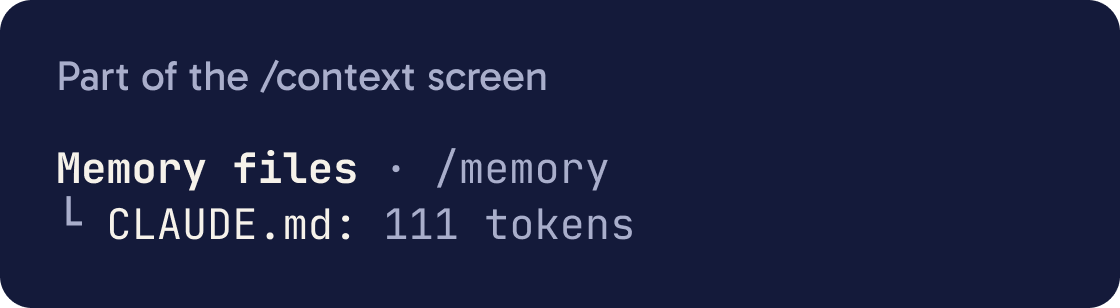
Type /context and press Enter.
What do my CLAUDE.md files tell you to do? List each instruction on its own line and say which file it came from.Look for the list headed Memory files. Your CLAUDE.md should be in it.
If it's there, Claude reads it at the start of every session you start in this folder.
You can also ask Claude what it knows, using the prompt below.
Step 6 of 14
Write your own starter CLAUDE.md
Good entries are facts Claude needs in every session. Write what you'd tell a new helper on their first day.
Create a file called CLAUDE.md in this project folder with exactly this content, then show it to me:

# About this project
- This project is [WHAT IT IS, IN ONE SENTENCE].
- It is for [WHO USES IT].

# How to run it
- Start it with: [COMMAND, OR "ask me"]
- Test it with: [COMMAND, OR "there are no tests yet"]

# How I work
- I am a beginner. Explain what you are about to do in plain English before you do it.
- Ask before you delete any file.
- Make one small change at a time.

# Rules
- Use British spelling in all text.
- [A RULE YOU KEEP REPEATING]Read my CLAUDE.md. Point out any line that is vague, repeated or in conflict with another line. Suggest a clearer version of each one. Don't change the file until I say yes.Add an entry when Claude makes the same mistake twice. Add one when you catch yourself typing the same correction again.
Make each line specific enough to check. "Use 2-space indentation" is clear. "Format code properly" is too vague.
Fill in the square brackets in the prompt below, then paste it into Claude Code.
Step 7 of 14
Keep it short and useful
Aim for under 200 lines per CLAUDE.md file. Longer files use more context, and Claude follows them less reliably.
Group rules under headings with bullet points. Claude follows organised sections more easily than long paragraphs.
If two rules contradict each other, Claude may pick either one. Delete the one you don't want.
Leave out things Claude can work out by reading your files, such as a full list of folders.
Long step-by-step procedures belong in a skill. A skill loads only when it's needed.
To leave a note for yourself that Claude won't read, wrap it like this: <!-- note for me -->. Claude Code removes these comments before Claude sees the file.
Run /doctor for a setup checkup. It can suggest cuts for a CLAUDE.md that has grown too big.
Step 8 of 14
Add a personal file for every project
Your personal file lives at ~/.claude/CLAUDE.md. Use it for habits you want in every project, such as how you like answers written.
Create the file ~/.claude/CLAUDE.md if it doesn't exist yet. Add these lines under a heading called # How I like to work:
- Explain things in plain English. I am new to coding.
- Before you change files, tell me which files and why.
- When you finish a task, tell me how to check that it worked.
Show me the file when you're done.
Claude reads it before the project file. Keep the two consistent so they don't give mixed messages.
For private notes about one project, use CLAUDE.local.md in that project folder. If you use git, add CLAUDE.local.md to your .gitignore file. That file lists things git should never share.
Step 9 of 14
Edit memory with /memory
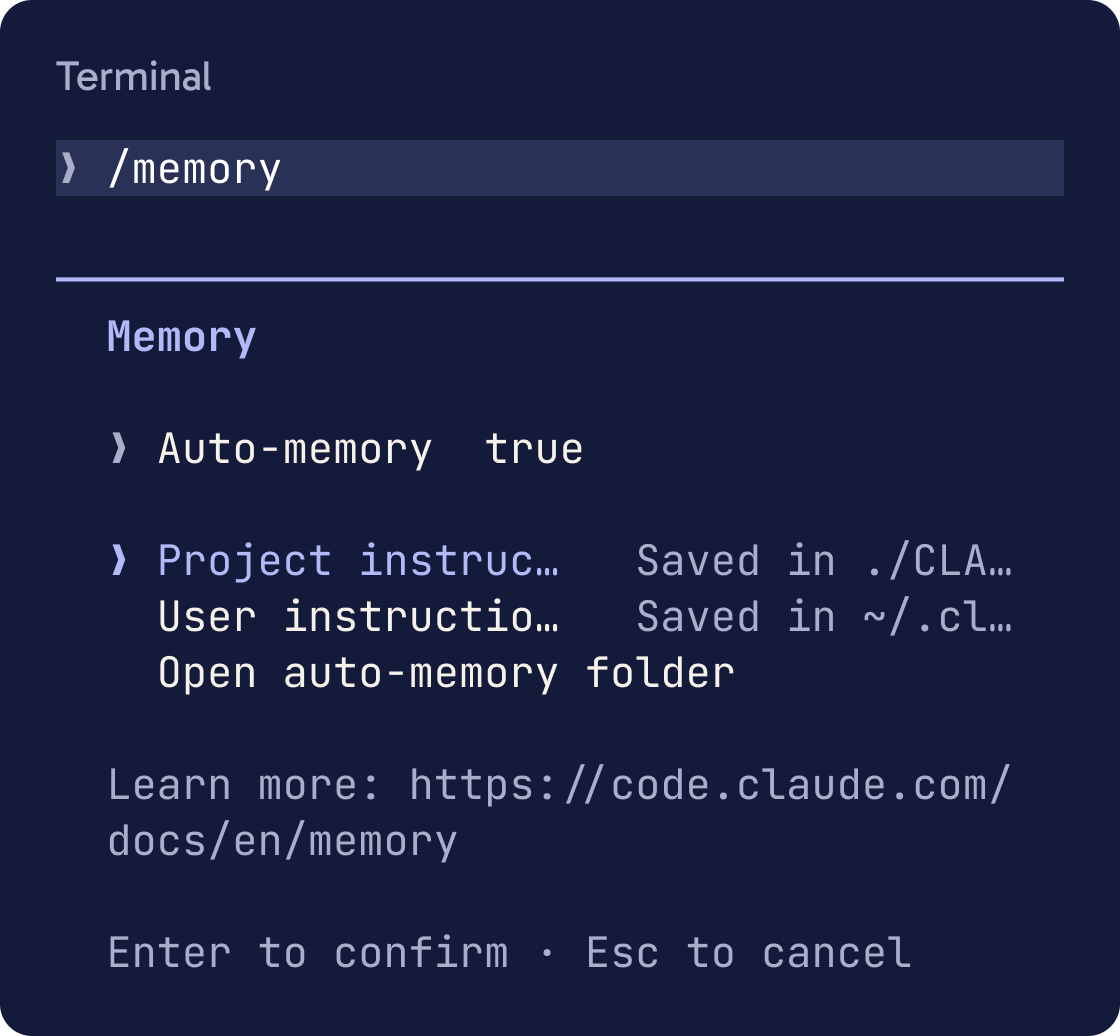
Type /memory and press Enter.
You see a list of your CLAUDE.md locations, including ones that don't exist yet. Pick one to open it in your text editor. Picking one that doesn't exist creates it.
The same screen has a switch for auto memory and an option to open the auto memory folder.
If the file opens in a separate window, such as VS Code, you can keep using Claude while it's open. A terminal editor such as Vim takes over the terminal until you quit it.
Step 10 of 14
Let auto memory take notes
Auto memory is on by default. Claude saves short notes for itself as it works with you.
Remember that I prefer short answers with numbered steps.Add this to CLAUDE.md: always ask me before installing anything new.It saves four kinds of note: who you are and how you like to work, corrections you give it, ongoing project decisions, and where to find outside information.
It skips anything it can work out from your files or that your CLAUDE.md already says. It won't save something every session.
When it saves or reads notes, you see messages such as "Saved 2 memories" or "Recalled 2 memories".
To save something on purpose, say so. "Remember that..." goes to auto memory. "Add this to CLAUDE.md..." goes into your CLAUDE.md file.
Step 11 of 14
See and change what Claude saved
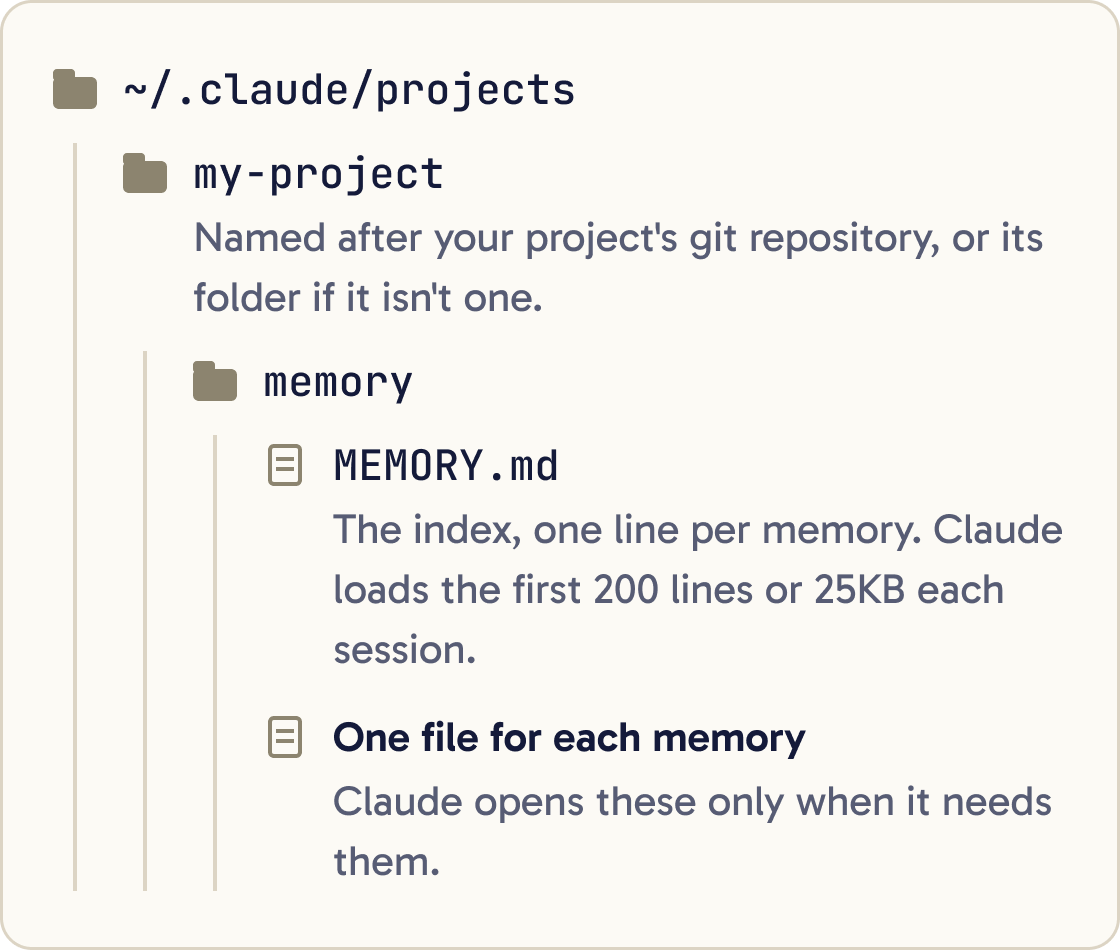
Auto memory lives in ~/.claude/projects/<project>/memory/. Claude Code names the <project> part after your project's git repository, or after the folder if it isn't one. Each project gets its own memory folder.
Inside is MEMORY.md, an index with one line per memory, plus one file for each memory.
Claude loads the first 200 lines or 25KB of MEMORY.md each session, whichever comes first. It opens the other files only when it needs them.
To look, run /memory and choose the auto memory folder. Every file is plain text, and you can edit or delete any of them.
To switch auto memory off everywhere, run /memory and use the auto memory switch.
Step 12 of 14
Split rules into topic files when it grows
For bigger projects, put rule files in a .claude/rules/ folder inside the project. Give each file one topic, such as testing.md.
Create .claude/rules/writing.md with a paths setting so it only applies to Markdown files (**/*.md). The rule should say: use British spelling and keep sentences short. Show me the file when you're done.A rule file with no settings at the top loads every session, the same as CLAUDE.md.
You can limit a rule to certain files by adding a paths list at the top. The rule then loads only when Claude works on files that match.
You can also pull another file into CLAUDE.md by writing @ and its path, such as @README.md. That file loads at the start too, so it doesn't save any space.
Step 13 of 14
Know how Claude reads it
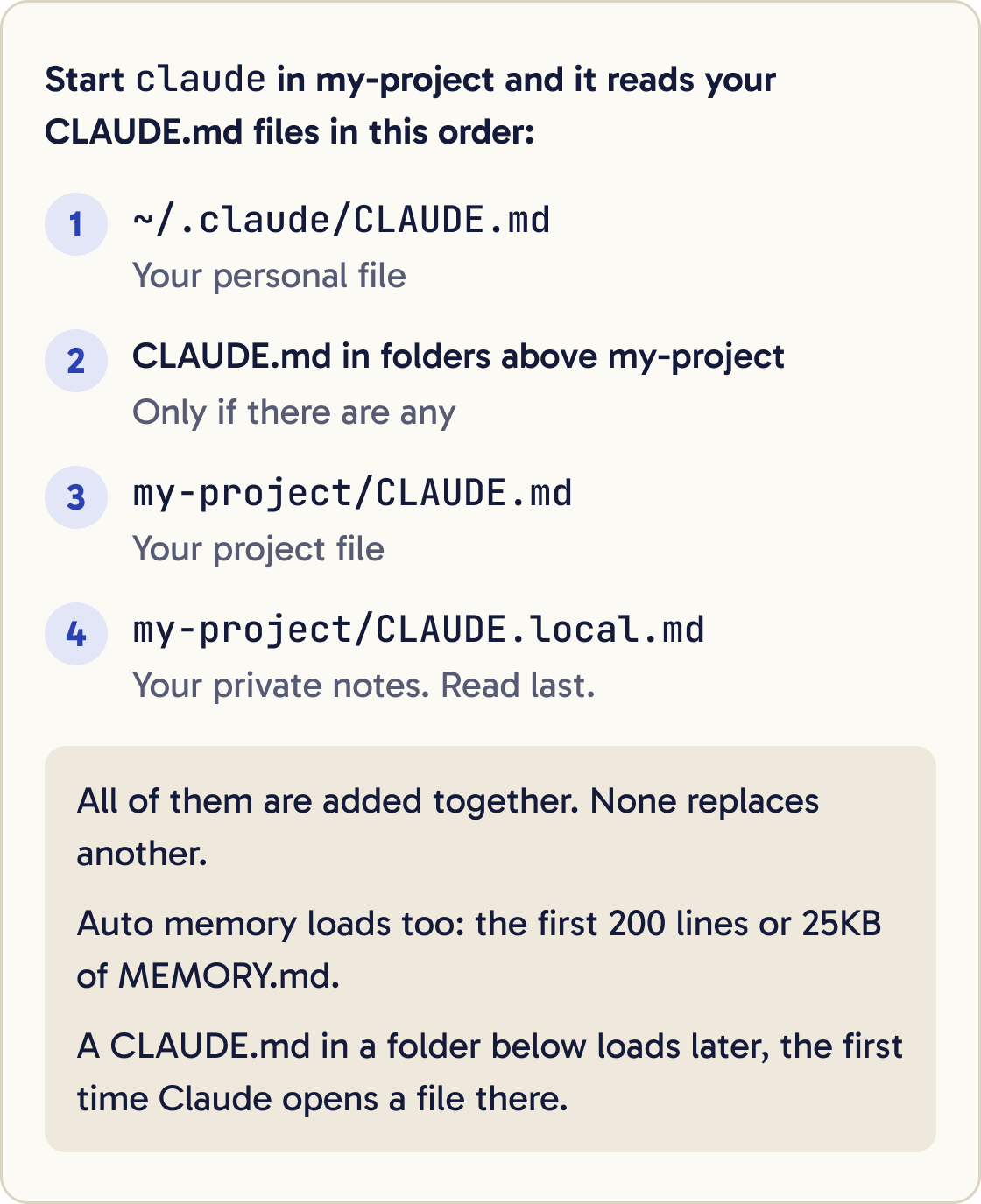
Claude Code loads CLAUDE.md files from the folder you start in and from every folder above it.
CLAUDE.md files in folders below load later, the first time Claude opens a file in that folder.
All the files are added together, and none replaces another. The file closest to where you started is read last.
Claude Code hands the contents to Claude as a message after its main instructions. Claude tries to follow them, but there's no guarantee.
After /compact, which shrinks a long conversation, Claude reads the project CLAUDE.md again from disk. Rules you only typed in chat can get lost, so put lasting rules in the file.
For something that must happen every time, use a hook. A hook is a command Claude Code runs at a set moment, such as after every file edit. The hooks guide covers them.
Step 14 of 14
Fix it when Claude ignores your rules
Work through the checks below in order. Stop when one of them fixes the problem.
My CLAUDE.md says [THE RULE]. In your last answer you didn't follow it. Tell me whether you can see that rule, which file it is in, and how I could word it so it is easier to follow.Did that work?
Still stuck? Send me a DM on Instagram at @maxbuilds.ai and I'll help.
Common mistakes
- Writing a huge CLAUDE.md on day one. Start with a few lines and add one each time Claude gets something wrong.
- Putting passwords or keys in CLAUDE.md. Claude reads it every session, and a project file may be shared with others. Keep secrets out of it.
- Writing vague rules such as "write good code". Write rules you could check, such as "run the tests before you finish".
- Telling Claude a rule in chat and expecting it next week. Chat is forgotten when the session ends. Put lasting rules in CLAUDE.md.
- Saving private notes in the shared project CLAUDE.md. Use `CLAUDE.local.md` for anything only you should see.
- Starting `claude` in the wrong folder. Claude loads memory based on where you start it, so `cd` into your project first.
Want the next guide?
I'll email you each new guide as I share it, with new tutorials and prompts too.