Reading on your phone? Send it to your laptop.
You'll get the guide and every prompt in one email.
Guide 018
Claude Code subagents: create helpers that work in their own space
You need
- Claude Code installed and signed in. Typing `claude` in your terminal should start it.
- A paid Claude plan (Pro, Max, Team or Enterprise) or a Claude Console account.
- A project folder with some files in it, so the helpers have something to work on.
Step 1 of 15
Understand what a subagent is
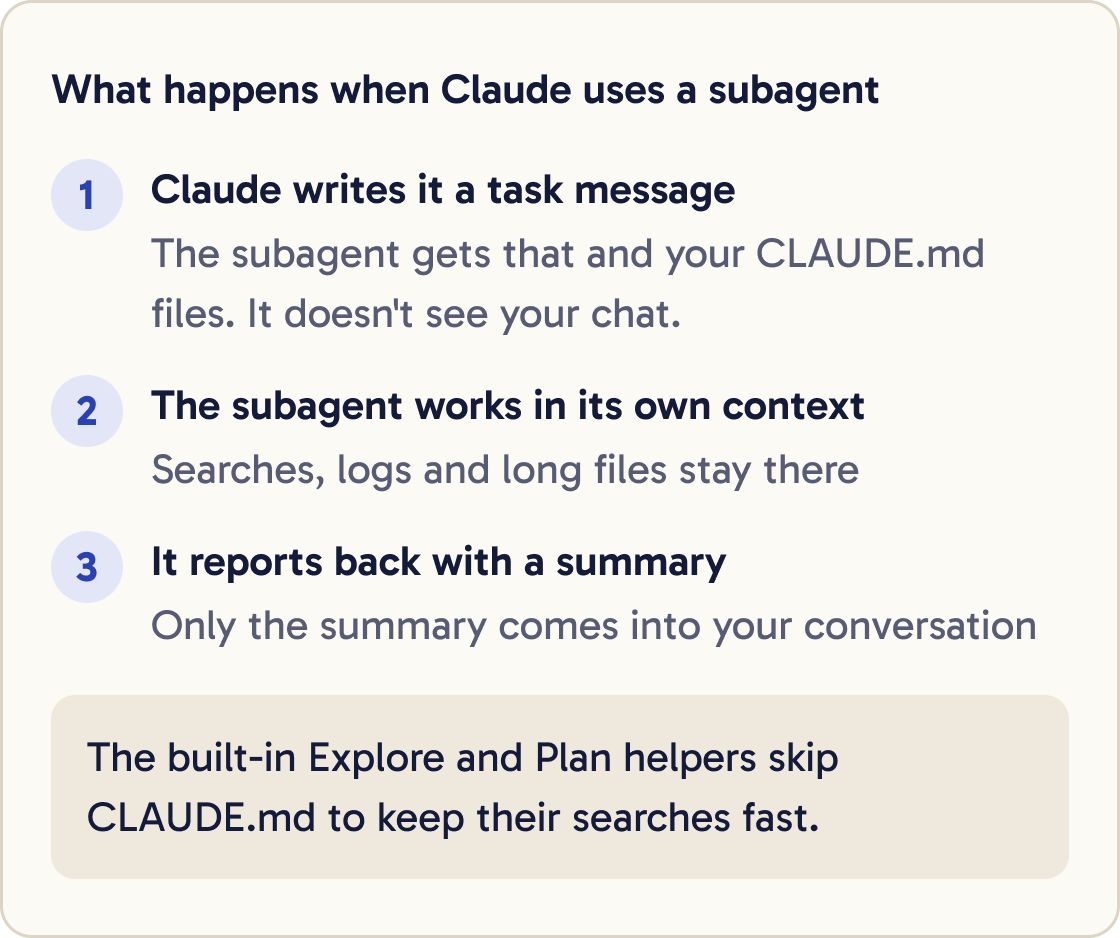
A subagent is a helper that Claude hands a task to. It works in its own separate conversation, then reports back with a summary.
Each subagent has its own context. Context is everything an AI is holding in mind at once. Searches, logs and long files stay in the helper's context, so your main conversation stays tidy.
Each subagent also has its own instructions, its own list of allowed tools and its own permissions.
A subagent starts fresh and doesn't see your conversation. It gets a task message from Claude, plus your CLAUDE.md files.
The built-in Explore and Plan helpers skip CLAUDE.md to keep their searches fast.
Did that work?
Still stuck? Send me a DM on Instagram at @maxbuilds.ai and I'll help.
Step 2 of 15
Know when a subagent helps
Use a subagent when a task makes lots of output you won't need again, such as running tests or reading many files.
Use one when you want to limit what a helper can do, such as a reviewer that can't edit files.
Use one when the work stands on its own and can come back as a summary.
Stay in the main conversation for quick changes and tasks with lots of back and forth. A subagent starts fresh, so it can take time to get up to speed.
For a quick question about something already in your chat, use /btw. It sees your conversation and keeps the answer out of the history.
Step 3 of 15
Meet the subagents you already have
Claude Code comes with built-in subagents. Claude uses them by itself when they fit.
Use a subagent to look through this project and tell me, in plain English, what each top-level folder is for. Keep the summary under 150 words.Explore is a fast, read-only helper for searching and understanding your files.
Plan is a read-only helper that gathers information while you're in plan mode.
General-purpose can both explore and make changes, for multi-step tasks.
When Claude uses one, you see a line with the helper's name and a short task, such as Explore(Find the login code).
Step 4 of 15
Ask Claude to use a subagent
You don't need any setup to use subagents. Ask for one in plain words.
Use a subagent to run the test suite and report only the failing tests with their error messages.Research [TOPIC A], [TOPIC B] and [TOPIC C] in this project in parallel using separate subagents. Then give me one combined summary.Use a subagent to list every file in this project that mentions [WORD], with one line on what each file does.Subagents help most with jobs that make lots of output, and with several separate investigations at once.
If you ask for several in parallel, each one works on its own area and Claude combines what they find.
Step 5 of 15
Learn where your own subagents live
A custom subagent is a Markdown file with settings at the top. Markdown is plain text with simple formatting.
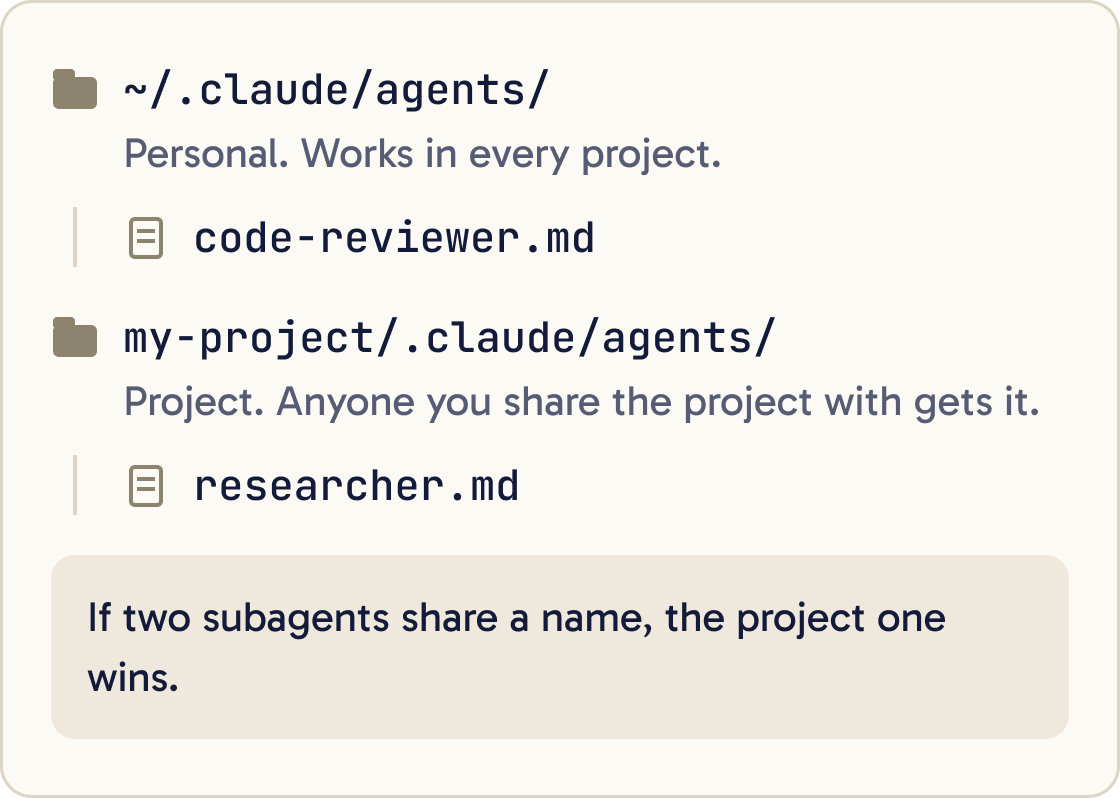
Personal subagents go in ~/.claude/agents/. The ~ means your home folder. These work in every project on your computer.
Project subagents go in .claude/agents/ inside a project folder. They work in that project, and anyone you share it with gets them.
If two subagents share a name, the project one wins over the personal one.
Plugins can bring subagents too. A plugin is a package of extras you install into Claude Code.
Step 6 of 15
Know what /agents does now
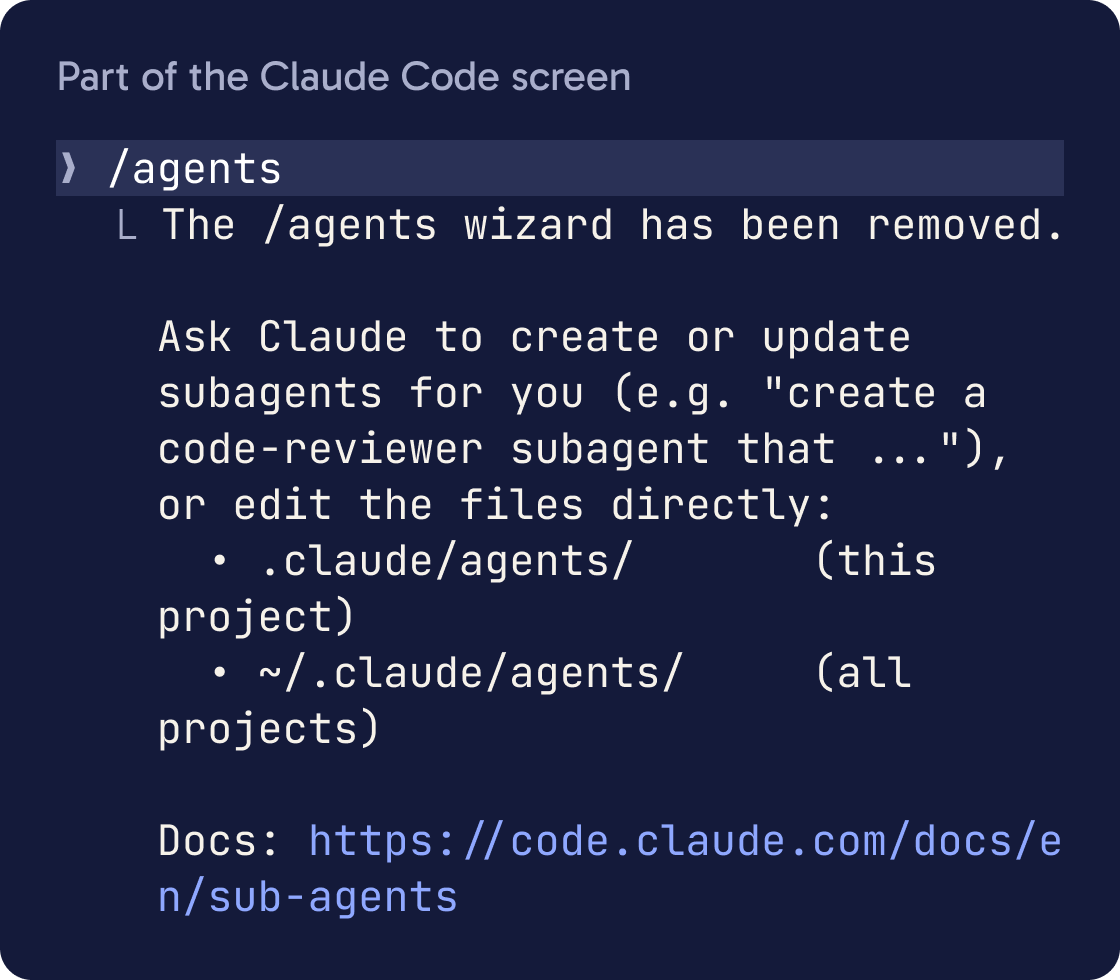
On current versions of Claude Code, /agents prints a reminder. It tells you to ask Claude to create subagents, or to edit the agents folders yourself.
On Claude Code v2.1.197 and earlier, /agents opened a menu for creating and editing subagents.
To check your version, run this in the terminal:
claude --version
This guide uses the current way: ask Claude to write the file.
Step 7 of 15
Create your first subagent by asking
The quickest way to make a subagent is to describe it and say where to save it.
Create a personal [JOB, FOR EXAMPLE: proofreader] subagent in ~/.claude/agents/ that [WHAT IT SHOULD DO]. Make it read-only and have it use Sonnet. Show me the file when you're done.Claude writes a file with a name, a description, a list of tools, a model and the helper's instructions.
Open the file afterwards and check it matches what you asked for.
Step 8 of 15
Learn the settings in a subagent file
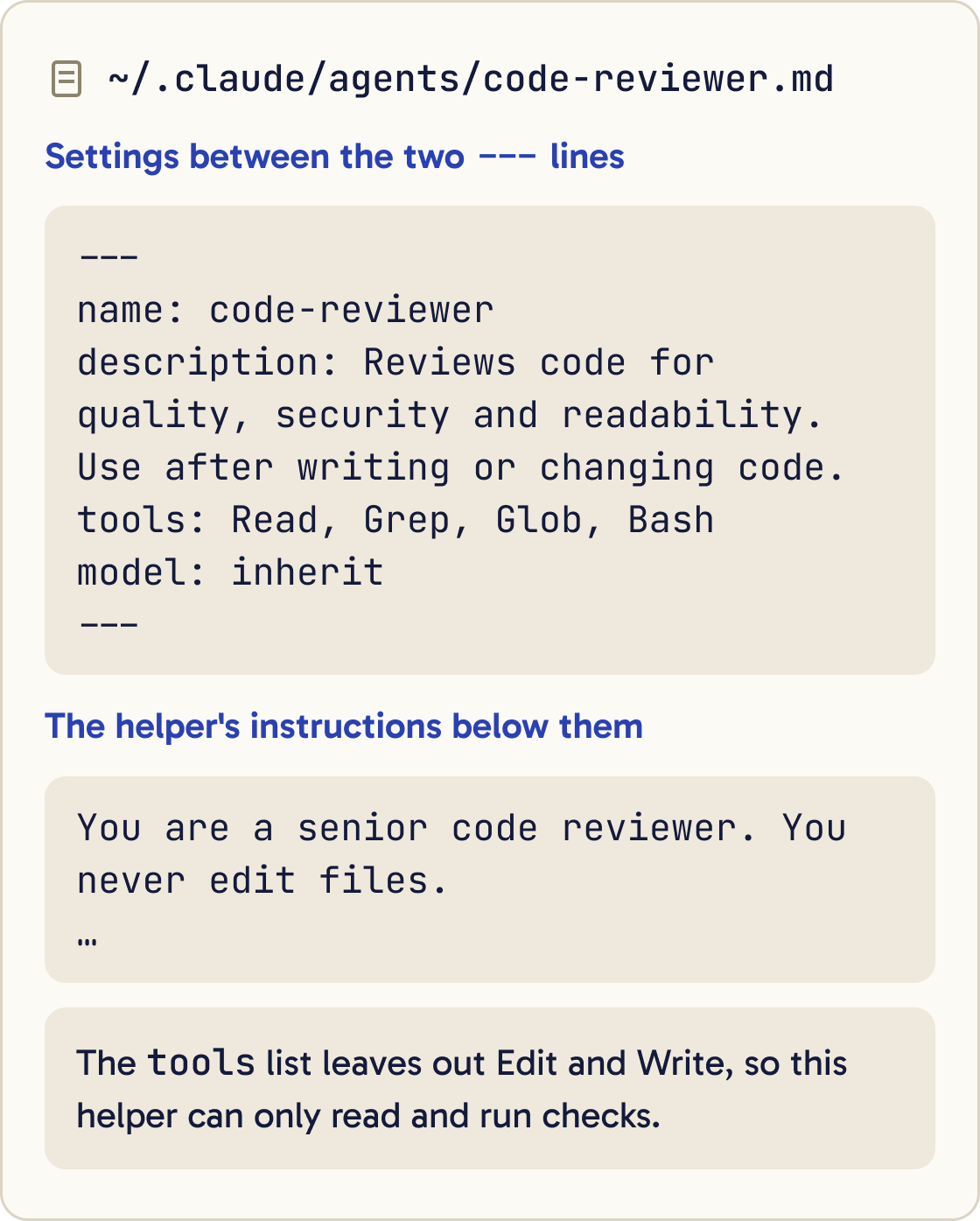
The settings sit between two --- lines at the top. Only name and description are required.
name: a unique name, such as code-reviewer. It can't contain a colon (:).
description: when Claude should hand work to this helper. Claude reads this to decide. Adding "use proactively" encourages Claude to use it without being asked.
tools: the tools it may use, such as Read, Grep, Glob. Leave it out and the helper gets every tool available to subagents.
disallowedTools: tools to take away, such as Write, Edit.
model: sonnet, opus, haiku, fable, or inherit to match your main conversation.
permissionMode: how it handles permission, such as default (ask) or plan (read-only).
maxTurns: the most steps it may take before it stops.
skills: skills to load into the helper at the start.
memory: user, project or local. This gives the helper its own notes folder that lasts between sessions.
Everything below the second --- line is the helper's instructions.
Setting names must match exactly, capitals included, such as maxTurns. Claude Code ignores a misspelled setting without telling you.
Step 9 of 15
Example: a code reviewer
This helper reviews code and never edits it. Its tool list leaves out Edit and Write, so it can only read and run checks.
Create the file ~/.claude/agents/code-reviewer.md with exactly this content, then show it to me:

---
name: code-reviewer
description: Reviews code for quality, security and readability. Use after writing or changing code.
tools: Read, Grep, Glob, Bash
model: inherit
---

You are a senior code reviewer. You never edit files.

When invoked:
1. If this is a git project, run git diff to see recent changes. Otherwise, review the files you were asked about.
2. Focus on the files that changed.
3. Check that the code is clear, well named, handles errors, has no exposed passwords or keys, and checks its inputs.

Report your findings in three groups:
- Must fix
- Should fix
- Worth considering

For each finding, name the file, explain the problem in plain English and show how to fix it.Have the code-reviewer subagent look at my recent changes.Paste the prompt below to create it as a personal subagent.
Step 10 of 15
Example: a researcher
This helper looks things up in your files and on the web. It uses Haiku, a faster and lower-cost model, to save usage.
Create the file ~/.claude/agents/researcher.md with exactly this content, then show it to me:

---
name: researcher
description: Read-only researcher. Use when the user wants facts looked up in this project's files or on the web, with sources.
tools: Read, Grep, Glob, WebFetch, WebSearch
model: haiku
---

You are a careful researcher. You never edit files.

1. Restate the question in one sentence.
2. Search the project files and the web for the answer.
3. Write a short answer in plain English, under 200 words.
4. List every source you used: a file path or a web address.
5. Say clearly if you could not confirm something.
Use the researcher subagent to find out [QUESTION]. Give me the answer and the sources.It can't edit files, because its tool list only has reading and searching tools.
Step 11 of 15
Call a subagent three ways
Name it in your message. Claude usually hands the task over, though it decides for itself. For example: "Use the researcher subagent to..."
@-mention it to make sure it runs. Type @ and pick it from the list, or type it out in full:
@agent-code-reviewer look at the files I changed today
Run a whole session as that subagent by starting Claude Code with it. The main conversation then takes on its tools, model and instructions:
claude --agent code-reviewer
Step 12 of 15
Watch, steer and continue subagents
In a normal session, subagents run in the background. You can keep typing while they work.
Running helpers appear in a panel below the prompt. Use the arrow keys to pick one and Enter to open its conversation.
Type /tasks to see background work, including helpers that finished in the last 30 seconds. Select a running one and press x to stop it.
When a helper needs permission, the request appears in your main session. Approve it, or press Esc to refuse that one action.
To continue a helper's work later, ask Claude to carry on, for example: "Continue that code review and now check the login code."
Step 13 of 15
Hand off a side task with /subtask
/subtask creates a fork. A fork is a helper that starts with a copy of your whole conversation, so you don't need to explain the background.
It runs in the background while you keep working. Its result arrives in your conversation when it's done.
If /subtask shows Unknown command, run claude update in the terminal and try again.
/subtask draft a short README for this project based on what we've discussed
Step 14 of 15
Understand the limits and costs
Every subagent sends its own requests. They count toward the same usage limits as your main conversation.
Results come back into your main conversation. Many helpers sending long reports can fill your context fast, so ask for short summaries.
To save usage, set model: haiku on simple helpers. Run /usage to see how much of your usage went to subagents.
By default, up to 20 subagents can run at once. A subagent can start its own helpers, up to three layers deep.
Subagents can't ask you questions while they work. Put everything they need in the task.
Keep descriptions short. If all your subagents' descriptions add up to more than 15,000 tokens, Claude Code warns you at startup. A token is a small chunk of text, roughly part of a word.
Step 15 of 15
Fix common subagent problems
Find your problem below and try the fix.
Did that work?
Still stuck? Send me a DM on Instagram at @maxbuilds.ai and I'll help.
Common mistakes
- Using a subagent for a tiny change. A fresh helper needs time to learn the project, so quick edits are faster in the main chat.
- Giving every helper every tool. List only the tools each one needs, so a reviewer can't edit files by accident.
- Writing vague descriptions such as "helps with code". Claude chooses helpers by their description, so name the exact job.
- Expecting a subagent to remember your chat. It starts fresh, so put the key facts in your request or in CLAUDE.md.
- Starting many helpers that each return long reports. Ask each one for a short summary to protect your context and usage.
- Following old tutorials that rely on the `/agents` menu. On current versions, ask Claude to write the file.
Want the next guide?
I'll email you each new guide as I share it, with new tutorials and prompts too.