Reading on your phone? Send it to your laptop.
You'll get the guide and every prompt in one email.
Guide 005
Claude usage limits, context and costs explained
You need
- Claude Code installed and signed in
- A Claude Pro or Max plan, or a pay-as-you-go Claude Console account
- About 20 minutes
Step 1 of 12
Know what you pay for
Claude's free plan doesn't include Claude Code. Pro does. Pro costs $20 a month, or $17 a month if you pay $200 for a year up front.
Max starts at $100 a month. You choose 5 or 20 times the usage of Pro.
You can also pay per use with a Claude Console account, billed at standard API rates. The API is the direct connection programs use to talk to Claude.
Anthropic recommends signing in with a plan. A plan also keeps your monthly price fixed.
Did that work?
Still stuck? Send me a DM on Instagram at @maxbuilds.ai and I'll help.
Step 2 of 12
Understand how plan limits work
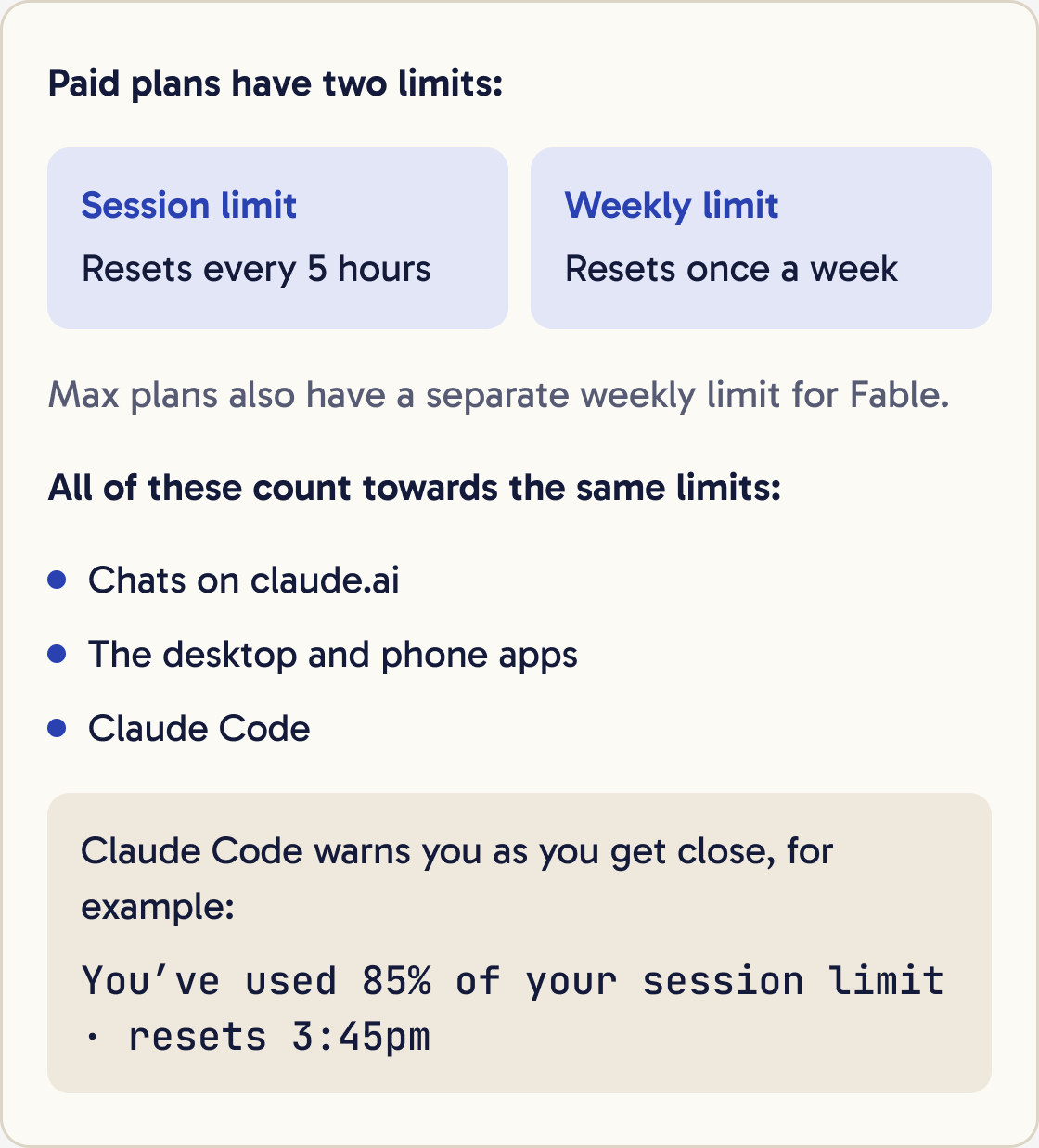
Paid plans have two limits. A session limit resets every 5 hours. A weekly limit resets once a week. Max plans also have a separate weekly limit for Fable, the model family Anthropic offers for the hardest and longest tasks.
Everything you do with Claude counts towards the same limits. That includes chats on claude.ai, the desktop and phone apps, and Claude Code.
Anthropic's help pages don't give a fixed number of messages. How far your limit goes depends on how long your messages and conversations are, which model you use and how much work each request does.
Claude Code warns you as you get close, with a message such as You've used 85% of your session limit · resets 3:45pm.
Step 3 of 12
Learn what a token is
Claude reads and writes text in small pieces called tokens. A token can be a whole word, part of a word or a single character.
On older Claude models, one token is about 3.5 English characters. Claude's newer models split the same text into about 30% more tokens.
Your usage is measured in tokens. Everything Claude reads counts, including your messages, the files it opens and its own replies.
Step 4 of 12
Understand the context window
The context window is Claude's working memory for one conversation. It holds everything Claude can see right now: your messages, its replies, the files it has read and any instructions loaded at the start.
On paid plans, the newest models have a context window of up to 1 million tokens. Older models have 500,000 or 200,000.
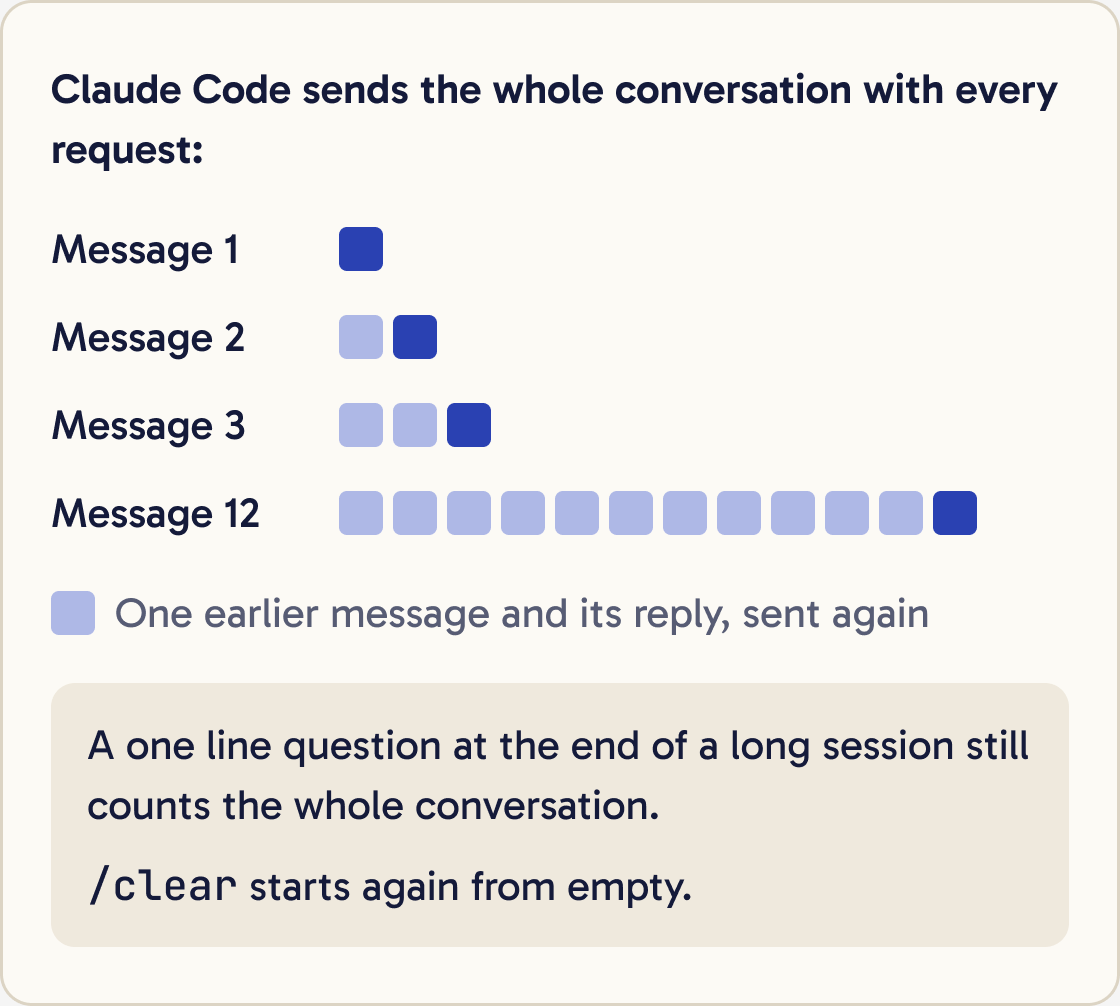
Claude Code sends the whole conversation to Claude with every request. A one-line question at the end of a long session still counts the entire conversation against your limits.
A prompt cache helps. Claude Code reuses recent conversation text, and reused text counts for less. On a subscription the cache lasts 1 hour, or 5 minutes once you're using usage credits.
If you leave a session for longer than the cache lasts, your next message reprocesses everything at full cost.
Step 5 of 12
Check your usage
In Claude Code, type this and press Enter:
/usage
On a Pro or Max plan, it shows bars for your session and weekly limits and when they reset. It also shows what used the most, such as skills, add-ons or long conversations. Press d or w to switch between the last day and the last week.
You can also type /cost or /stats. Both open the same screen.
On claude.ai, go to Settings, then Usage. You see the same session and weekly bars.
Step 6 of 12
See what fills your context
Type this and press Enter:
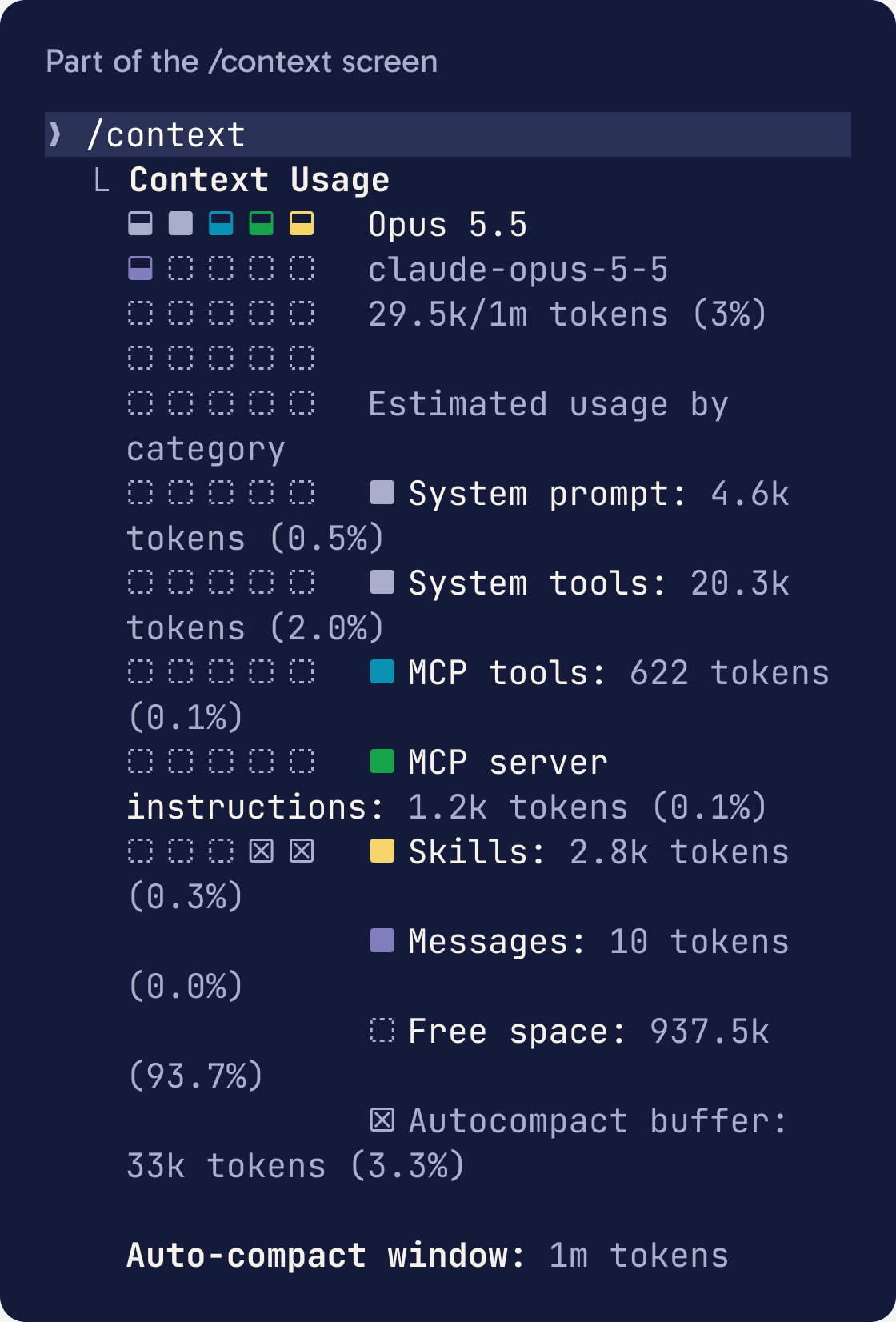
/context
It draws a coloured grid of your context window. Each colour is a type of content, such as your conversation, files Claude read and instructions that load at the start. It also suggests ways to free up space.
If one thing takes up a large share, deal with that first. The usual causes are a long conversation, a huge file Claude read or many add-ons switched on.
Step 7 of 12
Start fresh with /clear
When you finish one task and start another, type:
/clear
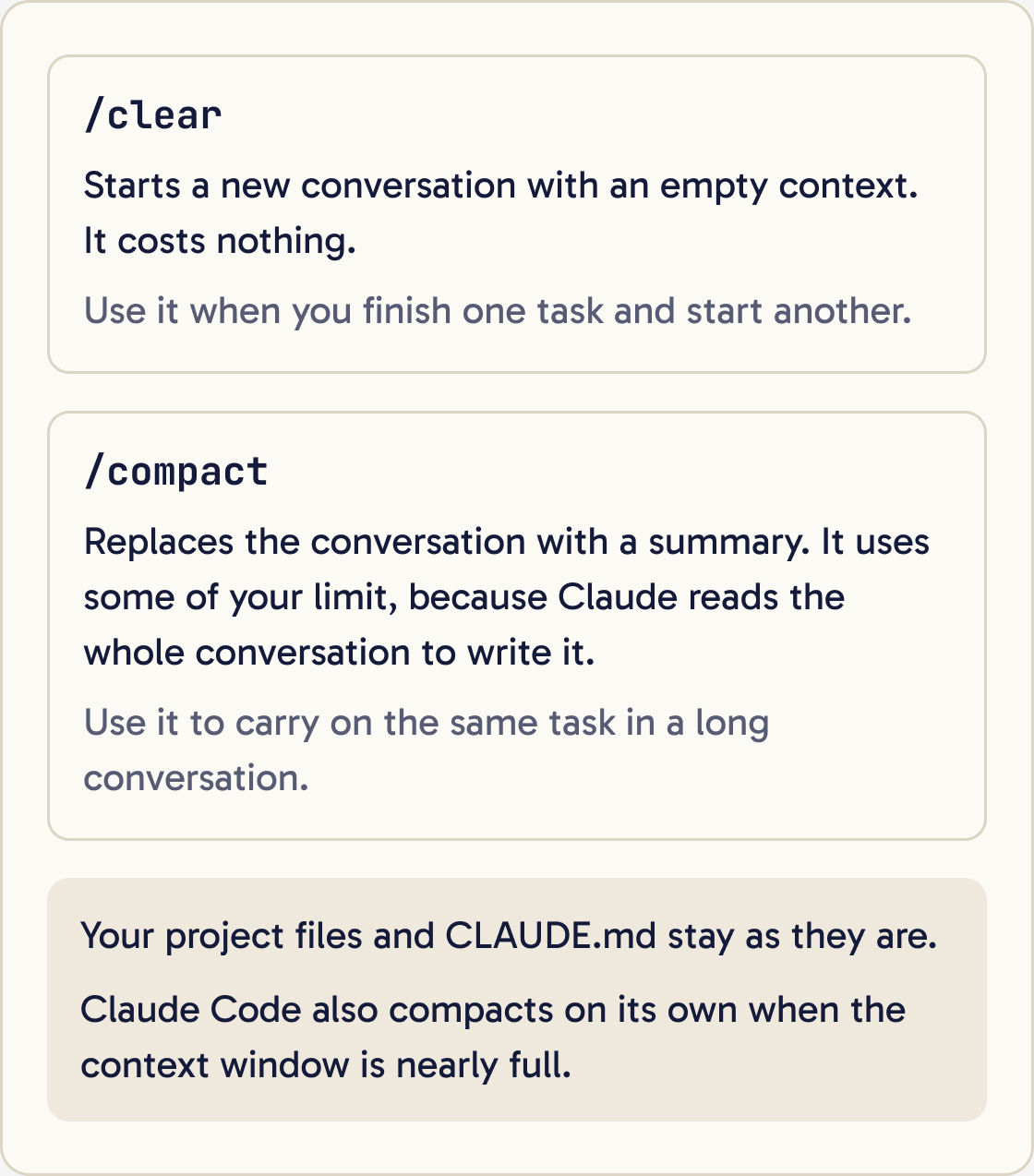
This starts a new conversation with an empty context. It costs nothing. Your project files and your CLAUDE.md instructions stay as they are.
Anthropic calls one conversation full of unrelated tasks the kitchen sink session. The old messages get in the way of the new task and cost tokens on every message.
To come back to an old conversation, name it first with /rename, such as /rename homepage-design. Later, type /resume and pick it from the list.
Step 8 of 12
Shrink a long conversation with /compact
When you want to carry on the same task but the conversation is long, type:
Summarise this session in under 200 words for a fresh conversation: what we're building, what's finished, what's left, any decisions we made and the files involved. I'll paste it after I run /clear./compact
Claude replaces the conversation with a summary, which frees space. You can tell it what to keep, for example /compact focus on the contact form bug.
Claude Code also compacts on its own when the context window is nearly full, so a full window doesn't end your session.
Compacting uses some of your limit. Claude reads the whole conversation to summarise it, which is one large request. If you don't need the old conversation, /clear is cheaper.
Step 9 of 12
Pick the right model and effort
A model is the version of Claude that answers you. Type /model to see the models your plan includes and switch between them.
Anthropic says Sonnet handles most coding tasks well and costs less than Opus. Keep Opus for complex planning and hard problems. Haiku is the fastest and suits simple tasks.
On Pro and Max, the default model is Opus 5.5. If you hit limits often, switching to Sonnet for everyday work makes your usage last longer.
Effort sets how hard Claude thinks before answering. Higher effort uses more tokens. Type /effort to change it. The levels are low, medium, high, xhigh and max. Opus 5.5 starts on medium.
A mixed option called opusplan uses Opus in plan mode and Sonnet while it builds.
Step 10 of 12
Build habits that make usage last
Be specific. A request like 'improve this project' makes Claude read many files. 'Fix the spacing in the header in styles.css' lets it go straight to the right place.
Look at how this project is set up: CLAUDE.md, connected tools and anything else that loads at the start of each session. Tell me what takes up the most context and suggest 3 changes that would cut my usage without making your work worse. Don't change anything yet.Plan big jobs first. Press Shift + Tab until you see plan mode on, and Claude proposes a plan before it edits anything. Fixing a plan costs less than redoing the work.
Stop wrong turns early. Press Esc as soon as Claude heads the wrong way, then redirect it.
Put several related questions in one message. Each message sends the whole conversation again.
Turn off add-ons you don't use. Type /mcp to see connected tools and disable the ones you don't need.
Keep your CLAUDE.md short. It loads into every session, and Anthropic suggests keeping it under 200 lines.
Step 11 of 12
Know what happens when you hit a limit
You see a message such as You've hit your session limit · resets 3:45pm or You've hit your weekly limit · resets Mon 12:00am. Claude Code stops sending requests until that time.
Switching models doesn't help with the session or weekly limit, because those cover all models. It does help with a model limit, such as You've hit your Opus limit. Type /model and pick a model from a different family.
If you leave the session open, Claude Code carries on the interrupted task after the reset. Type /rate-limit-options to see your other choices.
If you hit the session limit mid-reply, Claude Code may keep working for a short time to finish the step. You'll see Usage limit reached · wrapping up.
Step 12 of 12
Decide whether to use usage credits
Usage credits let you keep working after you hit a limit. You pay for the extra at standard API rates, on top of your plan.
To turn them on, go to claude.ai, open Settings, then Usage. In the Usage credits section, click Enable, add a payment method and set a monthly spend limit. You pay in advance by adding funds. In Claude Code, /usage-credits opens the same page.
Set a spend limit before you add funds. Leave auto-reload off if you don't want automatic top-ups. You can turn usage credits off again in the same place.
The monthly API credits that come with Max plans can't be used in Claude Code or the Claude apps.
Did that work?
Still stuck? Send me a DM on Instagram at @maxbuilds.ai and I'll help.
Common mistakes
- Running one conversation all day. Use `/clear` between unrelated tasks.
- Coming back to a huge conversation after a long break. The cache has expired, so your first message costs the most. Clear or compact first.
- Using Opus at high effort for small edits. Switch to Sonnet or lower the effort for routine work.
- Leaving add-ons connected that you never use. Disable them with `/mcp`.
- Turning on usage credits without a spend limit. Set a monthly limit first.
Want the next guide?
I'll email you each new guide as I share it, with new tutorials and prompts too.