Reading on your phone? Send it to your laptop.
You'll get the guide and every prompt in one email.
Guide 026
Context engineering: keep Claude sharp on big projects
You need
- Claude Code on a project you've worked in for a while.
- A CLAUDE.md file in that project. If you don't have one yet, you'll build one as you go.
- You can edit Markdown files and run slash commands, the commands that start with `/`.
Step 1 of 12
Know what fills the context window
The context window is everything Claude holds in mind at once. It's measured in tokens, which are small chunks of text, often part of a word.
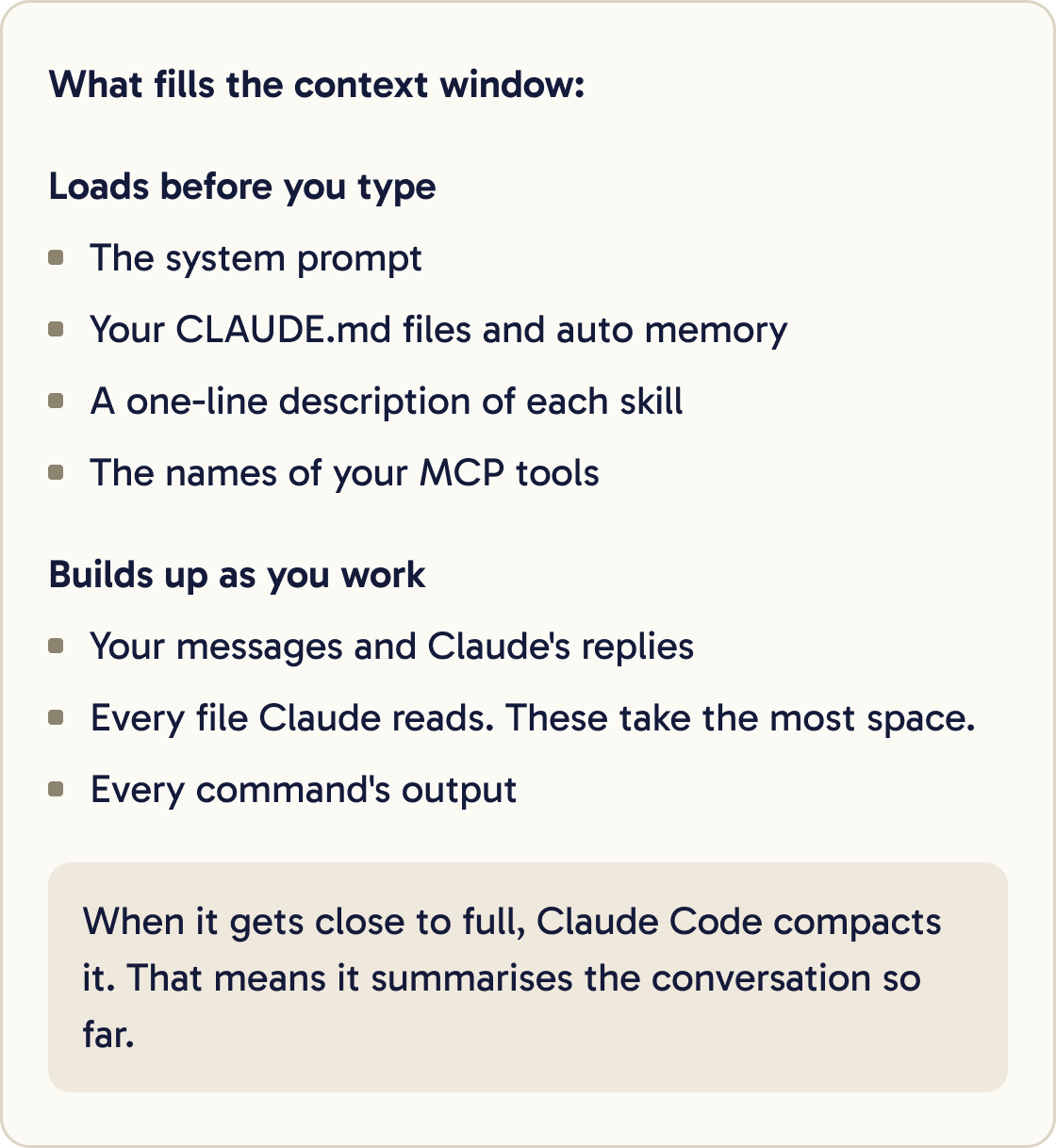
Some of it loads before you type: the system prompt, your CLAUDE.md files, auto memory, the one-line descriptions of your skills and the names of your MCP tools.
The rest builds up as you work: your messages, Claude's replies, every file it reads and every command's output. The docs say file reads take up the most space.
When the window gets close to full, Claude Code compacts it. That means it summarises the conversation so far. Long, unrelated history can also distract Claude and reduce the quality of its work.
Context engineering means choosing what goes in, when it loads and what gets left out.
Did that work?
Still stuck? Send me a DM on Instagram at @maxbuilds.ai and I'll help.
Step 2 of 12
Measure before you change anything
Run this in a session:
/context
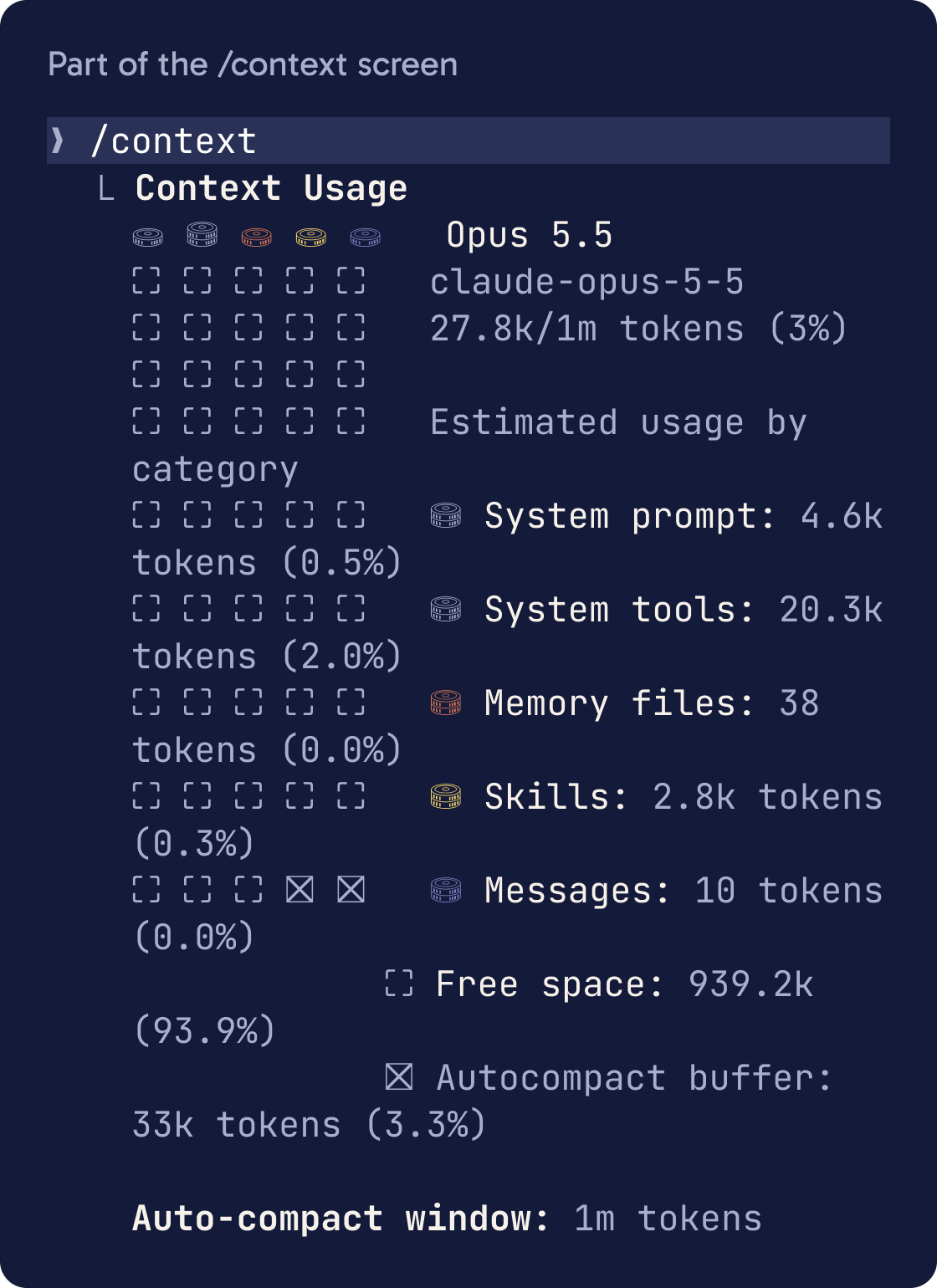
It shows a live breakdown of what's using your context, by category, with suggestions. It also lists which CLAUDE.md and memory files loaded.
Run /memory to open and edit those files.
Check /context again after each change in this guide to see what it saved.
Step 3 of 12
Layer your CLAUDE.md files
CLAUDE.md files hold instructions Claude reads every session. There are four levels, loaded from broadest to most specific.
Managed policy files are set by an organisation's IT team. ~/.claude/CLAUDE.md holds your personal preferences for every project. ./CLAUDE.md or ./.claude/CLAUDE.md holds the project's shared rules, which you commit. ./CLAUDE.local.md holds your private notes for this project, which you add to .gitignore.
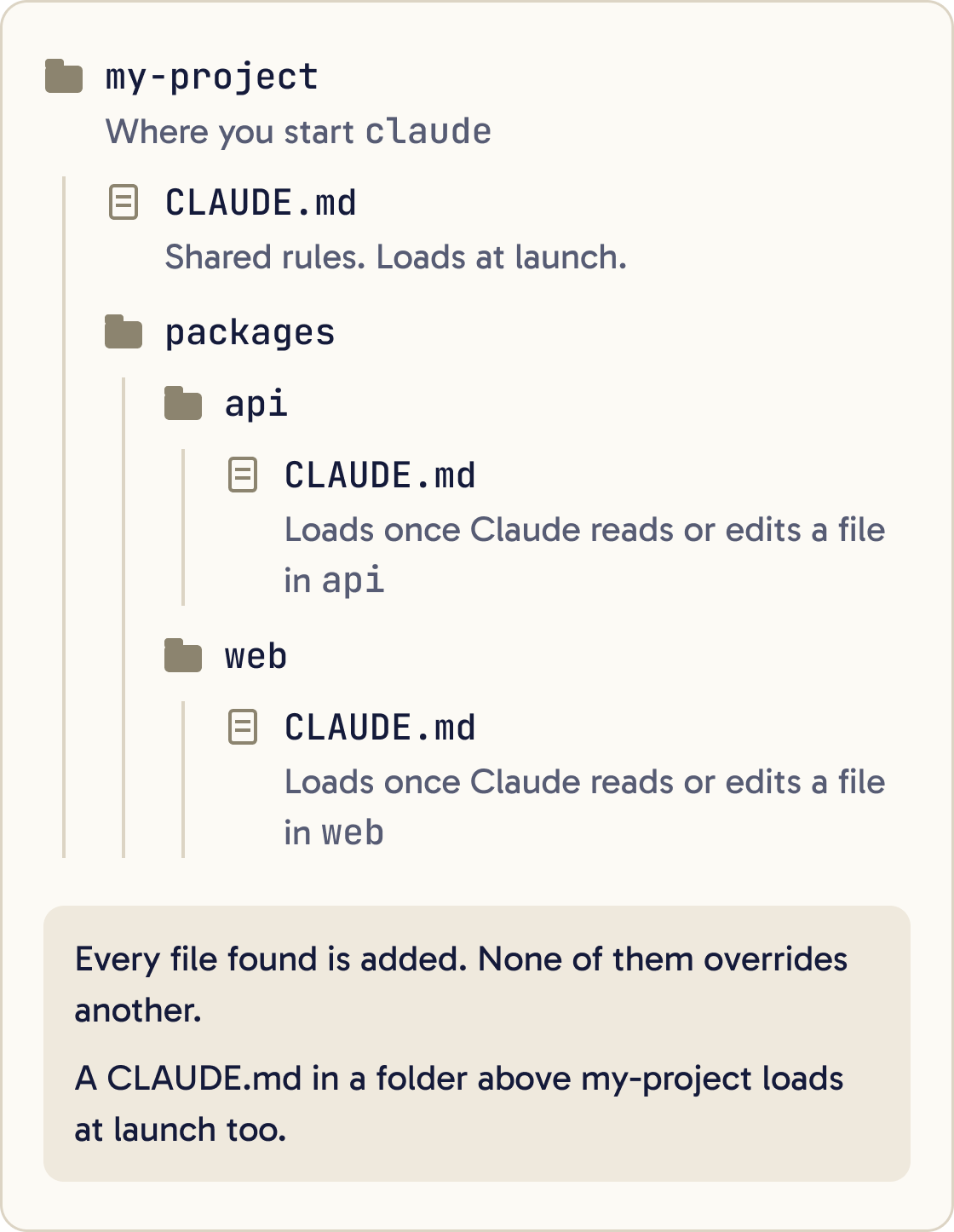
Every file found is added to context. None of them overrides another. Files closer to where you started Claude are read last.
Files in the folders above where you start Claude load at launch. A CLAUDE.md in a subfolder loads only once Claude reads or edits a file in that subfolder.
On a big project, put shared rules at the root and package rules in each package's own CLAUDE.md. Package rules then load only when Claude works in that package.
Step 4 of 12
Write instructions Claude can follow
Claude treats CLAUDE.md as context. Nothing enforces it, so the wording decides how reliably it's followed.
Audit every instruction file Claude Code loads in this project: CLAUDE.md files at every level, CLAUDE.local.md, files in .claude/rules/, and anything they import with @. Don't change anything yet.

Report in this order:
1. Each file, its line count, and whether it loads at startup or on demand.
2. Instructions that contradict each other, quoted side by side.
3. Instructions that are vague and can't be checked, with a concrete rewrite.
4. Content Claude could work out from the code itself, such as folder layouts or dependency lists.
5. Content that only matters for one part of the codebase and should move to a path-scoped rule.
6. Long procedures that should become skills.

Then propose a trimmed version of the root CLAUDE.md under 200 lines. Wait for my approval before editing.
Write rules you could check. "Run npm test before committing" works. "Test your changes" is too vague to follow reliably.
Keep each file under 200 lines. The docs say longer files take more context and reduce how well Claude follows them. Claude Code warns at startup when a file is over that length.
Group rules under headings with short bullet points.
HTML comments such as <!-- note for humans --> are stripped before Claude sees the file. Use them for notes to your team that cost no tokens.
Paste the prompt below to audit what you have. Claude Code also has a built-in check: run /doctor prompt-audit for a report on outdated or conflicting instructions. It changes nothing until you ask.
Step 5 of 12
Use imports to organise
A CLAUDE.md can pull in another file with an @ path, such as @docs/architecture.md. The path is relative to the file that contains it. Imports can nest up to four levels deep.
Imports keep files tidy. They save no space, because imported files load at launch with the file that imports them.
To mention a path without importing it, wrap it in backticks.
Claude asks you to approve imports from outside the project the first time it sees them. That stops a shared repository pulling in files from your machine without you knowing.
Some repositories have an AGENTS.md file for other coding tools. Claude Code reads it on its own only when there's no CLAUDE.md in your folder or above it. Since you have a CLAUDE.md, add the line @AGENTS.md to it so both tools share one file.
Step 6 of 12
Move topic rules into .claude/rules/
The .claude/rules/ folder holds one Markdown file per topic, such as testing.md or api-design.md.
Move the instructions in CLAUDE.md that only apply to [FOLDER OR FILE TYPE] into a new file .claude/rules/[NAME].md. Start the file with YAML frontmatter that has a paths field matching [GLOB PATTERN, FOR EXAMPLE "src/api/**/*.ts"]. Remove the moved lines from CLAUDE.md. Show me both changes before saving.A rule file without frontmatter loads at launch, like CLAUDE.md. Frontmatter is a short block of settings between two --- lines at the top of a file.
Add a paths field to the frontmatter and the rule loads only when Claude reads or edits a matching file. API rules then stay out of context while Claude works on the frontend.
Paste the prompt below to move a section out of CLAUDE.md.
Step 7 of 12
Turn long procedures into skills
A skill is a folder with a SKILL.md file that teaches Claude one procedure, such as a release checklist. Project skills live in .claude/skills/<skill-name>/SKILL.md.
Turn the [NAME OF PROCEDURE, FOR EXAMPLE "release checklist"] section of CLAUDE.md into a project skill at .claude/skills/[skill-name]/SKILL.md. Write a one-line description that says when to use it. Put the most important steps at the top. If the skill would be over 500 lines, move the reference detail into a separate file in the same folder and link to it from SKILL.md. Then remove the section from CLAUDE.md and show me both changes before saving.Only each skill's one-line description sits in context. The full body loads when you run it as /skill-name or when Claude decides it's relevant.
Add disable-model-invocation: true to a skill's frontmatter to keep it fully out of context until you run it by name.
Keep SKILL.md under 500 lines. Put long reference material in other files in the same folder and link to them, so Claude opens them only when needed.
After compaction, Claude Code puts the skills you used back in, capped at 5,000 tokens each and 25,000 in total. It keeps the start of each file and drops the oldest skills first, so put the most important steps at the top.
Step 8 of 12
Send research to subagents
A subagent is a helper with its own context window. It reads the files, and only its summary comes back to your session.
Use subagents to investigate [QUESTION, FOR EXAMPLE "how authentication handles token refresh"]. Split the search by area so they can run in parallel. Each subagent reports back in under 200 words, with file paths and line numbers for anything important. Then give me a combined answer in under 300 words. Don't change any files.Use subagents for anything that reads a lot and returns a little: exploring code you don't know, reading logs or running a test suite.
The summaries still land in your context, so ask for short ones.
For a quick question about something already in the conversation, use /btw. The answer doesn't get added to the conversation history.
Step 9 of 12
Keep tool output small
Be specific in your prompts. "Fix the bug in src/auth.ts" makes Claude read fewer files than "fix the login bug".
MCP tool definitions are deferred by default. Only the tool names sit in context until Claude needs a specific tool.
Command line tools such as gh use less context than an MCP server for the same job. They add nothing until Claude runs them.
A hook can filter output before Claude sees it. A hook is a script Claude Code runs at a set moment, such as before a command. The docs show one that trims test output to just the failures.
Step 10 of 12
Compact on your terms
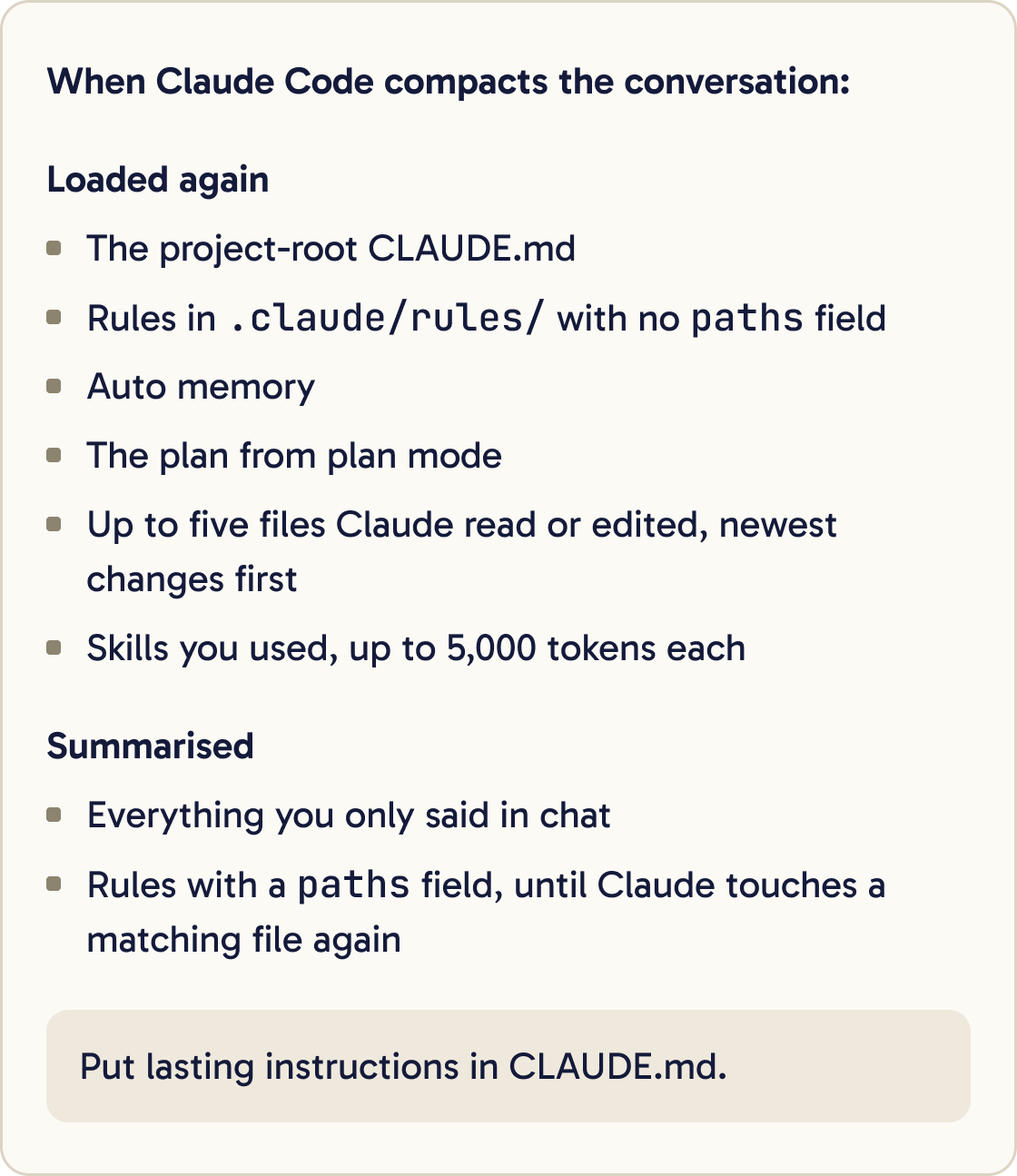
Automatic compaction decides for itself what to keep. You can tell it what matters.
/compact focus on the auth bug fix
Run /compact with a focus like this before you start a long new piece of work.
To summarise only part of the conversation, run /rewind, pick a message and choose "Summarize from here" or "Summarize up to here".
To compact earlier, set the trigger point with a token count, such as /autocompact 500k.
You can also add a line to CLAUDE.md, such as: "When compacting, always preserve the full list of modified files and any test commands."
Step 11 of 12
Clear between tasks
Run this when you switch to unrelated work:
/clear
It resets the conversation. Old history crowds out what you need next and costs tokens on every message.
Edits to your root or user CLAUDE.md don't reach a running session. Claude keeps the version it loaded at the start. Your changes load after /clear, /compact or a restart.
Step 12 of 12
Build good session habits
Give each task its own session. Name it with /rename so you can find it later.
Write HANDOFF.md for this task so a fresh session can pick it up. Include: the goal, what's done, what's left as a checklist, decisions we made and why, files changed, commands to run the tests, and anything that tripped us up. Keep it under 60 lines.Run claude --continue to pick up the last session, or claude --resume to choose one from a list.
Before a long task ends or a session gets crowded, write the state to a file. A fresh session can then read that file and start clean.
Correct course early. If Claude heads the wrong way, stop it and redirect before it reads more files down the wrong path.
Claude also keeps its own notes in auto memory. The first 200 lines or 25KB of MEMORY.md load each session. Open them with /memory now and then and delete anything wrong or out of date.
Did that work?
Still stuck? Send me a DM on Instagram at @maxbuilds.ai and I'll help.
Common mistakes
- Splitting a long CLAUDE.md into imports and expecting it to use less context. Imports load at launch too.
- Letting CLAUDE.md grow past 200 lines with layouts and dependency lists Claude can read from the code.
- Keeping one session going across unrelated tasks. Run `/clear` between them.
- Editing CLAUDE.md mid-session and expecting the change to apply straight away.
- Giving lasting instructions only in chat, where compaction can summarise them away.
- Asking subagents for long reports, which fills the context they were meant to protect.
Want the next guide?
I'll email you each new guide as I share it, with new tutorials and prompts too.