Reading on your phone? Send it to your laptop.
You'll get the guide and every prompt in one email.
Guide 027
Multi-agent workflows: split one big job across several agents
You need
- Claude Code on a paid plan or a Console account (pay as you go API billing). You should already use it day to day.
- A project in a git repository with at least one commit. Run `git status` to check.
- Tests or a command that shows the project still works. Reviewers need something to check against.
- You've made a custom subagent before, or read the Claude Code subagents guide.
Step 1 of 13
Know the ways to run several agents
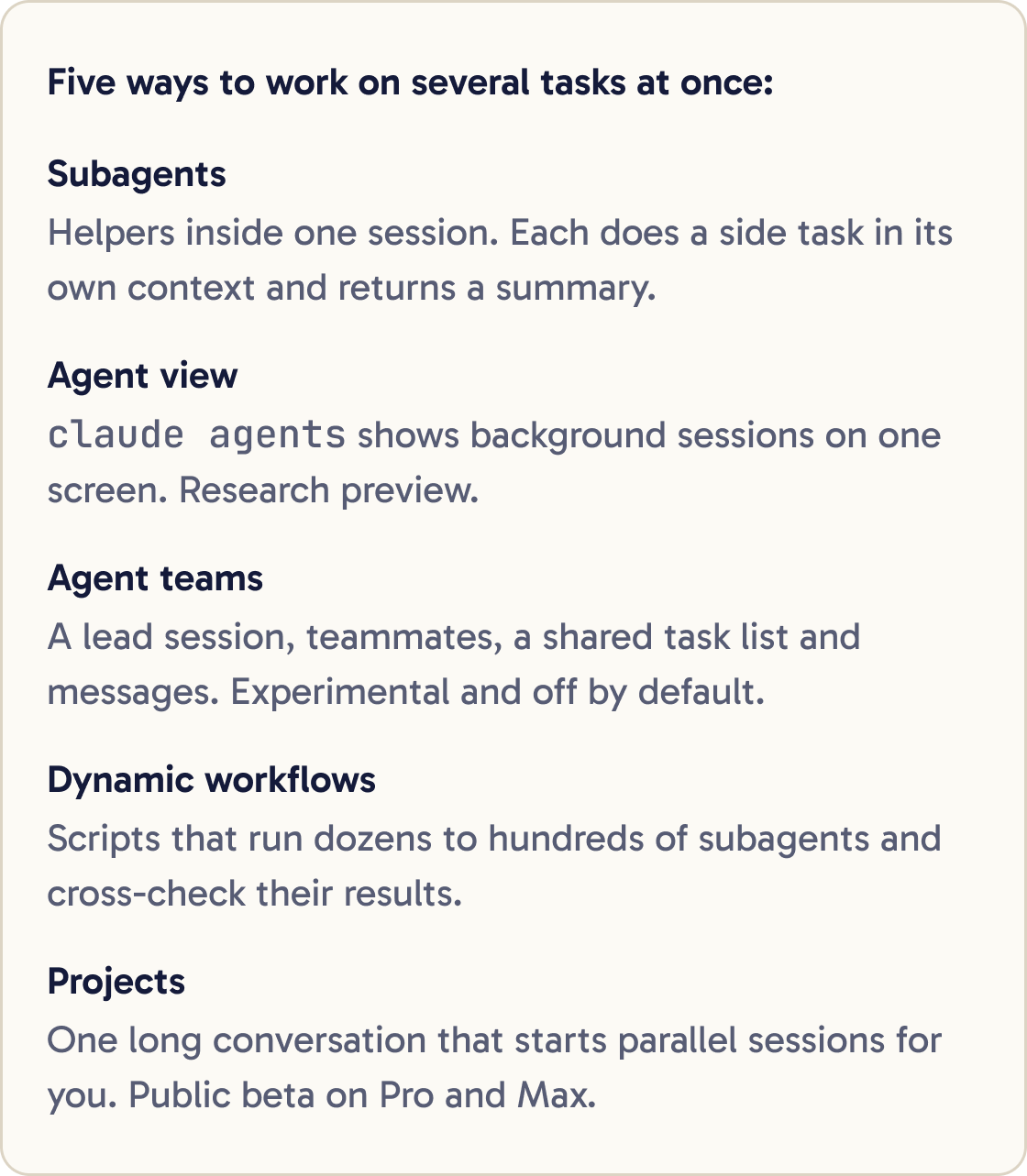
Claude Code has five ways to work on several tasks at once. Each worker is a Claude session.
Subagents are helpers inside one session. Each does a side task in its own context and returns a summary. Context is everything Claude holds in mind at once.
Agent view, opened with claude agents, shows sessions running in the background on one screen. It's a research preview.
Agent teams are several sessions with a lead, a shared task list and messages between them. They're experimental and off by default.
Dynamic workflows are scripts that run dozens to hundreds of subagents and cross-check their results. Projects keep one long conversation at claude.ai/code or in the desktop app and start parallel sessions for you. They're in public beta on Pro and Max.
Worktrees help with most of these. A git worktree is a separate folder with its own branch and files that shares your repository's history. Agents in different worktrees can't overwrite each other's edits.
Did that work?
Still stuck? Send me a DM on Instagram at @maxbuilds.ai and I'll help.
Step 2 of 13
Decide if it's worth it
The docs say running several sessions or subagents multiplies token usage. Each agent reads files and thinks on its own budget, and on a plan that comes out of your usage limits.
Split a job when its parts are independent: different files, no shared decisions, each checkable on its own. Research across several areas and review after each task are good fits.
Stay in one session when the work needs lots of back and forth. Do the same when every step depends on the last, or when the change is small.
A subagent starts fresh. It may spend tokens and time rebuilding context your main session already has.
Step 3 of 13
Split the job into independent tasks
Take care over the split, because every later step depends on it. Paste the prompt below and fill in the job.
I want to [DESCRIBE THE BIG JOB]. Don't write any code yet.

First, read the parts of the codebase this touches. Use subagents for the reading so my context stays clean, and have each one report back in under 200 words.

Then write PLAN.md with a numbered list of tasks. For each task give:
1. What it changes, in one sentence.
2. The files it will touch.
3. Which other tasks must finish first, or "none".
4. How to check it's done: a test, a command or something I can see.

Two tasks that touch the same file go into one task, or run one after the other. Mark which tasks can run in parallel. If this job is small enough for one session, tell me that instead.
It has Claude research with subagents, then write PLAN.md. Each task lists its files, what it depends on and how to check it.
Read the plan before anything runs. Two tasks that touch the same file will collide, so merge them or run them one after the other.
Step 4 of 13
Create a reviewer subagent
A reviewer in a fresh context sees only the plan and the diff, which is the list of lines that changed. It doesn't see the reasoning that wrote the change, so it judges the result on its own terms.
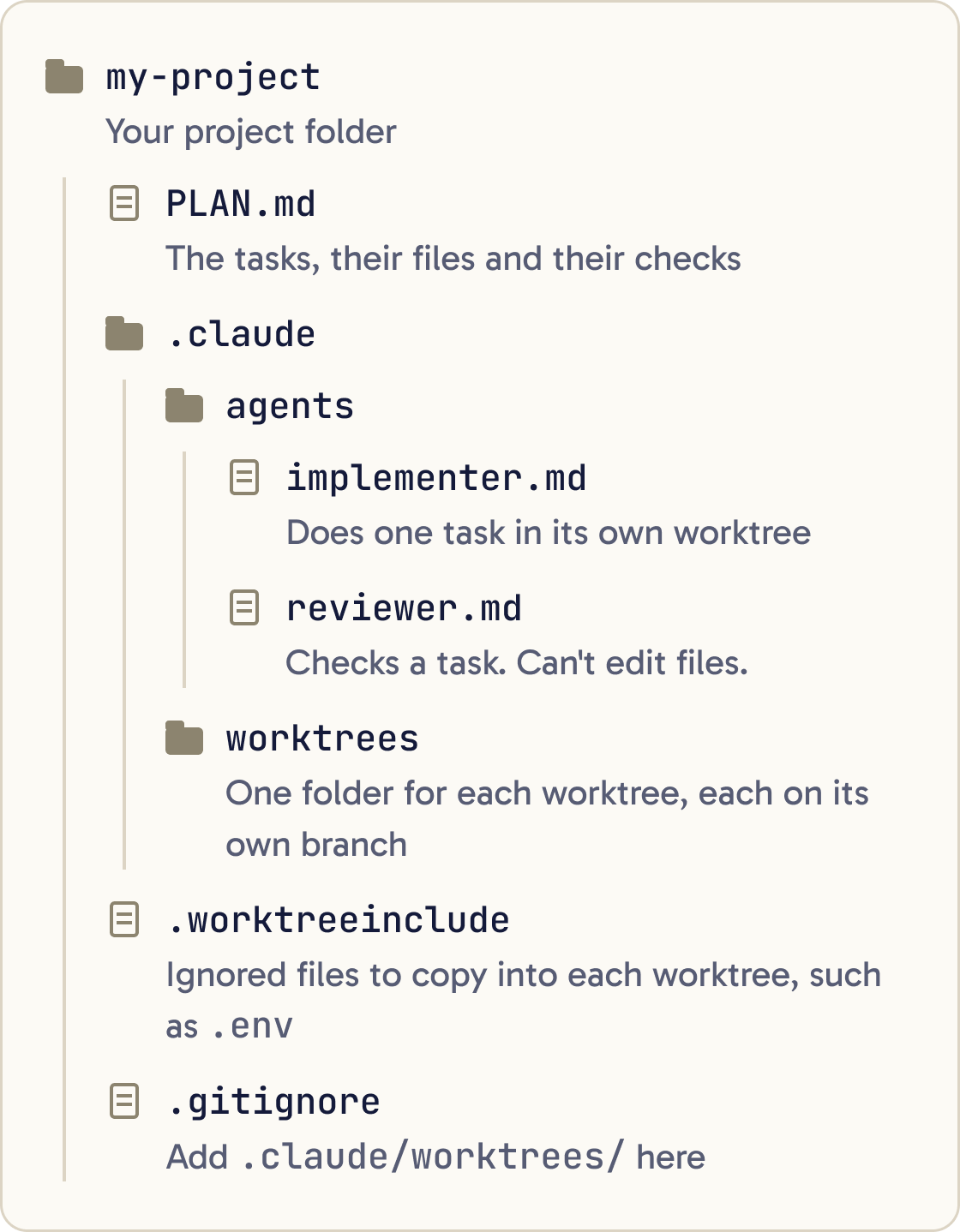
Create .claude/agents/reviewer.md with exactly this content, then show me the file:

---
name: reviewer
description: Reviews one finished task against PLAN.md. Use after each task is implemented, before it is merged.
tools: Read, Grep, Glob, Bash
model: inherit
---

You review one task at a time. You never edit files.

1. Read the task in PLAN.md you were given.
2. Run git diff for that task's branch or changes.
3. Run the task's check from PLAN.md and report the result.
4. Check that every part of the task is done, that nothing outside its listed files changed, and that new behaviour has a test.

Report only problems that break correctness or the task's requirements. List each one with the file, the line and a suggested fix. Put style comments under a separate "Optional" heading. If you find no real problems, say so plainly.
Paste the prompt below. It creates a read-only reviewer in .claude/agents/. It has no Edit or Write tool, so it can't change files.
The docs warn that a reviewer asked to find gaps will usually report some, even when the work is sound. That's why this one reports only problems that affect correctness or the task's requirements.
Step 5 of 13
Create an implementer that uses its own worktree
Paste the prompt below. The line isolation: worktree gives every implementer run its own temporary worktree.
Create .claude/agents/implementer.md with exactly this content, then show me the file:

---
name: implementer
description: Implements one task from PLAN.md in its own worktree. Use for any task that edits files.
isolation: worktree
model: inherit
---

You implement exactly one task from PLAN.md.

1. Install the project's dependencies if they are missing in this worktree.
2. Make only the changes the task describes, in the files it lists.
3. Run the task's check from PLAN.md until it passes.
4. Commit your work with a short message that names the task number.

Report back in under 150 words: what you changed, the check you ran and its result, and anything you could not do.
Subagent worktrees branch from your repository's default branch, such as main. If your work is on another branch, set worktree.baseRef to "head" in your settings so worktrees start from where you are.
A worktree is a fresh checkout. Files git ignores, such as .env, aren't there. List the ones you need in a .worktreeinclude file at the project root, using .gitignore syntax.
Add .claude/worktrees/ to your .gitignore so worktree folders don't show up as untracked files.
Step 6 of 13
Run one task, then review it
Start with one task to test the setup. Paste the prompt below.
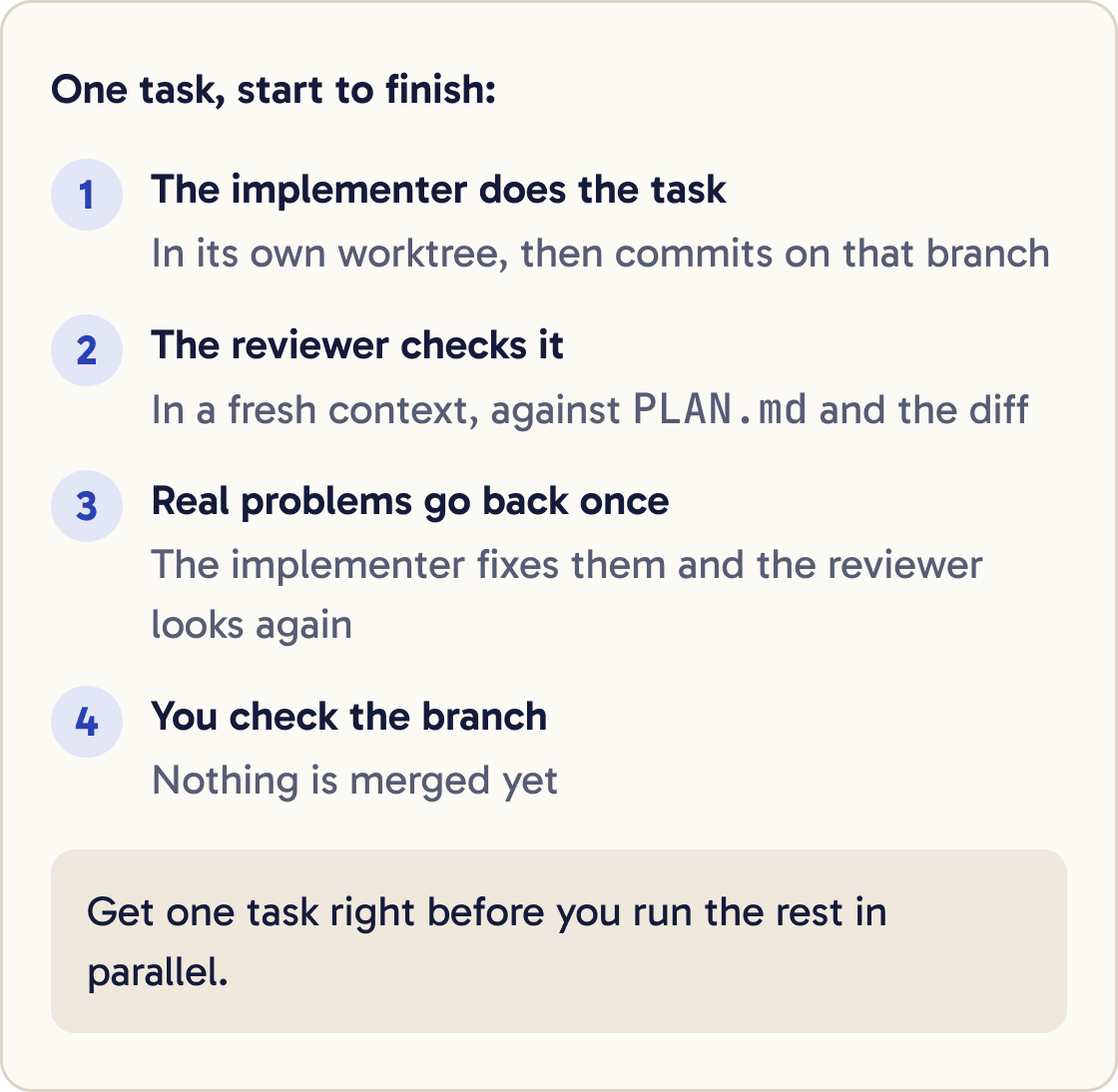
Do task 1 from PLAN.md. Use the implementer subagent for the work. When it reports back, use the reviewer subagent on that task. If the reviewer finds real problems, send them to the implementer to fix, then review once more. Then tell me: the branch name, the check result and anything still open. Don't merge anything yet.Claude sends the task to the implementer, then the reviewer checks the result. Real problems go back for one round of fixes.
Check the branch yourself before you go further. If the first task went wrong, fix the plan or the subagent files now, while it's cheap.
Step 7 of 13
Run independent tasks in parallel
Once one task works end to end, run the independent ones together. Paste the prompt below with the task numbers from PLAN.md.
Tasks [NUMBERS] in PLAN.md don't depend on each other. Run them in parallel, each with its own implementer subagent in its own worktree. As each one finishes, run the reviewer subagent on it. When all are done, give me one table with each task's branch, check result and open problems. Don't merge anything yet.Run /tasks to see what's running, check on one or stop it.
By default a session runs at most 20 subagents at once. Subagents can start their own subagents, up to three layers below your main conversation.
Every subagent's report comes back into your main context. Short reports keep your session clean, which is why the implementer reports in under 150 words.
Step 8 of 13
Merge the results
Merge one branch at a time and run the tests after each. Problems are easier to find in small steps.
Merge the branches from the finished tasks into my current branch one at a time, in the order of PLAN.md. After each merge, run the project's tests. If a merge conflicts or a test fails, stop and show me what went wrong. Don't force anything.Paste the prompt below. It stops at the first conflict or failing test.
Step 9 of 13
Run parallel sessions yourself
You can also run full sessions side by side. Start each in its own worktree:
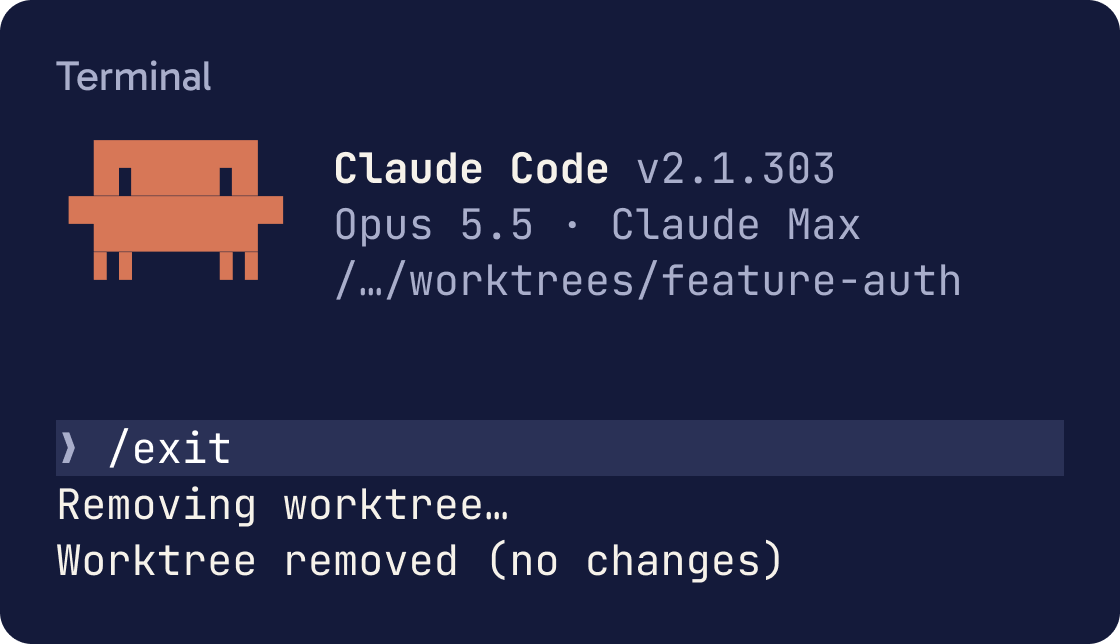
claude --worktree feature-auth
Run it again with another name in a second terminal. Each worktree goes under .claude/worktrees/ on a branch called worktree- plus the name.
This suits the writer and reviewer pattern from the docs. Session A writes the change. Session B reviews it in a fresh context. You paste B's findings back into A.
When you exit, Claude removes a worktree with no changes. If it has work in it, Claude asks whether to keep it. You'll see a claude --worktree <name> --resume command to come back to a kept one.
Step 10 of 13
Use /batch for one big repetitive change
For one change repeated across many files, such as renaming an API, run the bundled /batch skill with your instruction.
/batch Replace every call to [OLD FUNCTION] with [NEW FUNCTION] in [FOLDER]. Keep behaviour the same and run the tests for each changed file./batch splits the change across 5 to 30 subagents, each in its own worktree.
Try it on a narrow instruction first and check the results before you run it on the whole codebase.
Step 11 of 13
Use a dynamic workflow for very large jobs
A dynamic workflow is a script Claude writes that runs many subagents. The script holds the plan and the results, so your context holds only the final answer.
The docs suggest them for codebase-wide audits, migrations of hundreds of files and research where sources need cross-checking. Try the bundled one with /deep-research and a question.
Run /workflows to watch progress and each agent's token use. You can stop a run there.
Claude Code shows a Large workflow warning when a run plans more than 25 agents or its projected total passes 1.5 million tokens. Run on one folder first to see the cost.
Step 12 of 13
Know when to try agent teams
Agent teams have a lead session that assigns tasks to teammate sessions, which message each other. They're experimental and have known limits around resuming sessions and shutting down.
Turn them on by adding this to the env section of settings.json:
"CLAUDE_CODE_EXPERIMENTAL_AGENT_TEAMS": "1"
Teammates don't get separate worktrees. Give each teammate a different set of files so their edits don't collide.
The docs say teams use significantly more tokens than one session. To keep costs down, use Sonnet for teammates, keep teams small, keep spawn prompts short and shut teammates down when they finish.
Step 13 of 13
Keep the cost in check
Give helpers a cheaper model when the job allows it. Set model: sonnet or model: haiku in a subagent's file, or model: inherit to match your main session.
Ask for short reports. Long reports from many subagents fill your main context fast.
On a Pro, Max, Team or Enterprise plan, check /usage after a run. It shows what share of your usage went to subagents.
If the split doesn't save you time or catch problems you'd miss, go back to one session. More agents only help when the work splits into independent parts.
Did that work?
Still stuck? Send me a DM on Instagram at @maxbuilds.ai and I'll help.
Common mistakes
- Splitting tasks that depend on each other. Parallel agents then guess at decisions another agent is making.
- Letting parallel agents edit the same files without worktrees, so their changes overwrite each other.
- A reviewer that reports every style nit. Ask for correctness and requirement problems only.
- Asking subagents for long reports, which fills your main context.
- Forgetting that worktrees start without dependencies or `.env` files.
- Merging every branch at once, so you can't tell which one broke the tests.
Want the next guide?
I'll email you each new guide as I share it, with new tutorials and prompts too.