Reading on your phone? Send it to your laptop.
You'll get the guide and every prompt in one email.
Guide 022
Make Claude Code prove its work with tests
You need
- Claude Code installed and signed in on a paid plan or a Claude Console account.
- A JavaScript or TypeScript project with a `package.json` file, in git.
- Node.js 22.12 or newer if you use Vitest, the test runner in this guide. Check with `node --version`.
Step 1 of 13
Understand what a test is
A test is a small piece of code that runs your code with a known input and checks the output. If the output matches, the test passes. If it doesn't, the test fails and tells you what it got.
A test runner is the program that finds your tests, runs them and prints the results. This guide uses Vitest, a common test runner for JavaScript projects.
This example from Vitest's docs checks that a sum function adds 1 and 2 to make 3:
expect(sum(1, 2)).toBe(3)
That line is an assertion, a statement of what must be true. A test can have several.
Did that work?
Still stuck? Send me a DM on Instagram at @maxbuilds.ai and I'll help.
Step 2 of 13
Know why tests matter with Claude
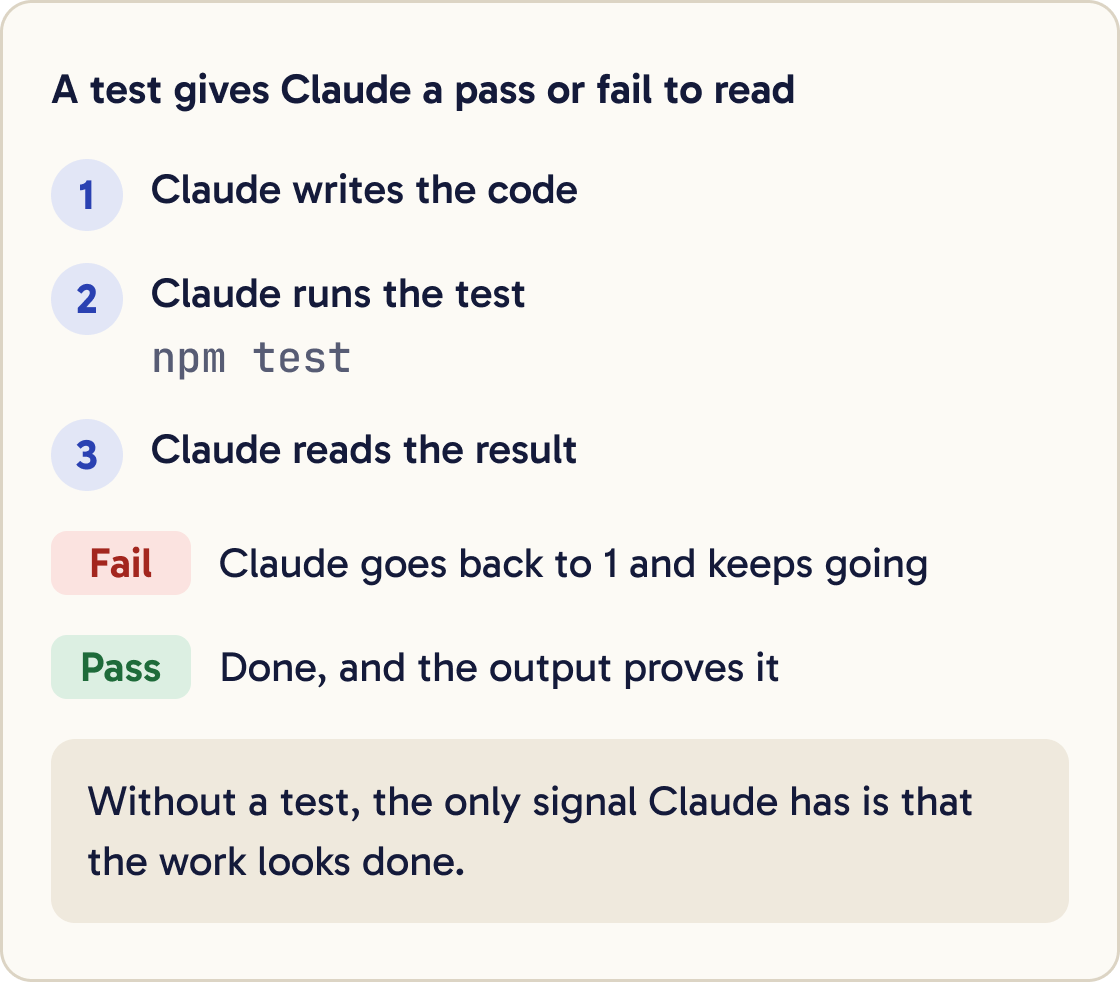
Anthropic's docs say Claude stops when the work looks done. Without a check it can run, looking done is the only signal it has, and you become the person who catches every mistake.
A test gives Claude a pass or fail it can read. Claude does the work, runs the test, reads the result and keeps going until it passes.
Claude can also make a test pass the wrong way, by changing the test. Most of this guide is about stopping that.
Step 3 of 13
Find or set up your test runner
Ask Claude how your project runs tests before you add anything. Many projects already have a test runner set up.
Find out how this project runs its tests. Look at package.json, any test config files and any existing test files. Tell me the exact command to run all tests, the command to run one test file, and how many tests exist now. Don't change anything.If there isn't one, install Vitest as a dev dependency. A dev dependency is a package your project needs while you build it, but not when it runs for visitors:
npm install -D vitest
Then add a test script to package.json. Use vitest run, which runs the tests once and exits. Plain vitest keeps watching for changes and never finishes, which leaves Claude waiting.
"scripts": { "test": "vitest run" }
Vitest only picks up files with .test. or .spec. in the name, such as price.test.js.
Step 4 of 13
Write the cases in plain English first
Write down what should happen before any code exists. List a few normal inputs and the output each should give.
Then add edge cases. An edge case is an input at the limits: empty, zero, very large, the wrong type, or exactly on a boundary. Bugs often turn up there.
For a discount function, that might be: 100 with 10 percent off gives 90. 0 gives 0. A negative price throws an error. A discount over 100 percent throws an error. 19.99 with 15 percent off gives 16.99, rounded to two decimal places.
Anthropic's docs show the same approach. Give Claude example cases in the prompt, then ask it to run the tests after.
Step 5 of 13
Ask for the failing test first
Test driven development, or TDD, means you write the test before the code. The test fails at first, because the code doesn't exist yet. Then you write code until it passes.
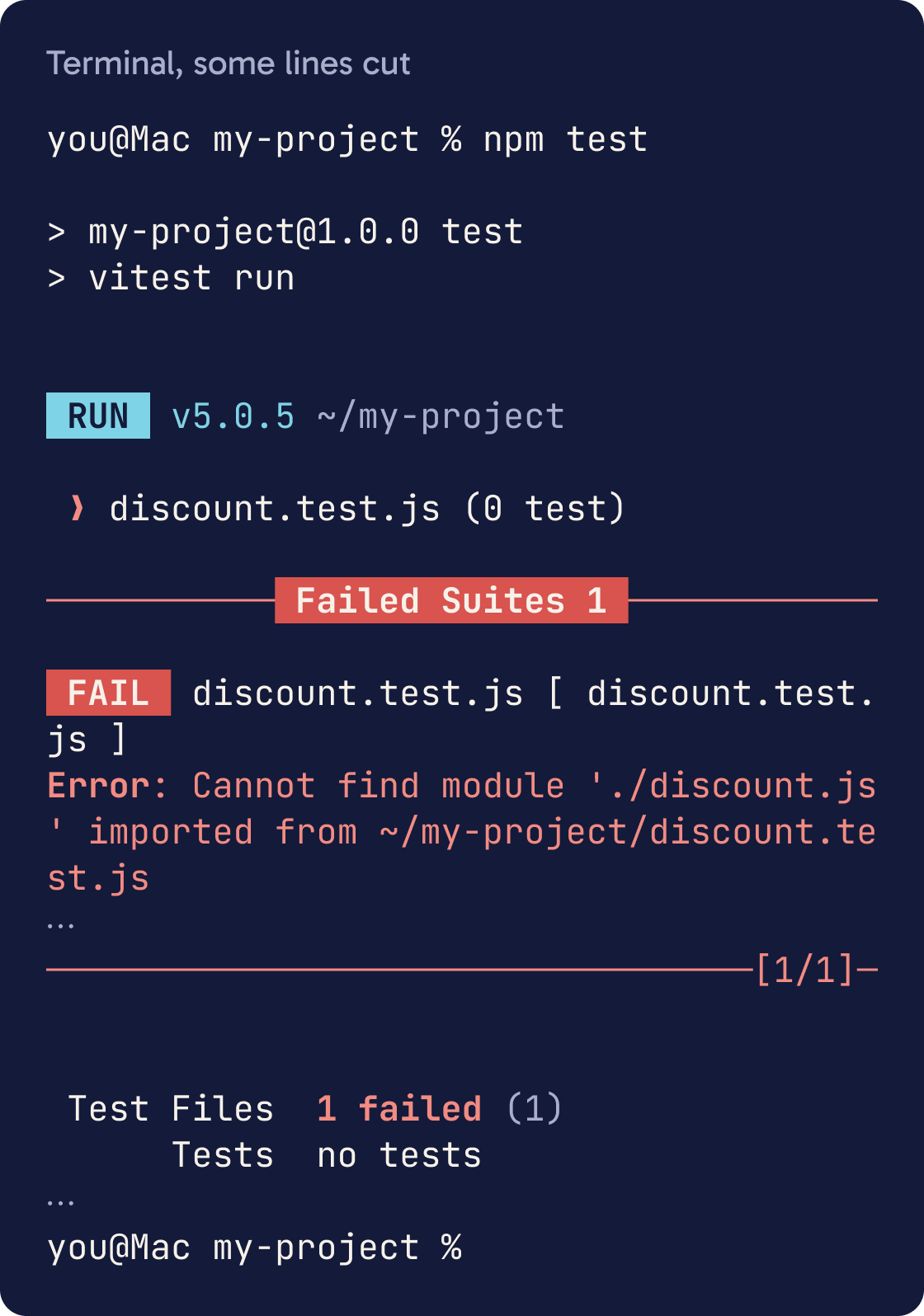
We're doing test driven development. Write tests for [FUNCTION OR FEATURE] covering these cases: [YOUR LIST OF INPUTS AND EXPECTED OUTPUTS]. Don't write the implementation and don't create mock versions of it. Run the tests and paste the output. They should fail because the code doesn't exist yet. Tell me if any test fails for a different reason.Seeing the test fail first proves the test can catch a problem. A test that passes before the code exists isn't checking anything.
Ask Claude to write tests only, run them, and show you that they fail for the right reason.
Step 6 of 13
Commit the tests before the code
Save the failing tests in git, so you have a fixed version to compare against later.
git add .
git commit -m "add failing tests for discount"
From here, any change to a test file shows up in git diff. That's how you'll catch Claude editing a test to make it pass.
Step 7 of 13
Make the tests pass without touching them
Ask Claude to write the code now, and tell it the tests are off limits.
Write the implementation so the tests in [TEST FILE] pass. Don't edit, skip or delete any test. Write a general solution that works for all valid inputs, including ones the tests don't cover. Don't hard code values that only work for specific test inputs. If a test seems wrong, stop and tell me why. When you're done, run the full test suite and paste the exact command and output.Anthropic's prompting guide warns that Claude can focus too hard on making tests pass. Its suggested wording asks for a general solution that works for all valid inputs, and asks Claude to say so if a test looks wrong.
The prompt below uses that wording.
Step 8 of 13
Read the evidence yourself
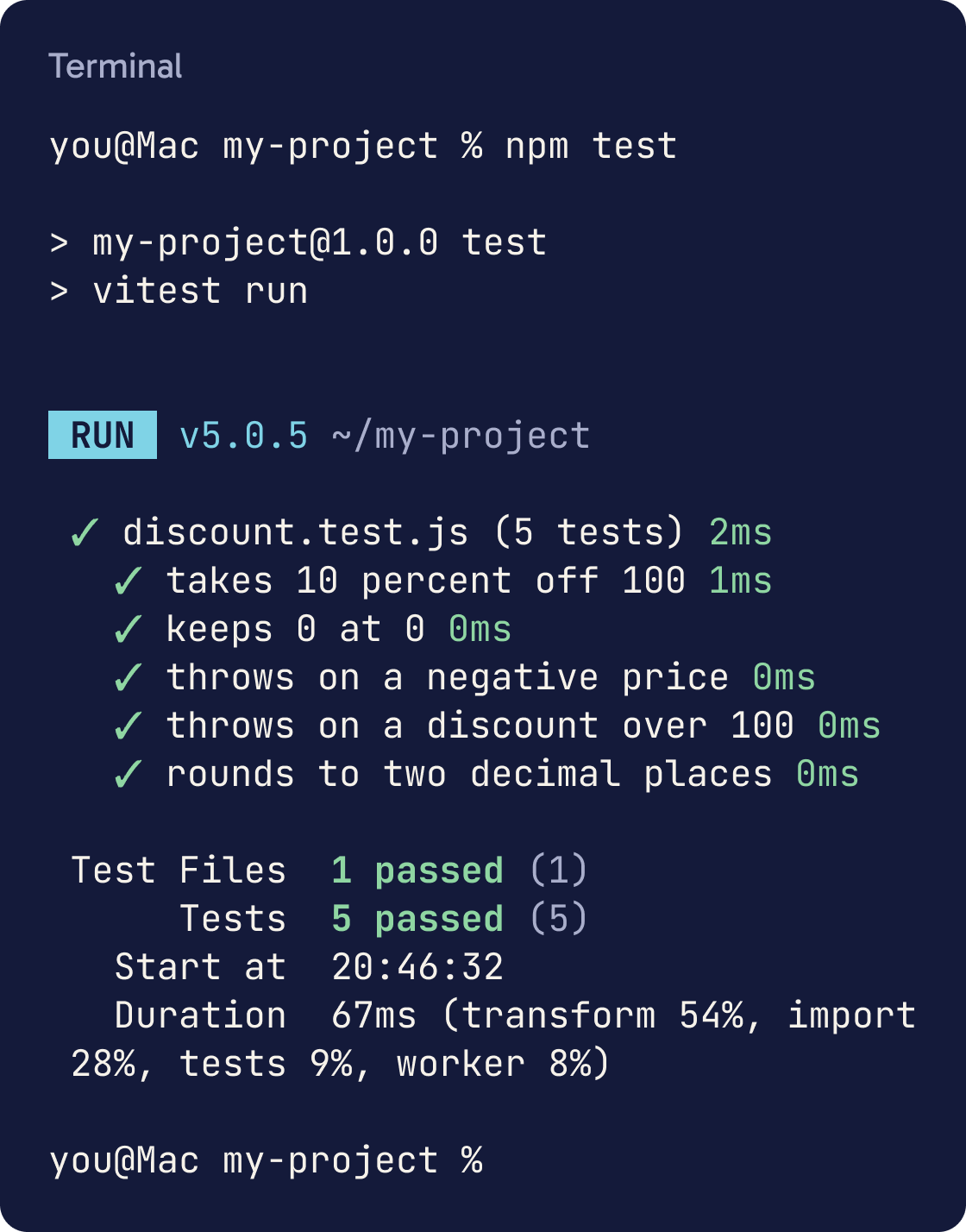
Run the tests yourself once, so you know what a real pass looks like:
npm test
Vitest prints a summary at the end. A clean run shows lines like Test Files 1 passed (1) and Tests 5 passed (5). Check the number of tests matches what you asked for.
Anthropic's docs say to ask for evidence: the command Claude ran and what it returned. A message saying all tests pass isn't evidence on its own.
Step 9 of 13
Spot fake passing
Fake passing is when the tests go green but the code isn't fixed. Check for these five signs after every task.
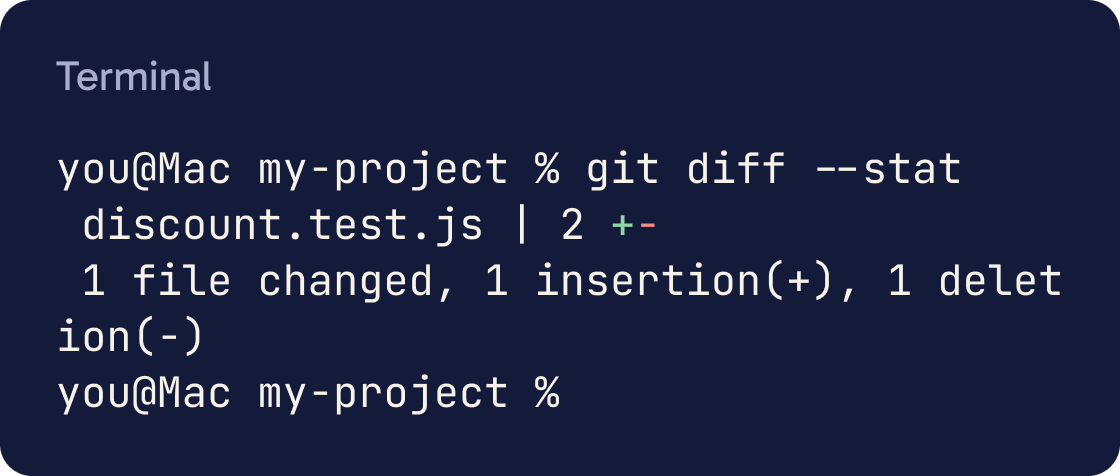
Compare the current code with the last commit. List every change to test files, every skipped or focused test (.skip or .only), every assertion that got weaker, every mock of code in this project, and any code that returns special values for specific inputs. For each one, explain why it's there. Don't fix anything yet.Look for changed test files. Run git diff --stat and look for any file with .test. in the name.
Look for weakened assertions. A check like toBe(90) swapped for toBeTruthy() passes for almost any value.
Look for skipped tests. test.skip and it.skip turn a test off, and .only makes Vitest ignore the other tests.
Look for mocks of the thing being tested. A mock is a fake stand in for a real piece of code. Mocks are useful for slow outside services like email, but a mock of your own function means the test only checks the mock.
Look for hard coded answers. That's code that checks for the exact test input and returns the expected output.
Step 10 of 13
Ask for the edge cases you missed
Claude is good at finding cases you didn't think of. Anthropic's docs suggest asking it to look at error conditions, boundary values and unexpected inputs.
Read [FILE] and its tests. List edge cases the tests don't cover yet: error conditions, boundary values, empty or missing inputs and unexpected types. For each, say what should happen and how likely it is in real use. Don't write any tests yet. I'll pick which ones to add.Ask for a list first. Then pick which cases matter and have Claude add them as failing tests, using the same loop.
Step 11 of 13
Check coverage and know its limits
Coverage measures how much of your code the tests run, as a percentage of lines and branches. A branch is one path through an if or a switch.
Run npx vitest run --coverage and paste the summary. Name the three files with the lowest coverage, and for each one describe in plain English which behaviour has no test. Don't add tests yet.Install Vitest's coverage tool, then run the tests with coverage:
npm install -D @vitest/coverage-v8
npx vitest run --coverage
You'll see a table with a percentage for each file. Low coverage shows code nothing tests. High coverage doesn't prove the code is right, because a test can run a line without checking its result.
Step 12 of 13
Fix bugs with a failing test first
Use the same loop for bugs. Have Claude write a test that reproduces the bug and fails, then fix the code until it passes.
Bug: [WHAT HAPPENS AND WHEN]. It's probably in [FILE OR FOLDER]. First write a test that reproduces it and run it to show it fails. Then fix the root cause without changing that test. Don't suppress the error. Run the full suite and paste the output.This proves the fix works. The test also stays in your project, so the bug can't come back without you noticing.
Anthropic's docs give this pattern: describe the symptom and where it probably lives, then ask for a failing test before the fix.
Step 13 of 13
Make it the default
Add your test rules to CLAUDE.md so every session follows them. Keep it to two or three lines.
Add these lines to CLAUDE.md under a heading called Testing: "Run tests with npm test. Write a failing test before new code or bug fixes. Never edit, skip or delete a test to make it pass. If a test looks wrong, stop and ask." Keep the rest of CLAUDE.md as it is.For bigger changes, try a writer and reviewer split. Anthropic's docs suggest one Claude session writes the tests and a second session writes code to pass them.
Run /code-review before you call a task done. It's a built in skill that reviews your current changes for bugs in a fresh context.
Did that work?
Still stuck? Send me a DM on Instagram at @maxbuilds.ai and I'll help.
Common mistakes
- Letting Claude write the code and the tests in one go. Commit the failing tests first, so any later change to them shows up.
- Trusting "all tests pass" without the output. Ask for the command and its result every time.
- Using watch mode. Plain `vitest` never exits, so use `vitest run` in your test script.
- Reading coverage as proof. 100 percent coverage only means every line ran. It doesn't mean every result was checked.
- Mocking your own code. Mock slow outside services, and test your own functions for real.
- Skipping the failing run. If you never saw the test fail, you don't know it can.
Want the next guide?
I'll email you each new guide as I share it, with new tutorials and prompts too.