Reading on your phone? Send it to your laptop.
You'll get the guide and every prompt in one email.
Guide 009
What to do when Claude gets stuck or things break
You need
- Claude Code installed and signed in
- A project that has gone wrong, or this guide saved for when one does
- About 15 minutes to read
Step 1 of 13
Know what you can undo
Things break when you build. You can undo most of it.
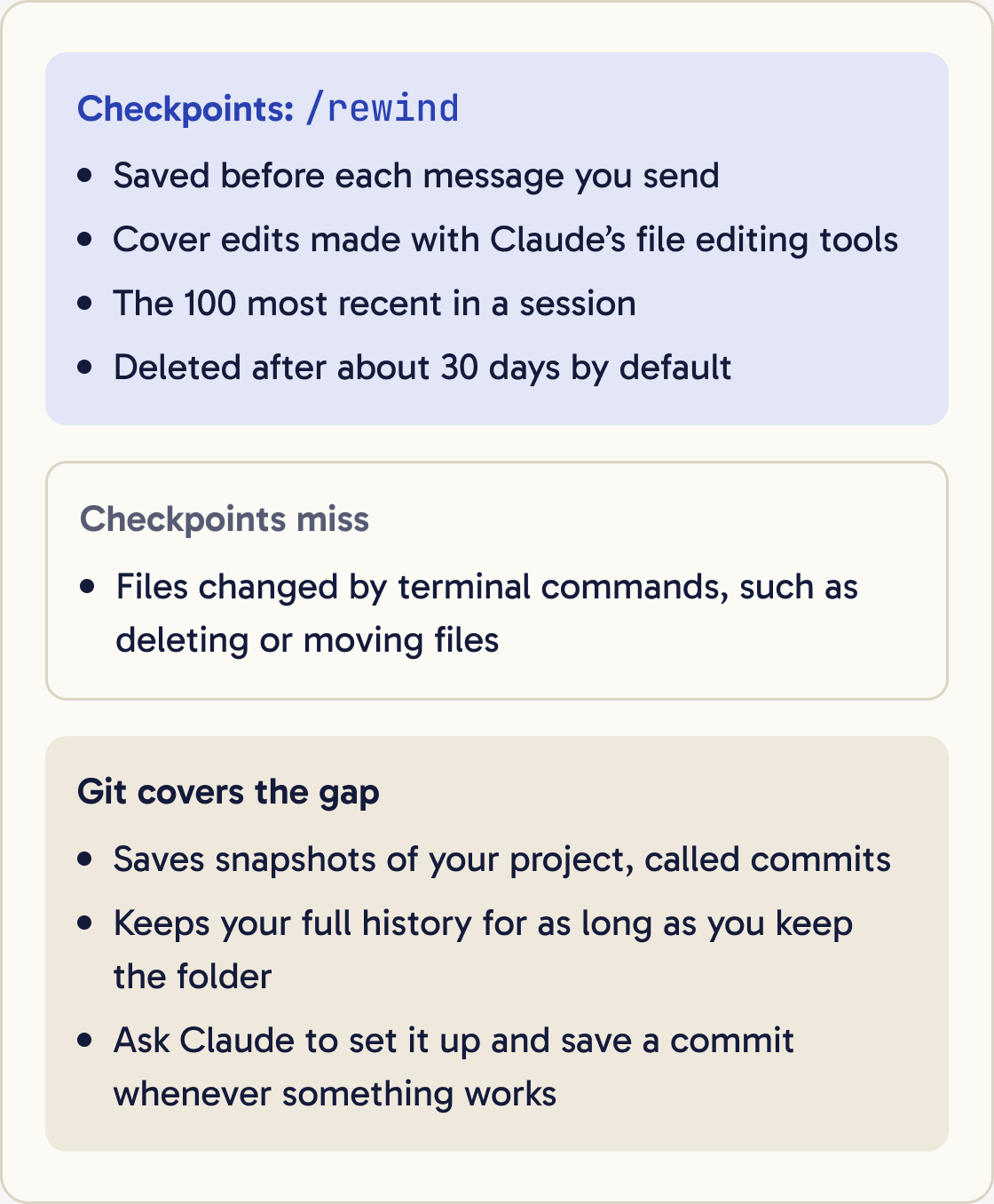
Claude Code saves a checkpoint of your files before each message you send. A checkpoint is a snapshot you can go back to. It keeps the 100 most recent checkpoints in a session.
Checkpoints only cover edits made with Claude's file editing tools. They don't cover files changed by terminal commands, such as deleting or moving files. Step 9 shows how Git covers that gap.
Did that work?
Still stuck? Send me a DM on Instagram at @maxbuilds.ai and I'll help.
Step 2 of 13
Stop Claude when it goes the wrong way
Press Esc to stop Claude mid task. Your conversation stays, so you can type a correction straight away.
If Claude Code stops responding, press Ctrl + C to cancel what it's doing.
If that doesn't work, close the terminal window. Open a new one, go back to your project folder with cd, and type this to reopen your last conversation:
claude --continue
Step 3 of 13
Find and read the error
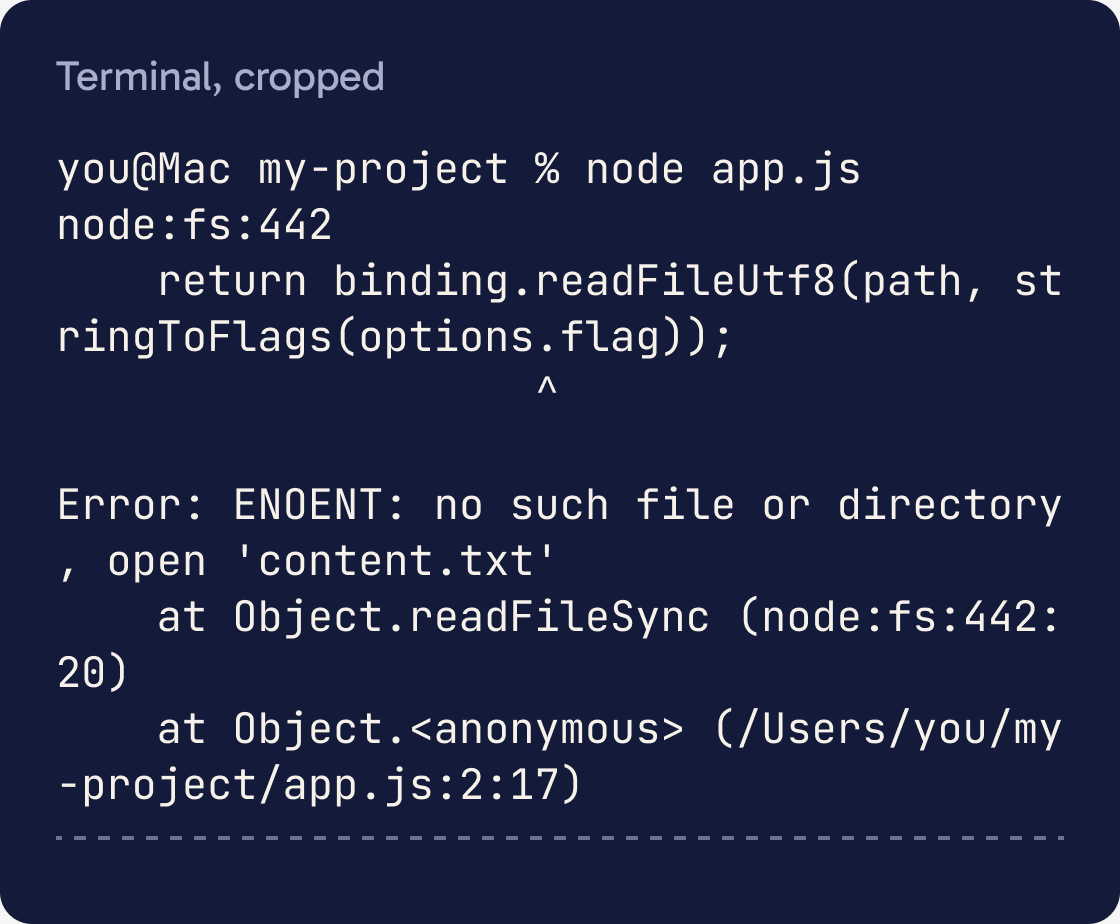
An error is a message that says what went wrong. It can look scary, and it's still your best clue.
Errors show up in two places. Some appear in the terminal. Errors on a web page appear in the browser's Console, a hidden panel for developers.
In Chrome, open the Console with Cmd + Option + J on a Mac or Ctrl + Shift + J on Windows. Errors there show in red.
Look for three things: the error's name, the file it mentions and the line number. For example, ENOENT in a message means a file or folder wasn't found.
Step 4 of 13
Give Claude the whole error
Copy the entire error message and paste it into Claude Code. Include every line, even the parts that look like nonsense, since Claude often needs the file paths and line numbers in the middle.
I got this error after [WHAT YOU DID, for example: clicking the Send button on the contact form]. I expected [WHAT SHOULD HAPPEN]. Here is the full error:

[PASTE THE WHOLE ERROR]
If you can't copy it, take a screenshot and paste it with Ctrl + V (Alt + V on Windows), or drag the image file into the window.
Also say what you did just before it broke and what you expected to happen. Claude can't do much with 'it broke'.
Step 5 of 13
Ask Claude to explain before it fixes
Ask Claude what went wrong before it changes anything. You learn what the error means, and you can spot a wrong guess before it edits your files.
Explain this error in plain English as if I've never coded. Tell me what caused it, which file and line it comes from, and how sure you are. Then describe the fix you'd make. Don't change any files until I say go.Fix the cause of this error. Don't hide it, skip the failing part or switch off the check that reports it. After the fix, run the same thing again and show me the result.Anthropic advises asking for the root cause. A quick patch can hide the problem until it comes back.
Step 6 of 13
Spot a loop and break it
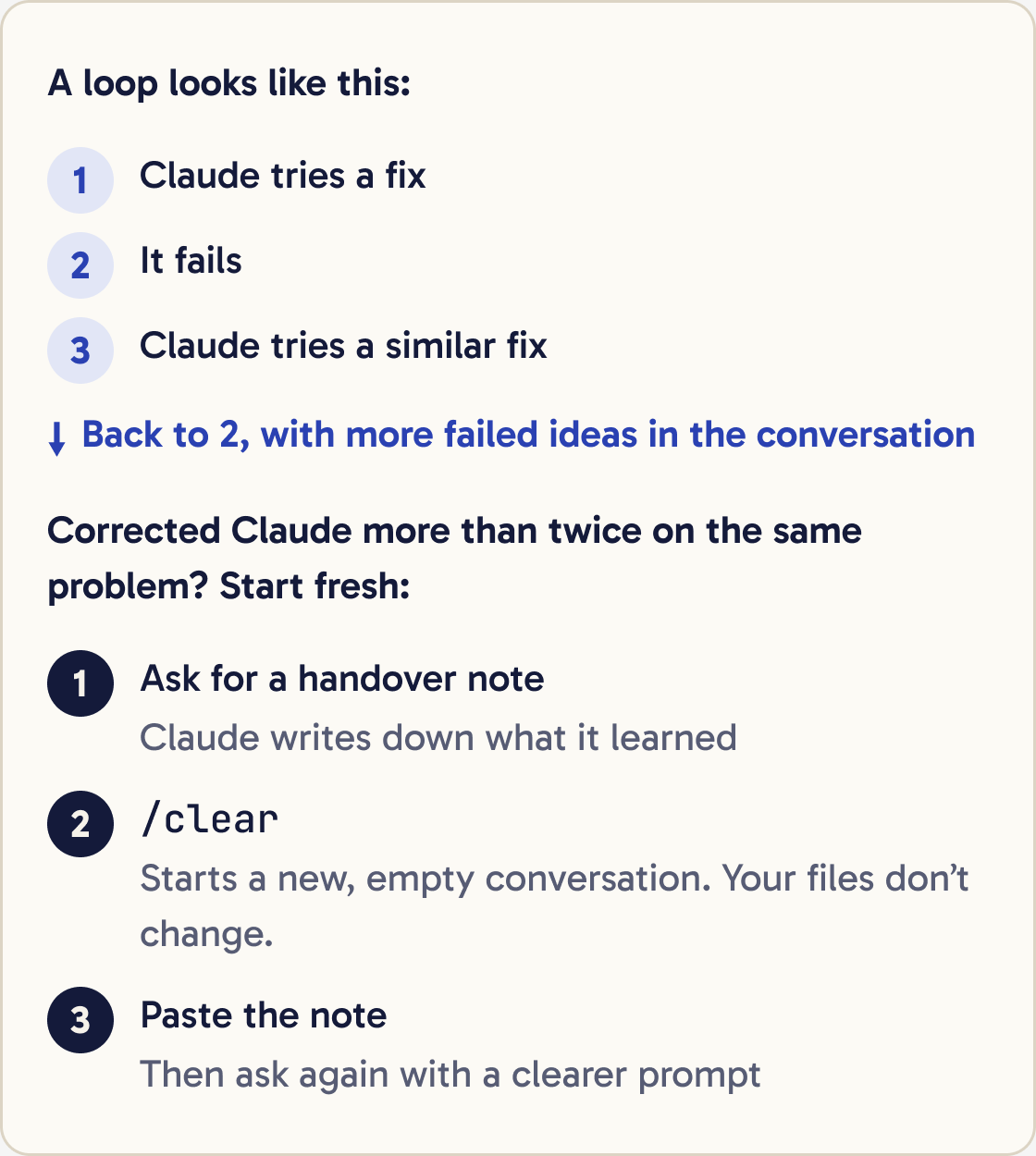
A loop is when Claude tries a fix, it fails, and Claude tries a similar fix that fails too. Each attempt fills the conversation with failed ideas, which makes the next attempt worse.
Stop. We've tried this [NUMBER] times and it still fails. Don't write any code yet. List every approach we've tried and why each one failed. Then suggest 2 completely different ways to solve this, with the pros and cons of each.Anthropic's best practices give a rule for this. If you've corrected Claude more than twice on the same problem, clear the conversation and start again with a better prompt.
Signs of a loop: the same error keeps coming back, Claude says it has fixed something that still fails, or it undoes and redoes the same change.
Step 7 of 13
Start fresh with a handover note
A fresh conversation with a clear prompt almost always beats a long one full of corrections. Before you clear, have Claude write down what it learned.
Write a short handover note for a fresh conversation. Include: what I'm building, the exact problem, the full error message, every fix we tried and why it failed, and anything we ruled out. Keep it under 250 words.Then type this to start a new, empty conversation:
/clear
Paste the handover note into the new conversation. Your files don't change when you clear.
Step 8 of 13
Roll back a bad change with /rewind
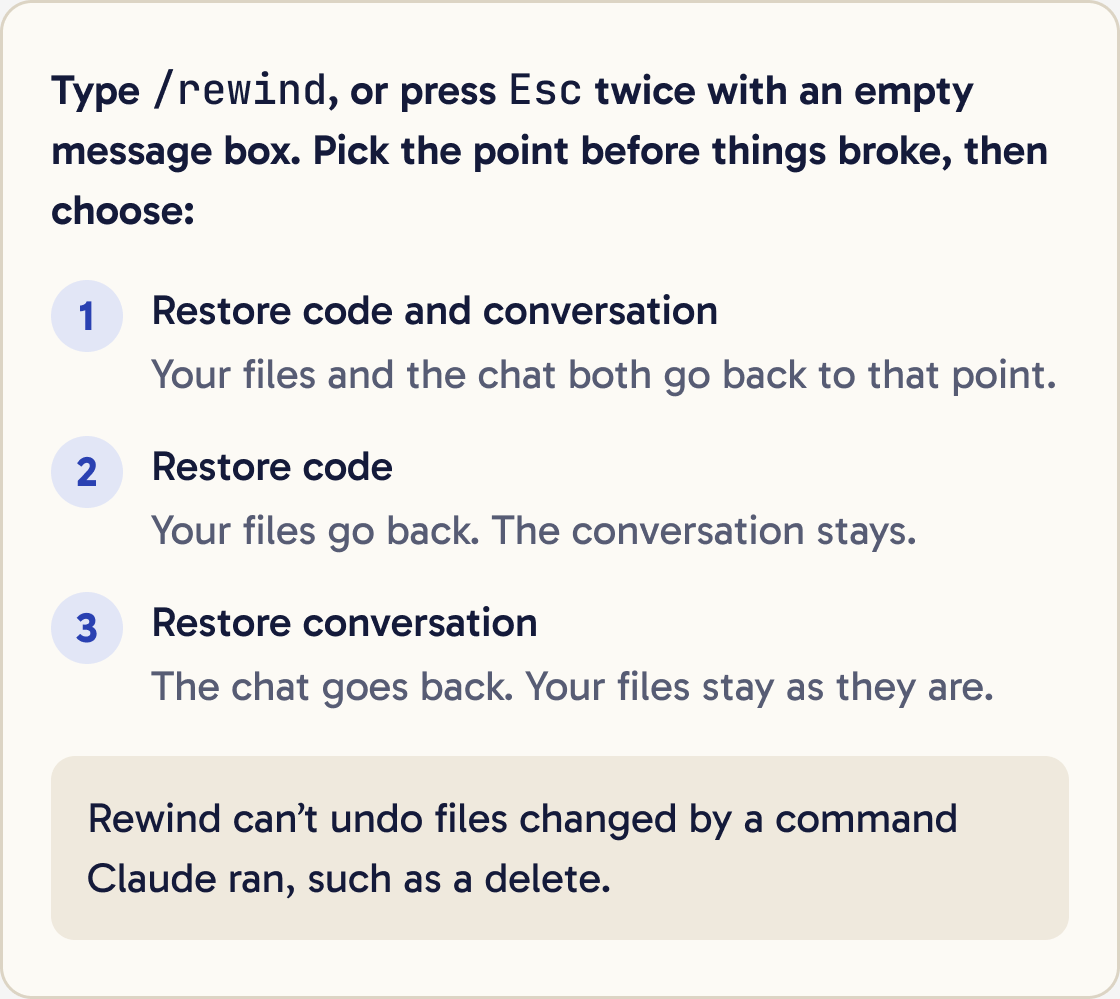
If a change broke something that used to work, go back to before it. Type:
/rewind
You can also press Esc twice when your message box is empty. A list of your earlier messages appears. Use the arrow keys to pick the point before things broke.
Then choose an option. Restore code and conversation takes both back to that point. Restore code puts your files back and keeps the conversation. Restore conversation rewinds the chat and leaves your files as they are.
Step 9 of 13
Save safe points with Git
Git is free version control software. It saves snapshots of your project, called commits, that you can return to at any time.
Set up Git in this project folder if it isn't set up already. Then save a commit of everything as it is now, with a message saying what works. Explain in one sentence what you did. From now on, whenever I say 'save this', make a commit with a short description.Something broke since the last commit. Show me in plain English what has changed since then. Then ask me whether to undo all of it or only some files. Don't delete anything until I confirm.Checkpoints only cover Claude's own edits, and Claude Code deletes them after about 30 days by default. Git keeps your full history for as long as you keep the folder.
You don't need to learn the commands. Ask Claude to set it up and to save a commit whenever something works.
Step 10 of 13
Check that the fix works
Claude can say a problem is fixed when it isn't. Check for yourself every time.
Show me evidence that this is fixed. Run it again and paste the exact output. Tell me what I should test myself, step by step, to confirm it works.Do the exact thing that broke before, in the same way. For a web page, do a hard refresh first so you don't see an old copy: Cmd + Shift + R on a Mac or Ctrl + Shift + R on Windows. Then check the Console for red errors.
Anthropic advises asking Claude for evidence, such as the command it ran and what it returned. That's quicker to check than taking its word for it.
Step 11 of 13
Learn Claude Code's own error messages
Some errors come from Claude Code itself. These are the common ones.
API Error: 500 Internal server error means something failed at Anthropic's end. It isn't your fault. Check status.claude.com, wait a minute, then type try again.
API Error: Repeated 529 Overloaded errors means Claude is overloaded for everyone. It doesn't use your limit. Wait a few minutes, or type /model and switch model.
Unable to connect to API means Claude Code can't reach the internet or Anthropic. Check your Wi-Fi, and turn off any VPN that might block it.
Not logged in · Please run /login means Claude Code has no valid sign-in. Type /login.
Context limit reached · /compact or /clear to continue means the conversation is too long. Type /compact to shrink it or /clear to start fresh.
You've hit your session limit means you used your plan's allowance for now. The message shows when it resets. Type /usage to see your limits.
Step 12 of 13
Learn common errors in your project
Other errors come from the code Claude writes or the tools it runs. You'll see these often.
I got EADDRINUSE. Find which program is using that port, tell me what it is, and ask me before you stop it.command not found means the terminal doesn't know that program. Either it isn't installed, or you typed it wrongly.
ENOENT means no such file or folder. A path is wrong, or a file is missing.
EACCES means permission denied. Your user account isn't allowed to change that file.
EADDRINUSE means address already in use. Another program, often an old copy of your preview server, is already using that port. A port is a number that identifies one network connection on your computer.
ECONNREFUSED means connection refused. Nothing is answering at the address you tried, so the server you need may not be running.
ERR_MODULE_NOT_FOUND or Can't find module means the code needs a package or file that isn't there.
Step 13 of 13
Ask for help the right way
If you're still stuck, other people can help when you give them enough detail.
Write a clear help request I can post on a forum. Use what we've done in this conversation. Include what I'm building, the steps that cause the problem, what I expected, what happened, the full error, what we've tried, my operating system and my Claude Code version. Remove any passwords, keys or personal details.Include these six things: what you're building, what you did, what you expected, what happened instead, the full error and what you've already tried. Add your operating system and your Claude Code version, which claude --version shows.
Type /doctor in Claude Code for a setup checkup. It finds installation and settings problems and proposes fixes, which Claude applies after you confirm.
To report a bug to Anthropic, type /feedback. You choose how much of the conversation to include before anything is sent. You can also search known issues at github.com/anthropics/claude-code/issues.
For billing or account problems, sign in at claude.ai, click your initials in the lower left and choose Get help.
Did that work?
Still stuck? Send me a DM on Instagram at @maxbuilds.ai and I'll help.
Common mistakes
- Pasting only the last line of an error. Paste all of it.
- Saying 'it's broken' with no detail. Say what you did, what you expected and what happened.
- Letting Claude try the same fix over and over. After two failed corrections, write a handover note and `/clear`.
- Believing 'fixed' without testing. Repeat the exact steps that broke it.
- Working for hours with no Git commits. Save a commit each time something works.
- Approving commands you don't understand. Ask Claude what a command does before you say yes.
Want the next guide?
I'll email you each new guide as I share it, with new tutorials and prompts too.