Reading on your phone? Send it to your laptop.
You'll get the guide and every prompt in one email.
Guide 025
Write Claude Code skills that trigger when you need them
You need
- Claude Code installed, signed in and up to date. Run `claude update` first.
- You've made at least one basic skill, or read the beginner skills guide.
- A task you keep explaining to Claude again and again.
Step 1 of 15
Start from a task you've already done
Do the task once with Claude in a normal chat, and notice what you keep telling it. Anthropic's skill authoring guide says that repeated context is what belongs in the skill.
Look back over this conversation. List the instructions, rules and context I gave you that would help with the same kind of task next time. Then create a skill at .claude/skills/[SKILL NAME]/SKILL.md that captures only those. Leave out anything you'd know without being told. Show me the file before saving.Then ask that same Claude to turn it into a skill. Anthropic says Claude understands the skill format already, so you don't need a special prompt.
Test the skill in a fresh session. The guide calls the two sessions Claude A, which helps you write the skill, and Claude B, which uses it on real work.
Did that work?
Still stuck? Send me a DM on Instagram at @maxbuilds.ai and I'll help.
Step 2 of 15
Write your test prompts first
Anthropic recommends building evaluations before you write much of the skill. An evaluation is a realistic request plus a description of what a good result looks like.
Write at least three requests that should use the skill, phrased the way you'd really type them. Add two that sound similar but shouldn't use it.
Run the three real requests without the skill first and note what goes wrong. That's your baseline, and the skill only needs to fix those gaps.
Step 3 of 15
Pick a clear name
The name field becomes the command you type, such as /writing-changelogs. If you leave it out, Claude Code uses the folder name.
Anthropic's rules for the name are lowercase letters, numbers and hyphens only, up to 64 characters, and no reserved words such as claude or anthropic.
Their guide suggests the verb plus ing form, such as processing-pdfs or writing-documentation. Avoid vague names like helper, utils or tools.
Step 4 of 15
Write a description that matches how you ask
The description decides whether Claude uses your skill. Claude sees the skill descriptions on every turn and picks a skill when your request matches one.
Read the description in .claude/skills/[SKILL NAME]/SKILL.md. Here are requests that should trigger it: [3 REAL REQUESTS]. Here are requests that shouldn't: [2 REQUESTS]. Rewrite the description in the third person so it says what the skill does and when to use it, using the words from the requests that should trigger it. Keep the main use in the first sentence. Show me the old and new versions.Say what the skill does and when to use it, in the words you'd type. Anthropic's guide says to write it in the third person, such as "Writes changelog entries". Avoid "I can help you".
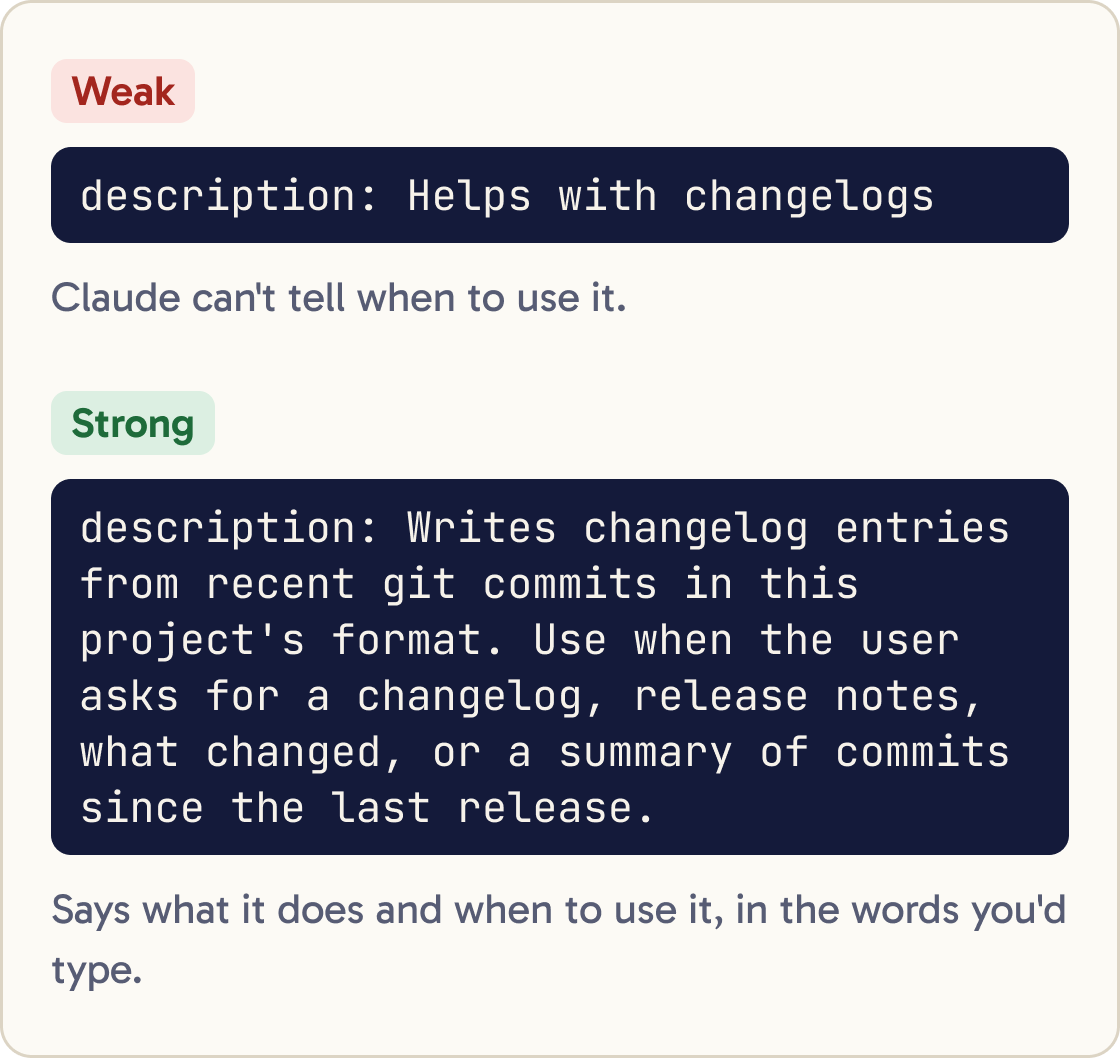
A weak description reads description: Helps with changelogs.
A strong one reads description: Writes changelog entries from recent git commits in this project's format. Use when the user asks for a changelog, release notes, what changed, or a summary of commits since the last release.
Put the main use first. Claude Code cuts the combined description and when_to_use text at 1,536 characters in its skill list.
Step 5 of 15
Decide who can start it
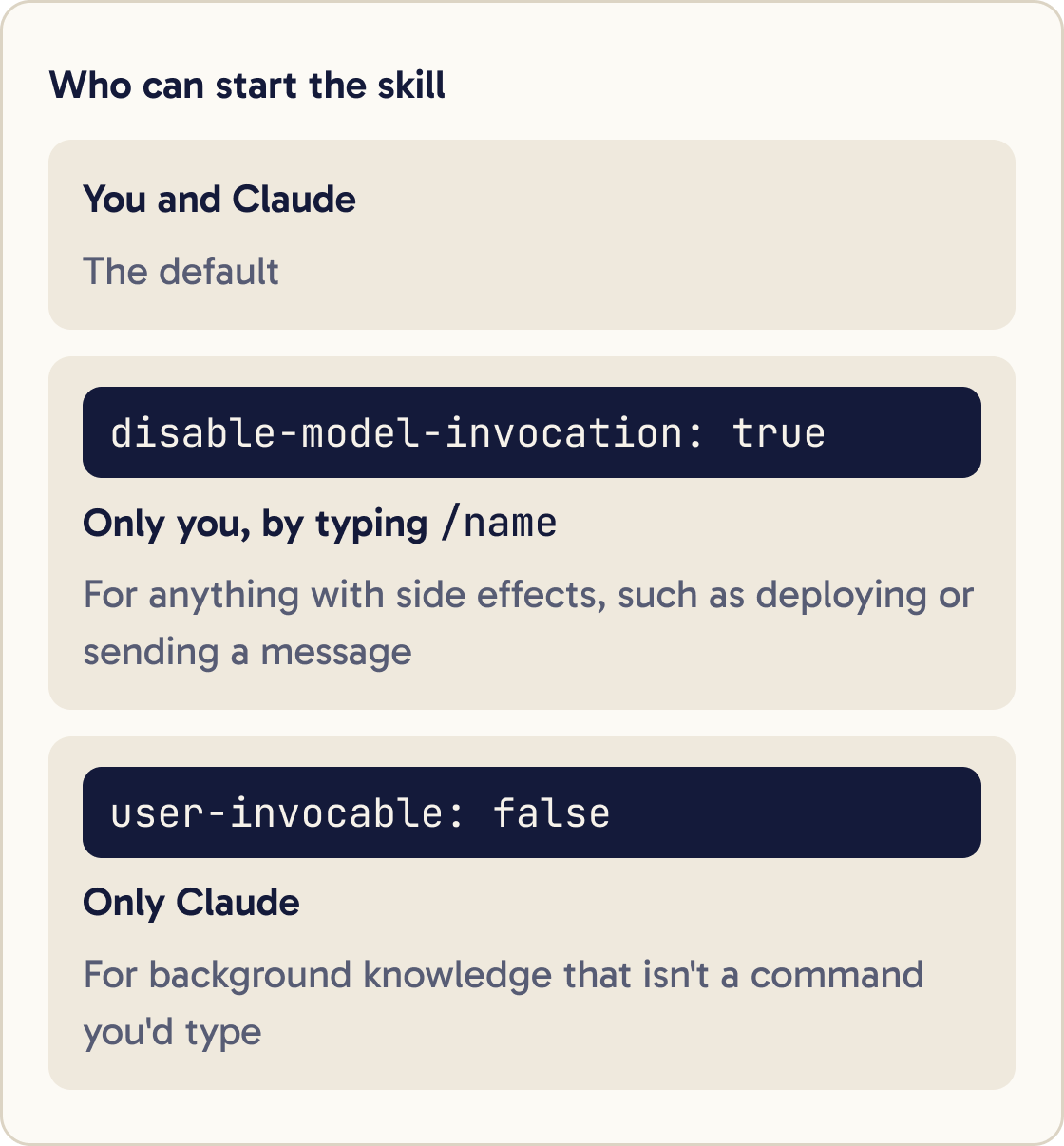
By default, both you and Claude can start a skill. Two fields change that.
disable-model-invocation: true means only you can start it, by typing /name. Use it for anything with side effects, such as deploying or sending a message, so Claude never deploys just because the code looks ready.
user-invocable: false means only Claude can start it. Use it for background knowledge, such as how an old system works, that isn't a command you'd type.
Step 6 of 15
Keep SKILL.md short
Anthropic's guide starts from one assumption: Claude is already very smart. Only add what it doesn't already know, such as your project's rules, names and steps.
Read .claude/skills/[SKILL NAME]/SKILL.md. Mark every line that explains something a capable developer would already know, and every line that repeats another. Propose a shorter version that keeps only project specific rules, names, steps and examples. Move the most important rules to the top. Show me the result before saving.Keep SKILL.md under 500 lines. Once a skill loads, every line competes for room with your conversation.
Put the most important rules near the top. After Claude Code compacts a long conversation, it keeps only the first 5,000 tokens of each skill. A token is a small chunk of text, roughly a short word.
Write rules that apply to the whole task. Claude Code reads the file once and doesn't reread it, so "Run the tests after every edit" works better than a single "Run the tests" step.
Step 7 of 15
Move detail into linked files
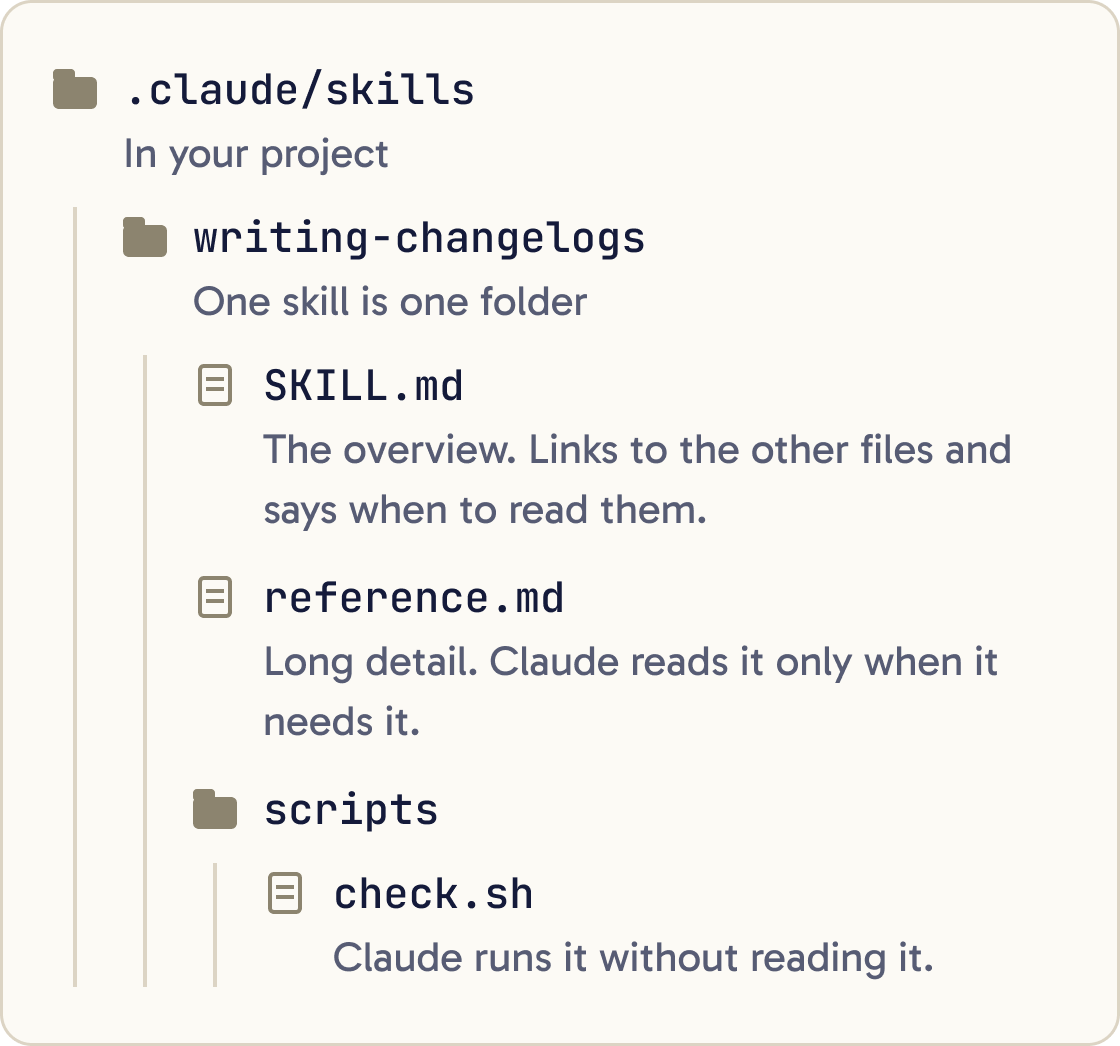
A skill is a folder, so it can hold more than one file. Keep SKILL.md as the overview and put long reference material in separate files beside it.
Claude reads a linked file only when it needs it, so a long reference file costs nothing until then.
Link each file from SKILL.md and say when to read it, for example: "For the full list of API fields, see reference.md".
Keep links one level deep. Anthropic's guide says Claude may only partly read a file that's linked from another linked file. Give any file over 100 lines a table of contents at the top.
Step 8 of 15
Add a script for exact jobs
A script is a small program saved in the skill's scripts/ folder. Anthropic's guide says a ready made script is more reliable than code Claude writes fresh each time. It also saves tokens, because Claude runs it without reading it.
Write a script for my [SKILL NAME] skill at .claude/skills/[SKILL NAME]/scripts/[SCRIPT NAME] that [WHAT IT SHOULD DO]. It should check its inputs, print a clear error message for each way it can fail, and exit with a non zero code on failure. Then update SKILL.md to say when to run it, using ${CLAUDE_SKILL_DIR}/scripts/[SCRIPT NAME], and add a matching allowed-tools Bash rule. Run the script once on a real input and show me the output.Refer to it with ${CLAUDE_SKILL_DIR}, which Claude Code replaces with the skill's folder path. Add the same path to allowed-tools so it runs without a permission prompt:
allowed-tools: Bash(${CLAUDE_SKILL_DIR}/scripts/check.sh *)
In the body, say whether Claude should run the script or read it. Make the script handle its own errors and print a clear message, so Claude isn't left to guess what went wrong. List any packages it needs in SKILL.md.
Step 9 of 15
Check the file loads
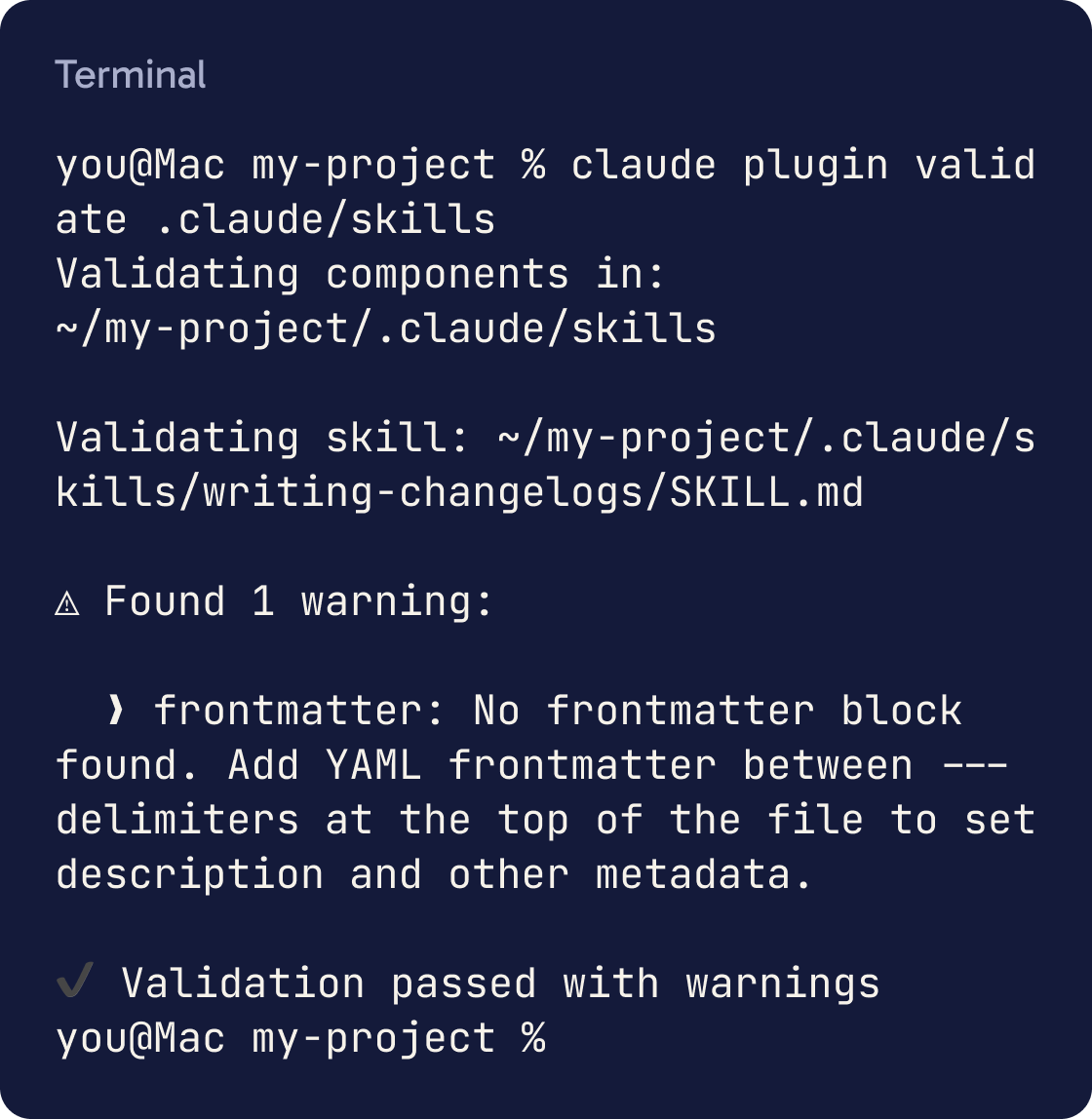
A small mistake in the frontmatter can break a skill without any warning. The frontmatter is the block between the --- lines at the top, and the first --- must be the very first line of the file.
If the frontmatter doesn't parse, the skill still loads but Claude can't see the description, so it never triggers on its own. Check your skills folder with this command:
claude plugin validate .claude/skills
For personal skills, use claude plugin validate ~/.claude/skills. This needs Claude Code v2.1.233 or later.
Then ask Claude "What skills are available?" and check yours is listed.
Step 10 of 15
Test it in a fresh session
Start a new session and paste your test requests one at a time. Use a fresh session, because what's left over from writing the skill hides gaps in it.
Check two things: did the skill trigger, and was the result what you expected? Then compare with the skill turned off.
To turn a skill off, type /skills, highlight it, press Space until it shows off, then press Esc to save. Claude Code saves this in .claude/settings.local.json.
Anthropic also suggests testing with each model you'll use. A skill that's clear enough for Opus may need more detail for Haiku. Switch models with /model.
Step 11 of 15
Measure it with skill-creator
Anthropic's skill-creator plugin automates the with and without comparison. Install it inside Claude Code:
Evaluate my [SKILL NAME] skill with skill-creator. Use these requests as test cases: [YOUR 3 SHOULD TRIGGER REQUESTS]. Also test these, which should not trigger it: [YOUR 2 REQUESTS]. Show me the pass rate with and without the skill, and suggest description changes if it triggers wrongly./plugin install skill-creator@claude-plugins-official
Then ask Claude to evaluate a skill by name. It stores test cases in evals/evals.json in the skill folder, runs each one in a clean context and grades the results. It can also suggest description changes when the skill triggers on the wrong requests.
Step 12 of 15
Fix the four common failures
If it doesn't trigger, add the words you type to the description and check it appears in the skill list. You can always run it directly with /name.
If it triggers too often, make the description more specific, or add disable-model-invocation: true so only you can start it.
If Claude stops following it partway through, reword steps as rules for the whole task. If the conversation was compacted, run the skill again. If a rule must hold every time, move it into a hook, which Claude Code runs on every matching event.
If descriptions are cut short, you have too many skills for the list. Claude Code drops the descriptions of skills you use least. Run /skill-doctor to see each skill's cost and how often you use it, then turn off the ones you don't need.
Step 13 of 15
Share it with your team
A project skill is the simplest way to share. Put the folder in .claude/skills/ and commit it to git, and everyone who clones the project gets it.
Ask teammates whether it triggers when they expect and what's missing. Anthropic's guide says other people's requests show gaps your own phrasing hides.
Step 14 of 15
Package it as a plugin
A plugin bundles skills and other extras so people can install them with one command in any project. Use one when a skill should work across many projects or teams.
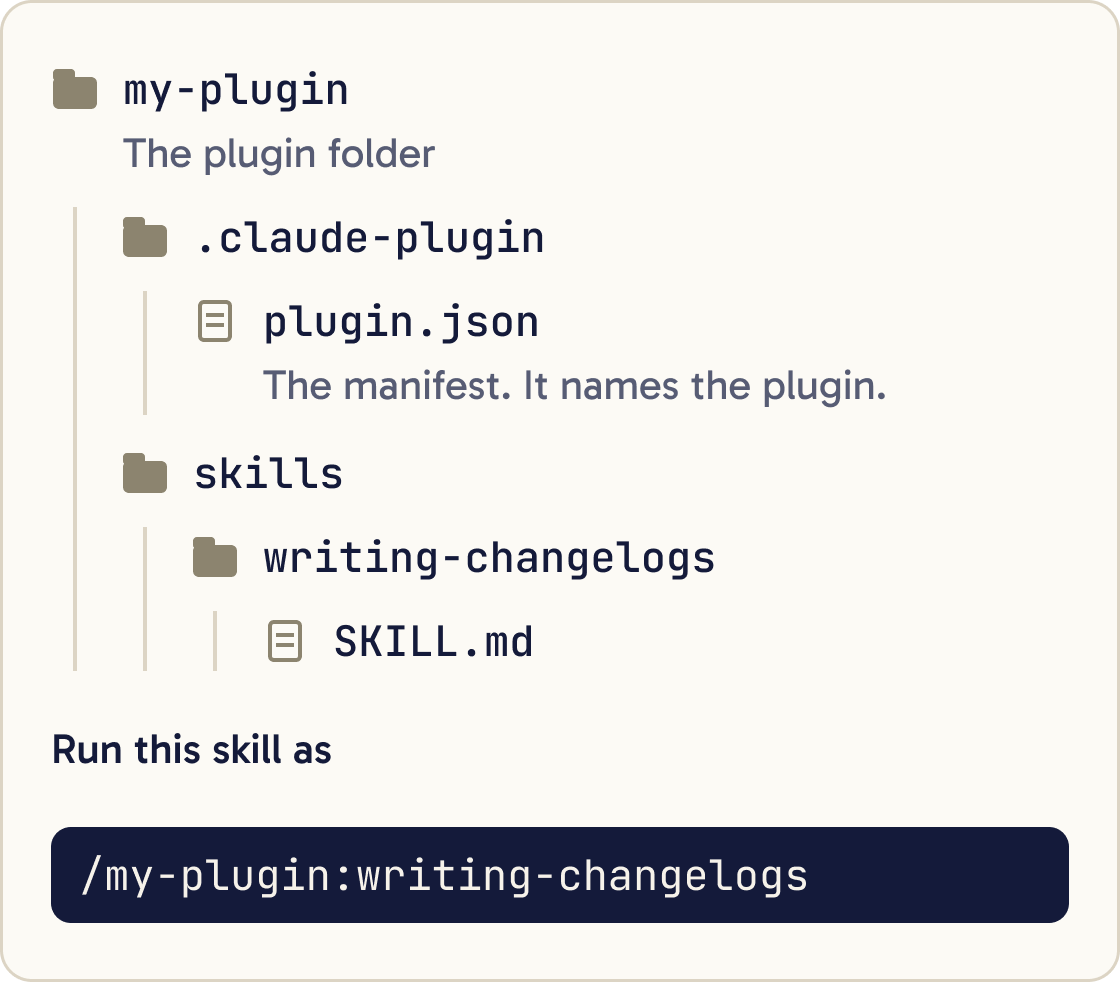
Create a plugin folder called [PLUGIN NAME] next to this project. Add .claude-plugin/plugin.json with name, description, version 1.0.0 and author name [YOUR NAME]. Copy my skill from .claude/skills/[SKILL NAME] into [PLUGIN NAME]/skills/[SKILL NAME]. Then run claude plugin validate on the plugin folder and show me the output.A plugin is a folder with a manifest at .claude-plugin/plugin.json and your skills in skills/. The manifest is a JSON file that names the plugin. A skill inside it sits at a path like my-plugin/skills/writing-changelogs/SKILL.md.
Check it, then try it for one session without installing:
claude plugin validate ./my-plugin
claude --plugin-dir ./my-plugin
Plugin skills get the plugin name in front, so you run this one as /my-plugin:writing-changelogs.
Step 15 of 15
Publish it through a marketplace
A marketplace is a folder or git repository with a .claude-plugin/marketplace.json file that lists plugins. Teammates add it once, then install plugins from it by name and get your updates.
Create a marketplace folder called [MARKETPLACE NAME] with .claude-plugin/marketplace.json. Give it a name, an owner with my name [YOUR NAME], and a plugins list with one entry for [PLUGIN NAME] whose source is ./plugins/[PLUGIN NAME]. Copy the plugin into plugins/. Run claude plugin validate on the marketplace folder and show me the output.Push the marketplace folder to GitHub. Teammates then run these two commands, with your details in place of the brackets:
claude plugin marketplace add [OWNER]/[REPO]
claude plugin install [PLUGIN NAME]@[MARKETPLACE NAME]
Every enabled plugin adds its skills' descriptions to every session, even when nothing from it runs. Keep plugins small and focused, so people only pay for what they use.
Did that work?
Still stuck? Send me a DM on Instagram at @maxbuilds.ai and I'll help.
Common mistakes
- A vague description like "Helps with documents". Say what it does and when, in the words you'd type.
- Writing the whole skill before testing anything. Write three test requests first and check the baseline.
- Explaining things Claude already knows. Every extra line costs context once the skill loads.
- Testing in the same session you wrote the skill in. Leftover context hides gaps, so use a fresh session.
- Linking reference files from other reference files. Keep every link one level deep from `SKILL.md`.
- Letting Claude start a deploy or send skill on its own. Add `disable-model-invocation: true` to anything with side effects.
Want the next guide?
I'll email you each new guide as I share it, with new tutorials and prompts too.